Type text, add images, blackout confidential details, add comments, highlights and more.
02. Sign it in a few clicks
Draw your signature, type it, upload its image, or use your mobile device as a signature pad.
03. Share your form with others
Send carefirst claim form via email, link, or fax. You can also download it, export it or print it out.
How to use or fill out carefirst enrollment form with our platform
Ease of Setup
DocHub User Ratings on G2
Ease of Use
DocHub User Ratings on G2
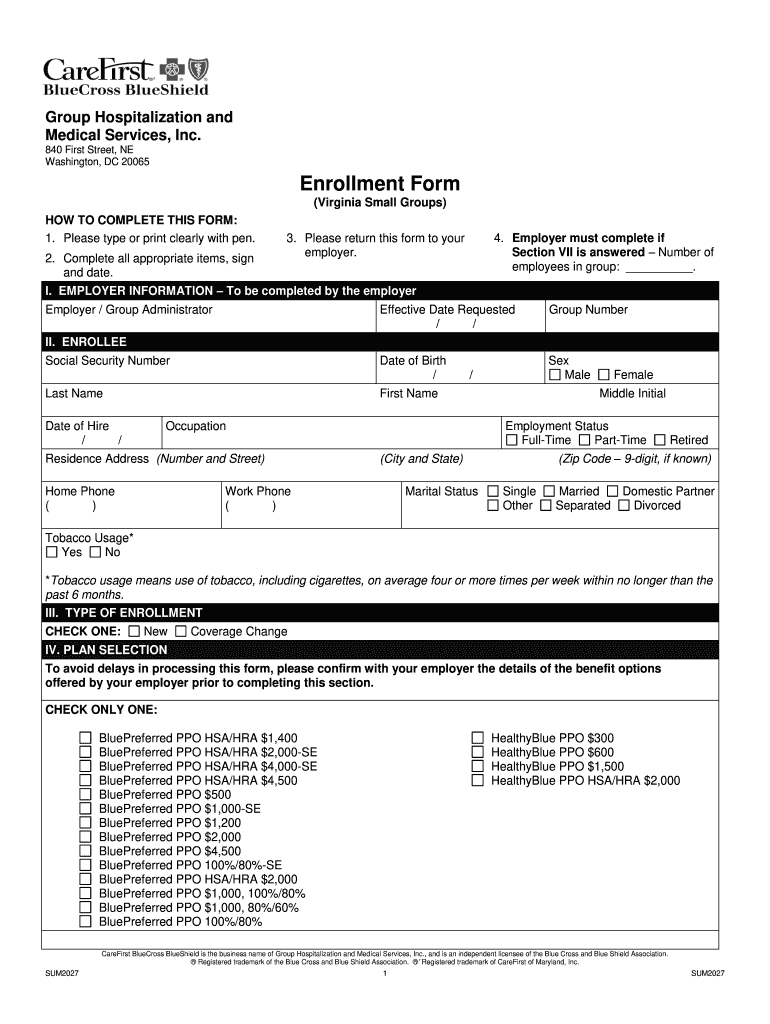
Click ‘Get Form’ to open the carefirst enrollment form in the editor.
Begin by filling out Section I, which requires employer information. Ensure you provide the effective date requested and group number.
In Section II, enter your personal details including your name, date of birth, and social security number. Be sure to indicate your employment status and marital status.
Proceed to Section III to select the type of enrollment. Choose between 'New' or 'Coverage Change' as applicable.
In Section IV, confirm your plan selection by checking only one option that corresponds with your employer's offerings.
If applicable, complete Section V regarding any changes to existing enrollment and list dependents in Section VI.
Fill out Medicare coverage details in Section VII if relevant, followed by prior coverage information in Section VIII.
Finally, review all sections for accuracy before signing and dating the form in Section IX. Ensure you consent to electronic notices if desired in Section X.
Start using our platform today for free to streamline your carefirst enrollment process!
Fill out carefirst enrollment form online It's free
Are Blue Cross and Blue Shield the same as CareFirst?
In 1969, Maryland Hospital Service, Inc. (Blue Cross) and Maryland Medical Service (Blue Shield) changed their names to Maryland Blue Cross and Maryland Blue Shield. In 1998, the Maryland and District of Columbia companies merged to form CareFirst BlueCross BlueShield.
How long do you have to keep health insurance enrollment forms?
Possible Rule of Thumb and other Considerations ERISA 107 requires plan records to be available for examination for not less than six (6) years after the filing date of the Form 5500 that is based on those records.
What is the special enrollment period for CareFirst?
Your special enrollment period for choosing a health insurance plan is a 4-month window, which includes: The 60 days before your 26th birthday, your 26th birthday, and. the 60 days after.
What is a health enrollment form?
Enrollment forms record whether employees have enrolled in or waived group benefits. For instance, if you have more than 50 full-time employees, you will need this data to complete IRS forms 1094 and 1095, which record health care coverage.
What is the enrollment form?
An enrollment form is a type of form used to collect information from individuals who are registering for a service, program, or event. The purpose of an enrollment form is to gather the necessary data to enroll the individual and ensure that they meet the eligibility criteria for the service or program.
carefirst forms
Carefirst enrollment form pdfCarefirst enrollment form bluecross blueshieldCarefirst enrollment form phone numberCarefirst enrollment form onlineCarefirst enrollment form bluecrossCareFirst Prior Authorization Form (PDF)CareFirst CLAIM FORM PDFCareFirst Open Enrollment 2026
Security and compliance
At DocHub, your data security is our priority. We follow HIPAA, SOC2, GDPR, and other standards, so you can work on your documents with confidence.
A Hospital Patient Registration Form is a form template designed to streamline the process of collecting patient details before their stay in the hospital.
What is the purpose of an enrollment form?
Enrollment forms are one of the most important tools for any organization. They provide you with the necessary information to get people signed up and ready for your services, whether theyre students, employees, or members.
carefirst open enrollment
Student Process
This application will approve your start date, and reimbursement. Once approved, forward the approval email to your advisor. (removing your employee ID) and.Read more
HOW TO COMPLETE THIS ENROLLMENT FORM: 1. Please type or print clearly with CareFirst BlueChoice, Inc. is an independent licensee of the Blue CrossRead more
Cookie consent notice
This site uses cookies to enhance site navigation and personalize your experience.
By using this site you agree to our use of cookies as described in our Privacy Notice.
You can modify your selections by visiting our Cookie and Advertising Notice.