Cementvoy 1990-2026

Get Form
cementvoy 1990 Preview on Page 1

Here's how it works

01. Edit your form online
Type text, add images, blackout confidential details, add comments, highlights and more.

02. Sign it in a few clicks
Draw your signature, type it, upload its image, or use your mobile device as a signature pad.

03. Share your form with others
Send it via email, link, or fax. You can also download it, export it or print it out.

How to use or fill out cementvoy 1990 with our platform

Form edit decoration
9.5
Ease of Setup
DocHub User Ratings on G2
9.0
Ease of Use
DocHub User Ratings on G2
  1. Click ‘Get Form’ to open the cementvoy 1990 document in the editor.
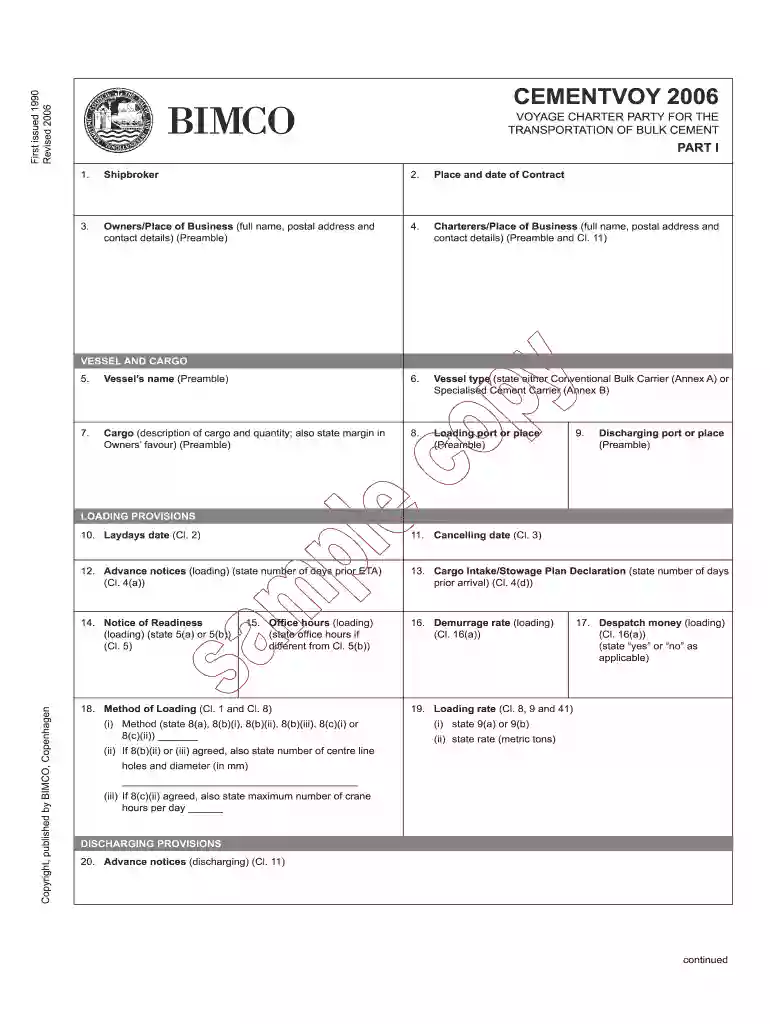
  2. Begin by filling in the 'Shipbroker' section with the relevant details of your shipbroker.
  3. Enter the 'Place and date of Contract' to establish when and where the agreement is made.
  4. Complete the 'Owners/Place of Business' field with full name, postal address, and contact details as required in the preamble.
  5. Fill out the 'Charterers/Place of Business' section similarly, ensuring all contact information is accurate.
  6. Proceed to specify the 'Vessel’s name' and 'Vessel type', selecting either Conventional Bulk Carrier or Specialised Cement Carrier as applicable.
  7. Detail the cargo description and quantity in the designated fields, including any margins in favor of Owners.
  8. Continue through each section, providing necessary information for loading provisions, discharging provisions, freight provisions, and general provisions as outlined in the form.

Start using our platform today to streamline your document editing and form completion for free!

be ready to get more

Complete this form in 5 minutes or less

Get form

Got questions?

We have answers to the most popular questions from our customers. If you can't find an answer to your question, please contact us.
Contact us

Of course, electronically drawing your signature is appropriate, but only if you use a tool that complies with industry regulations and policies. Consider DocHub, which guarantees eSignature validity under ESIGN and UETA requirements. All you need to eSign your cementvoy 1990 is an account with DocHub and an internet connection. When you open your paperwork in our editor, click Sign and choose the Draw tool.

As a comprehensive document editing platform, DocHub is available on mobile phones. Open DocHub in your choice of mobile internet browser and use our intelligent mobile-friendly toolset to fill out your cementvoy 1990.

Security and compliance

At DocHub, your data security is our priority. We follow HIPAA, SOC2, GDPR, and other standards, so you can work on your documents with confidence.

Learn more
ccpa2
pci-dss
gdpr-compliance
hipaa
soc-compliance