Type text, add images, blackout confidential details, add comments, highlights and more.
02. Sign it in a few clicks
Draw your signature, type it, upload its image, or use your mobile device as a signature pad.
03. Share your form with others
Send ic food list 2022 via email, link, or fax. You can also download it, export it or print it out.
How to use or fill out ics 203 with our platform
Ease of Setup
DocHub User Ratings on G2
Ease of Use
DocHub User Ratings on G2
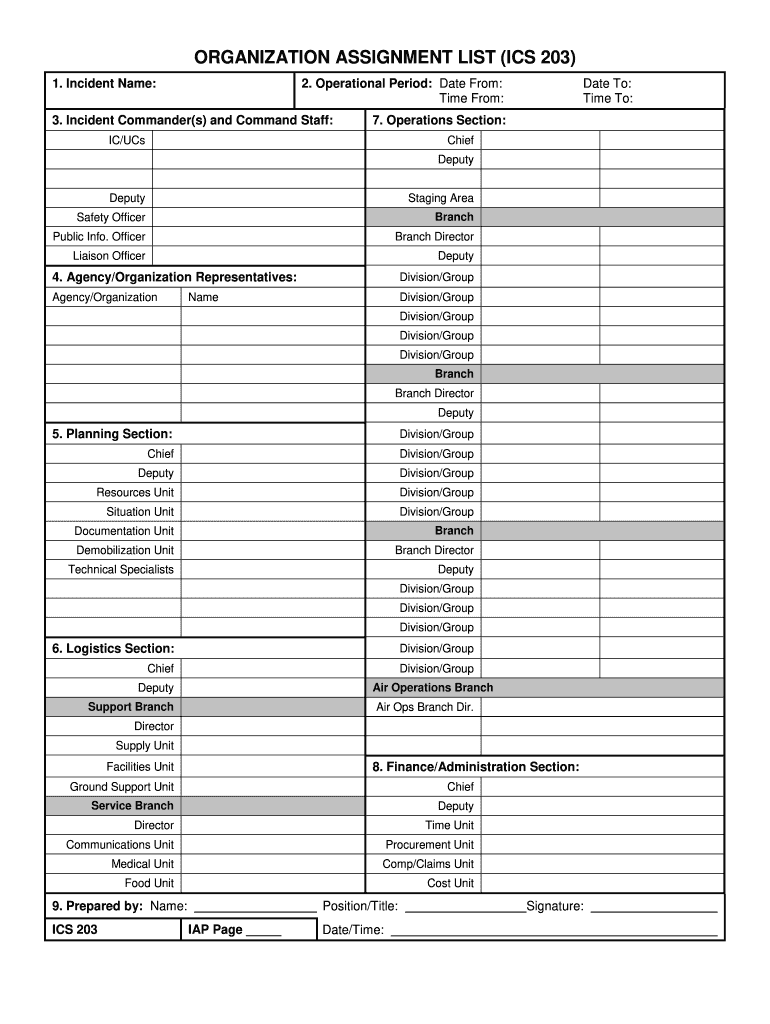
Click ‘Get Form’ to open the ICS 203 in the editor.
Begin by entering the 'Incident Name' in the first field. This should reflect the specific name assigned to your incident.
In the 'Operational Period' section, input the start and end dates and times using a 24-hour clock format. Ensure accuracy for effective planning.
Fill in the 'Incident Commander(s) and Command Staff' section with names, ensuring to label any assistants appropriately. Use at least first initials and last names.
Continue with 'Agency/Organization Representatives', listing each agency's name followed by their representatives’ names.
For sections like 'Planning', 'Logistics', and 'Operations', enter relevant personnel details as specified, including any shift changes separated by slashes.
Finally, complete the 'Prepared by' section with your name, position/title, signature, and date/time of preparation.
Start using our platform today for free to streamline your ICS 203 form completion!
Technical Protocol for Evaluating Natural Attenuation of
The information in this document was developed through a collaboration between the U.S.. EPA (Subsurface Protection and Remediation Division, National RiskRead more
Purpose. The Organization Assignment List (ICS 203) provides ICS personnel with information on the units that are currently activated and the names ofRead more
Cookie consent notice
This site uses cookies to enhance site navigation and personalize your experience.
By using this site you agree to our use of cookies as described in our Privacy Notice.
You can modify your selections by visiting our Cookie and Advertising Notice.