Type text, add images, blackout confidential details, add comments, highlights and more.
02. Sign it in a few clicks
Draw your signature, type it, upload its image, or use your mobile device as a signature pad.
03. Share your form with others
Send it via email, link, or fax. You can also download it, export it or print it out.
How to use or fill out 12. FINAL PA_REQUEST_FORM with our platform
Ease of Setup
DocHub User Ratings on G2
Ease of Use
DocHub User Ratings on G2
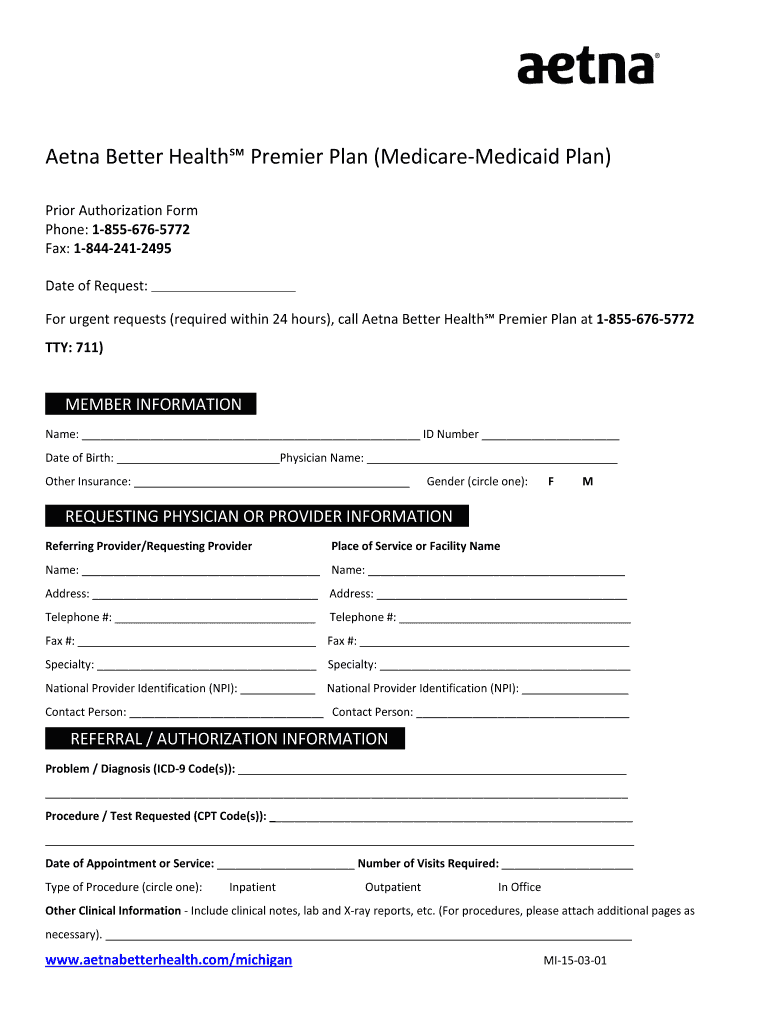
Click ‘Get Form’ to open the 12. FINAL PA_REQUEST_FORM in the editor.
Begin by entering the 'Date of Request' at the top of the form. This is essential for tracking your request.
Fill in the 'Member Information' section, including your name, ID number, date of birth, and physician's name. If you have other insurance, please include that information as well.
Indicate your gender by circling either 'F' for female or 'M' for male.
In the 'Requesting Physician or Provider Information' section, provide details for both the referring provider and facility. Ensure to include names, addresses, telephone numbers, fax numbers, specialties, and NPI numbers.
Next, complete the 'Referral / Authorization Information' section by detailing the problem/diagnosis using ICD-9 codes and any requested procedures/tests with CPT codes.
Specify the date of appointment or service and indicate how many visits are required. Circle the type of procedure: Inpatient, Outpatient, In Office, or Other.
Finally, add any additional clinical information necessary in the provided space. Attach extra pages if needed for comprehensive details.
Start using our platform today to fill out your forms online for free!
Fill out 12. FINAL PA_REQUEST_FORM online It's free
Forward Health Prior Authorization : formsForward Health Prior Authorization medicationForward health Prior Authorization phone numberPrior Authorization request form PA/RF F 11018Forward Health Prior Authorization listForward Health Prior Authorization for non preferred StimulantsForward Health pharmacy Related FormsWI Medicaid Prior Authorization form
Security and compliance
At DocHub, your data security is our priority. We follow HIPAA, SOC2, GDPR, and other standards, so you can work on your documents with confidence.
To avoid delays in decisions, be sure to complete the Prior. Authorization/Medication Exception Request form in its entirety, including medical justificationRead more
Enter the members last name, followed by their first name and middle initial. Use the EVS to obtain the correct spelling of the members name. If the name orRead more
Okla. Admin. Code 317:30-5-728 - Physical therapy (PT) for
PT is used to improve a persons ability to move, reduce or manage pain, restore function, and prevent disability. For pain management, PT is provided in aRead more
Cookie consent notice
This site uses cookies to enhance site navigation and personalize your experience.
By using this site you agree to our use of cookies as described in our Privacy Notice.
You can modify your selections by visiting our Cookie and Advertising Notice.