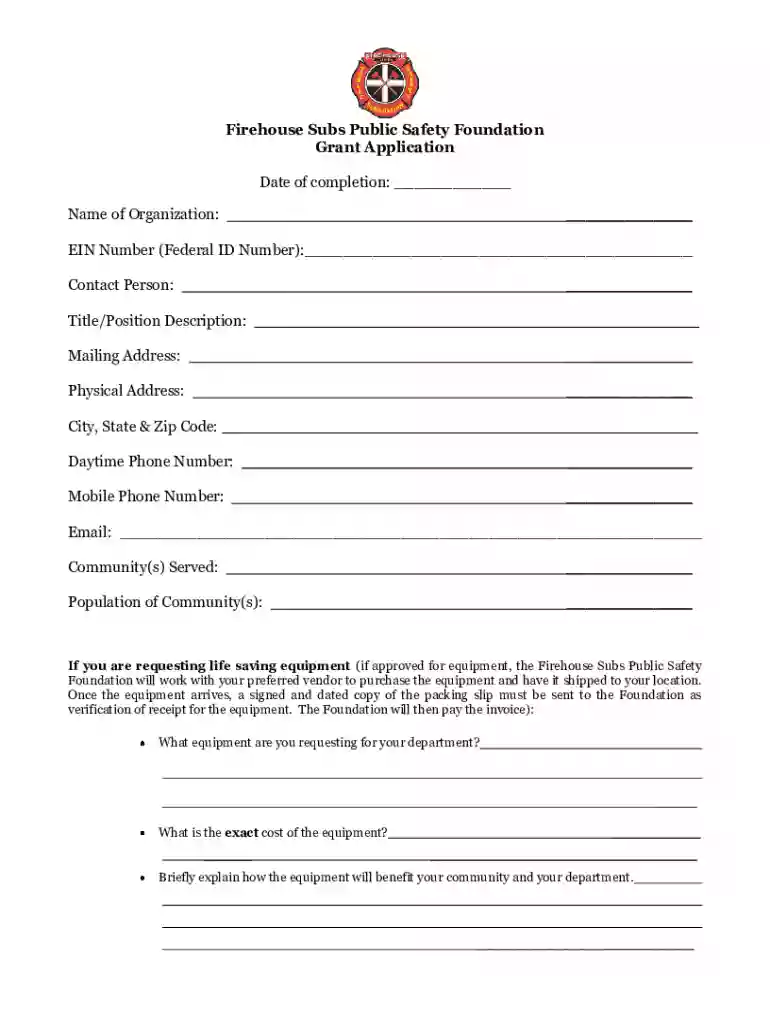
Firehouse subs grant 2026

Get Form
firehouse subs grant Preview on Page 1

Here's how it works

01. Edit your firehouse subs grant online
Type text, add images, blackout confidential details, add comments, highlights and more.

02. Sign it in a few clicks
Draw your signature, type it, upload its image, or use your mobile device as a signature pad.

03. Share your form with others
Send firehouse subs grants via email, link, or fax. You can also download it, export it or print it out.

How to use or fill out firehouse subs grant with our platform

Form edit decoration
9.5
Ease of Setup
DocHub User Ratings on G2
9.0
Ease of Use
DocHub User Ratings on G2
  1. Click ‘Get Form’ to open the Firehouse Subs Grant application in the editor.
  2. Begin by entering the date of completion at the top of the form. This helps track your submission timeline.
  3. Fill in your organization’s name and EIN number accurately, as this information is crucial for identification.
  4. Provide contact details including the contact person's name, title, mailing address, and phone numbers. Ensure all fields are complete to avoid delays.
  5. Detail the community served and its population. This information is vital for assessing your application’s impact.
  6. If requesting equipment, specify what you need and its cost. Include a brief explanation of how it will benefit your community.
  7. For prevention materials or education funding requests, follow similar steps: list materials or funding amounts and provide detailed descriptions.
  8. Finally, ensure all required attachments are included before submitting your completed application to the specified address.

Start filling out your Firehouse Subs Grant application today using our platform for free!

be ready to get more

Complete this form in 5 minutes or less

Get form

Got questions?

We have answers to the most popular questions from our customers. If you can't find an answer to your question, please contact us.
Contact us

With DocHub, you can easily sign your firehouse subs grant application or any other paperwork on iOS, even without setting up additional applications. You can access your DocHub account from any internet-connected browser and fill out and sign your document in any preferred method with just a couple of clicks.

You can easily complete, modify, and even eSign your firehouse subs grant program utilizing DocHub. Create a new profile and begin your free trial. After that, you may upload the file with the form and simply make all the needed edits. No need to print on paper or use a third-party application to sign it, as you can put your electronic signature on your document quicker via DocHub.

The chain's sales have tripled in size since 2010. Restaurant Brands International Inc. announced that it has completed its previously announced acquisition of Firehouse Restaurant Group Inc.
The card is not redeemable for cash and lost, damaged or stolen cards will not be replaced except as required by law. The card amount cannot be used to purchase other gift cards or non-Firehouse Subs® products. This card has no expiration date and is not subject to service or dormancy charges.
A portion of your purchase in 2022 at all US Firehouse Subs locations goes to the Firehouse Subs Public Safety Foundation, to be used to provide lifesaving equipment to first responders. Since the Foundation started, it has granted over $69 million to provide equipment, training, and support to hometown heroes.

Security and compliance

At DocHub, your data security is our priority. We follow HIPAA, SOC2, GDPR, and other standards, so you can work on your documents with confidence.

Learn more
ccpa2
pci-dss
gdpr-compliance
hipaa
soc-compliance

People also ask

How do I redeem my rewards? Before you order, tap or click on the reward that you want to redeem and follow the on-screen instructions. Enter your phone number at the register next time you order and the reward will be applied to your order.
Brothers Robin (left) and Chris Sorensen, former Jacksonville firefighters, founded Firehouse Subs and Firehouse Subs Public Safety Foundation in Jacksonville in 1994.
Only plastic Firehouse Subs gift cards are accepted. We do not accept digital or app-based gift cards.
Firehouse Subs has over 1,210 restaurants in 46 states, Puerto Rico, and Canada....Firehouse Subs. Firehouse Subs in Gahanna, OhioRevenueUS$695 million (2019) US$ 1.09 billion (2021; system-wide sales)Net incomeUS$ 2 million (2021)Total assetsUS$ 1.10 billion (2021)Number of employeesAbout 2,00015 more rows
Restaurant Brands International completes its purchase of Firehouse Subs. Restaurant Brands International on Wednesday said that has completed its $1 billion acquisition of Firehouse Subs. The deal gives the Toronto-based fast-food chain operator its fourth brand, to go along with Burger King, Tim Hortons and Popeyes.

firehouse subs grant application pdf