Type text, add images, blackout confidential details, add comments, highlights and more.
02. Sign it in a few clicks
Draw your signature, type it, upload its image, or use your mobile device as a signature pad.
03. Share your form with others
Send student certificate of completion mv 285 via email, link, or fax. You can also download it, export it or print it out.
How to use or fill out mv 285 with our platform
Ease of Setup
DocHub User Ratings on G2
Ease of Use
DocHub User Ratings on G2
Click ‘Get Form’ to open the MV-285 in the editor.
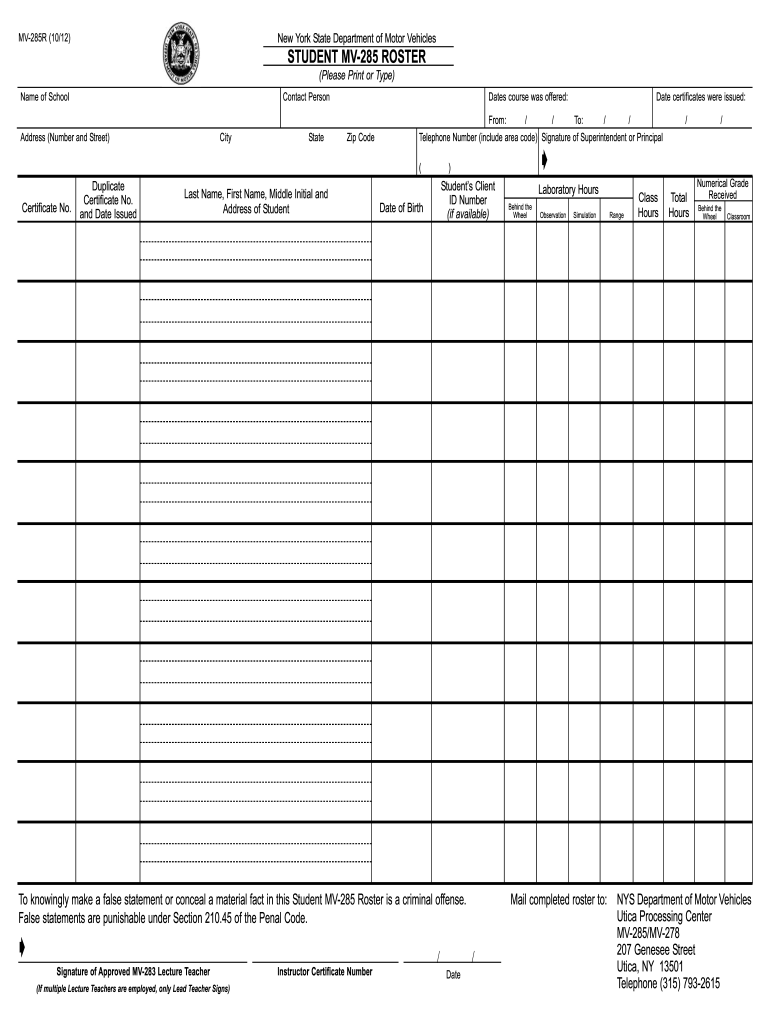
Begin by entering the 'Name of School' and 'Contact Person' in the designated fields. Ensure that all information is accurate and clearly typed.
Fill in the 'Address' section, including 'City', 'State', and 'Zip Code'. This information is crucial for proper identification.
Indicate the 'Dates course was offered' by selecting the appropriate start and end dates from the calendar tool available in our platform.
In the student section, enter each student's full name, date of birth, and client ID number if available. Make sure to double-check for any typos.
Complete the instructor's details by adding their signature, certificate number, and date. Only the lead teacher should sign if multiple instructors are present.
Finally, specify the total hours for various activities like laboratory hours, behind-the-wheel training, and classroom instruction. Review all entries before submission.
Start using our platform today to fill out your MV-285 form easily and for free!
MV-285 course onlineMV-285 course near meHow to get a MV-285 CertificateMV-278MV-285 course costMv 285 certificate onlineMV 285 vs MV 278MV-285 course NYC
Security and compliance
At DocHub, your data security is our priority. We follow HIPAA, SOC2, GDPR, and other standards, so you can work on your documents with confidence.
The Completion Certificate (MV-285), top part for the road test is valid for two years from the date of issue. The bottom half for insurance is good for student.Read more
To knowingly make a false statement or conceal a material fact in this Student MV-285 Roster is a criminal offense. Mail completed roster to: NYS DepartmentRead more
Cookie consent notice
This site uses cookies to enhance site navigation and personalize your experience.
By using this site you agree to our use of cookies as described in our Privacy Notice.
You can modify your selections by visiting our Cookie and Advertising Notice.