Type text, add images, blackout confidential details, add comments, highlights and more.
02. Sign it in a few clicks
Draw your signature, type it, upload its image, or use your mobile device as a signature pad.
03. Share your form with others
Send it via email, link, or fax. You can also download it, export it or print it out.
How to use or fill out dental form healthy with our platform
Ease of Setup
DocHub User Ratings on G2
Ease of Use
DocHub User Ratings on G2
Click ‘Get Form’ to open the dental form healthy in the editor.
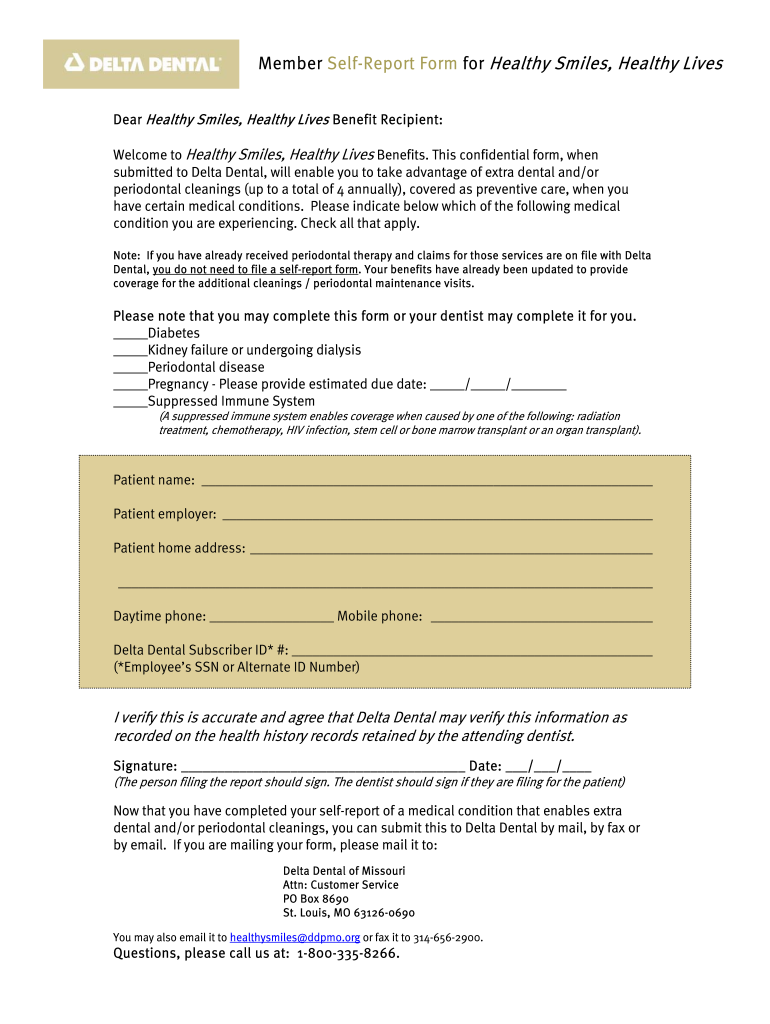
Begin by checking all applicable medical conditions that apply to you. This includes options like Diabetes, Kidney failure, Periodontal disease, Pregnancy (with an estimated due date), and Suppressed Immune System.
Fill in your personal information including your name, employer, home address, and both daytime and mobile phone numbers.
Enter your Delta Dental Subscriber ID number, which can be your Employee’s SSN or Alternate ID Number.
Review the accuracy of the information provided. Sign and date the form at the bottom. If a dentist is completing it for you, they should sign instead.
Once completed, submit the form via mail, fax, or email as instructed at the end of the document.
Start using our platform today to easily complete your dental form healthy for free!
DD Form 2813 Dental 2023 PDFOral Health Assessment Form pdfDD Form 2813 dental 2026 PDFOral Health Assessment Form 2026DD Form 2813 dental 2022 pdfOral Health Assessment Form for schoolDD Form 2813 dental 2026 pdf free downloadCurrent DD 2813 form
Security and compliance
At DocHub, your data security is our priority. We follow HIPAA, SOC2, GDPR, and other standards, so you can work on your documents with confidence.
We seek to enhance dental care, especially for elderly or otherwise debilitated persons by providing a biotechnical approach to dental caries prophylaxes.Read more
CONSENT FOR DENTAL SCREENING. I understand that by signing this form I am authorizing a University of Maryland School of Dentistry student and/or facultyRead more
Cookie consent notice
This site uses cookies to enhance site navigation and personalize your experience.
By using this site you agree to our use of cookies as described in our Privacy Notice.
You can modify your selections by visiting our Cookie and Advertising Notice.