Type text, add images, blackout confidential details, add comments, highlights and more.
02. Sign it in a few clicks
Draw your signature, type it, upload its image, or use your mobile device as a signature pad.
03. Share your form with others
Send it via email, link, or fax. You can also download it, export it or print it out.
How to use or fill out cincinnati with our platform
Ease of Setup
DocHub User Ratings on G2
Ease of Use
DocHub User Ratings on G2
Click ‘Get Form’ to open the cincinnati application in the editor.
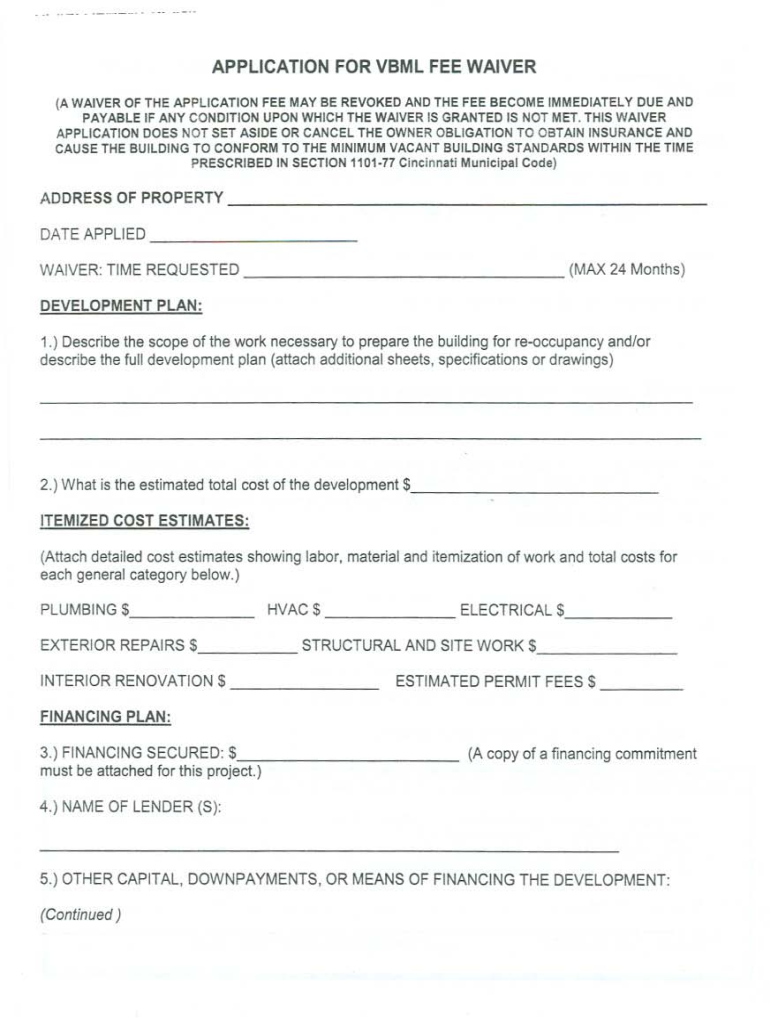
Begin by entering the address of the property in the designated field. Ensure accuracy as this is crucial for processing your application.
Fill in the date applied and specify the time requested for the waiver, noting that it cannot exceed 24 months.
In the development plan section, describe the scope of work necessary for re-occupancy. Attach any additional sheets if needed.
Provide an estimated total cost of development and itemize costs for plumbing, HVAC, electrical, exterior repairs, structural work, and interior renovations.
Complete the financing plan section by detailing secured financing and listing lenders. Attach proof of funds as required.
Finally, ensure all signatures are completed along with printed names and contact information before submitting your application.
Start using our platform today to streamline your cincinnati application process for free!
Things to do in CincinnatiCincinnati footballCincinnati on mapCincinnati in which countryCincinnati pronunciationCincinnati timeCincinnati ZIP CodeCincinnati from me
Security and compliance
At DocHub, your data security is our priority. We follow HIPAA, SOC2, GDPR, and other standards, so you can work on your documents with confidence.
Feb 25, 2006 Nine Inch Nails played at the US Bank Arena in Cincinnati, Ohio, on February 25, 2006, as part of the With Teeth Spring Arena Tour.Read more
Cookie consent notice
This site uses cookies to enhance site navigation and personalize your experience.
By using this site you agree to our use of cookies as described in our Privacy Notice.
You can modify your selections by visiting our Cookie and Advertising Notice.