Refund/Voucher Request Form - La Jolla YMCA 2026

Get Form
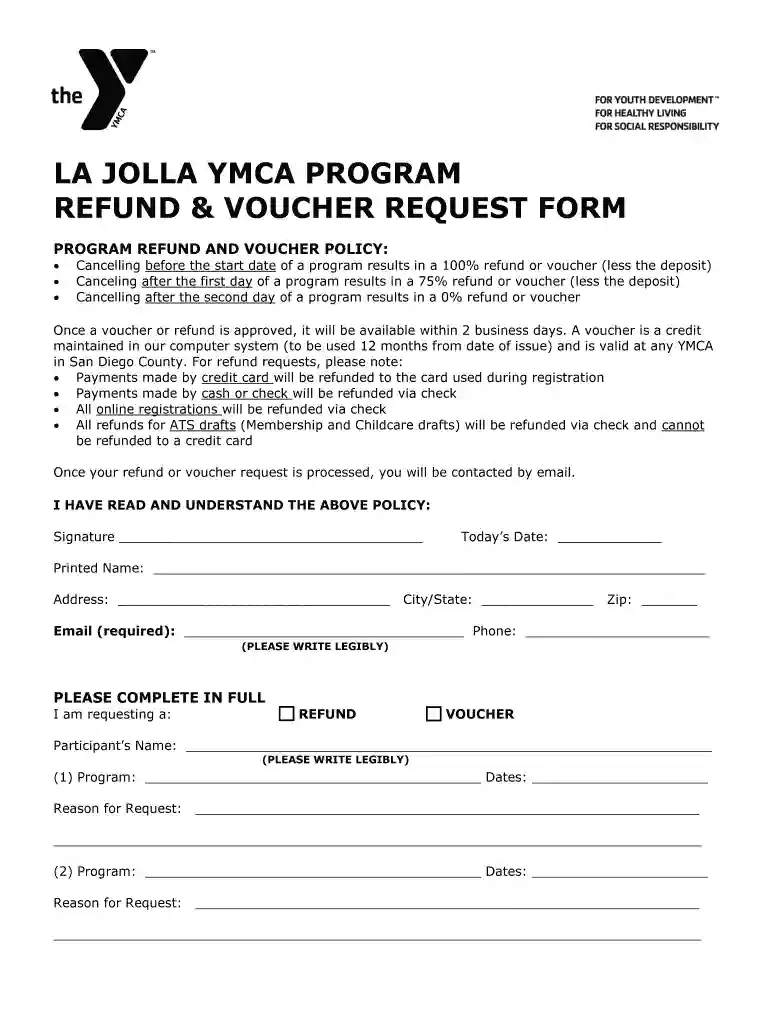
ymca refund request form Preview on Page 1

Here's how it works

01. Edit your ymca refund request form online
Type text, add images, blackout confidential details, add comments, highlights and more.

02. Sign it in a few clicks
Draw your signature, type it, upload its image, or use your mobile device as a signature pad.

03. Share your form with others
Send refund request form via email, link, or fax. You can also download it, export it or print it out.

How to use or fill out Refund/Voucher Request Form - La Jolla YMCA with DocHub

Form edit decoration
9.5
Ease of Setup
DocHub User Ratings on G2
9.0
Ease of Use
DocHub User Ratings on G2
  1. Click ‘Get Form’ to open it in the editor.
  2. Begin by reading the program refund and voucher policy carefully. This will help you understand the conditions under which refunds or vouchers are issued.
  3. In the section labeled 'I am requesting a:', select either 'REFUND' or 'VOUCHER' by clicking on the appropriate option.
  4. Fill in the participant’s name, followed by details of the program you are requesting a refund or voucher for, including program name and dates.
  5. Provide a clear reason for your request in the designated area. Be as detailed as possible to facilitate processing.
  6. Complete all required fields, including your contact information (address, email, phone) ensuring legibility for smooth communication.
  7. Finally, sign and date the form at the bottom to confirm that you have read and understood the policy before submitting it through our platform.

Start using our platform today to easily complete your Refund/Voucher Request Form!

be ready to get more

Complete this form in 5 minutes or less

Get form

Got questions?

We have answers to the most popular questions from our customers. If you can't find an answer to your question, please contact us.
Contact us

You need to use only trustworthy software solutions with strong data protection compliance to sign your paperwork electronically. DocHub is just the type of software you need! It stores data on Amazon Web Servers and complies with all necessary security requirements and eSignature laws, so it’s a reliable way to electronically sign your Refund/Voucher Request Form - La Jolla YMCA or other paperwork with this tool.

Document editing with DocHub is equally convenient on desktop and mobile devices. You only need an internet browser to edit your Refund/Voucher Request Form - La Jolla YMCA on Android. Open our site and sign in to access the tools you require. Add your document and introduce your intended changes. After that, you can keep your form in your document storage or send it out instantly.

If you are a direct debit member and wish to cancel the Agreement, once your contract is fulfilled, you must email your cancellation request directly to membership@yclub.org.uk. A minimum of one month direct debit notice is required to terminate your direct debit mandate.
All requests for changes in membership accounts must be done in person at your home branch. Any changes to your membership, including cancellation requests, must be submitted at least 5 days prior to your billing schedule in order for the change to take effect for the current month.
You can cancel anytime with 30 days written notice. Email your cancellation request to ygym@ymcabc.org.uk. Your 30-day notice starts from the day we receive your email. Dont cancel your Direct Debit with your bank.

Security and compliance

At DocHub, your data security is our priority. We follow HIPAA, SOC2, GDPR, and other standards, so you can work on your documents with confidence.
Learn more
ccpa2
pci-dss
gdpr-compliance
hipaa
soc-compliance
be ready to get more

Complete this form in 5 minutes or less

Get form