Type text, add images, blackout confidential details, add comments, highlights and more.
02. Sign it in a few clicks
Draw your signature, type it, upload its image, or use your mobile device as a signature pad.
03. Share your form with others
Send fpgec certification via email, link, or fax. You can also download it, export it or print it out.
How to use or fill out fpgec application with our platform
Ease of Setup
DocHub User Ratings on G2
Ease of Use
DocHub User Ratings on G2
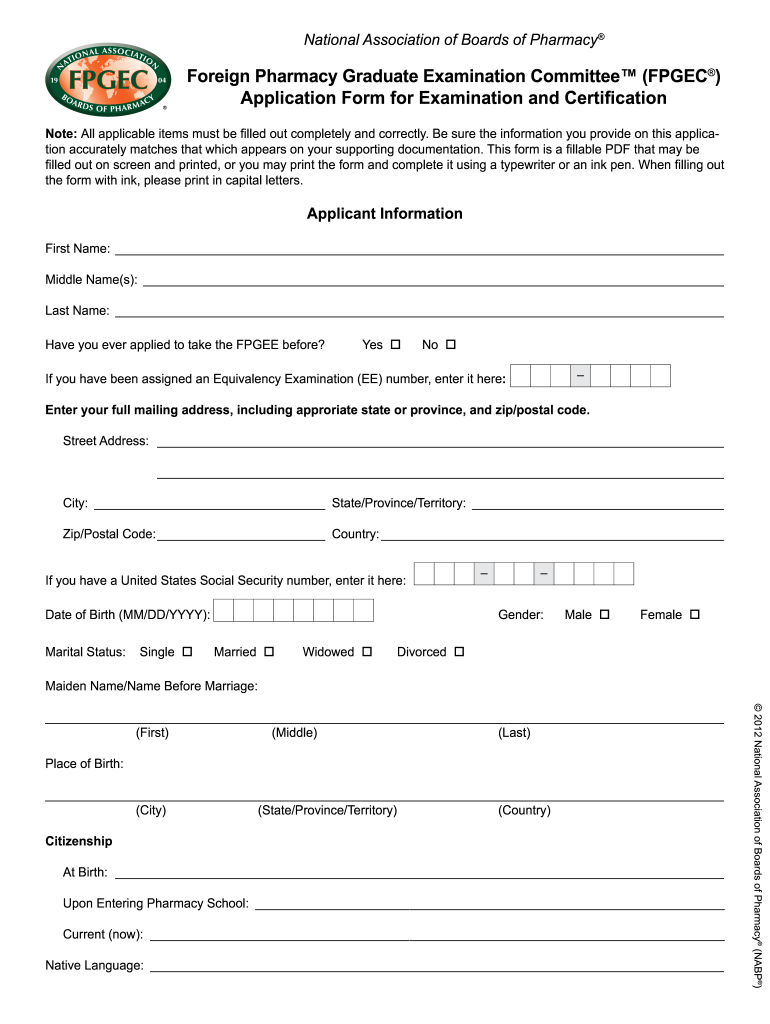
Click ‘Get Form’ to open the fpgec application in the editor.
Begin by filling out the Applicant Information section. Enter your first name, middle name(s), and last name accurately as they appear on your supporting documents.
Indicate whether you have previously applied for the FPGEE by selecting 'Yes' or 'No'. If applicable, enter your Equivalency Examination (EE) number.
Complete your mailing address, ensuring to include the correct state or province and zip/postal code. This is crucial for correspondence regarding your application.
Fill in personal details such as date of birth, marital status, gender, maiden name (if applicable), place of birth, and citizenship information.
In the Pharmacist Education Information section, list all schools attended along with relevant dates and degrees obtained. Ensure accuracy as this information is vital for your certification process.
Review all sections carefully before submitting. Use our platform’s features to save and edit your application as needed.
Start using our platform today to complete your fpgec application easily and for free!
PGY-1/PGY-2 Health System Pharmacy Administration and
At a minimum, the program must be a five-year pharmacy degree program. Have a pharmacist license or be eligible for licensure in the state where the residencyRead more
The Board does not accept or process FPGEC applications. FPGEC applications and fees must be submitted and paid to NABP.. Information regarding FPGECRead more
Cookie consent notice
This site uses cookies to enhance site navigation and personalize your experience.
By using this site you agree to our use of cookies as described in our Privacy Notice.
You can modify your selections by visiting our Cookie and Advertising Notice.