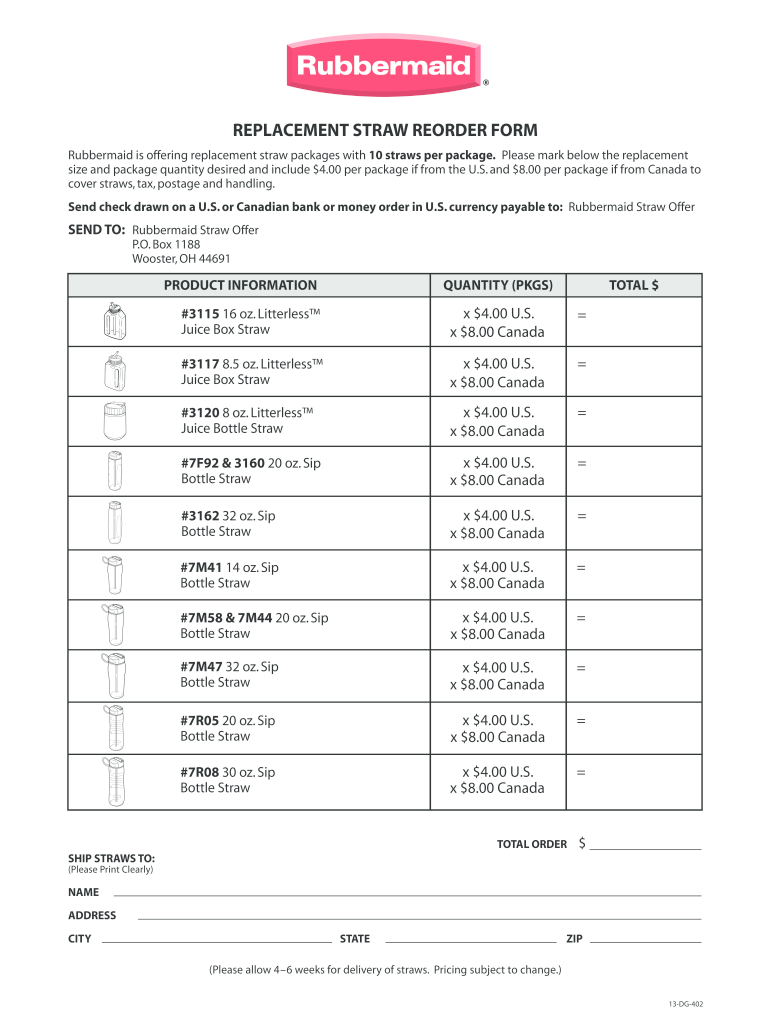
REPLACEMENT STRAW REORDER FORM - Rubbermaid 2026

Get Form
rubbermaid shed parts list Preview on Page 1

Here's how it works

01. Edit your rubbermaid shed parts list online
Type text, add images, blackout confidential details, add comments, highlights and more.
02. Sign it in a few clicks
Draw your signature, type it, upload its image, or use your mobile device as a signature pad.
03. Share your form with others
Send rubbermaid shed parts list pdf via email, link, or fax. You can also download it, export it or print it out.

How to use or fill out REPLACEMENT STRAW REORDER FORM - Rubbermaid with our platform

Form edit decoration
9.5
Ease of Setup
DocHub User Ratings on G2
9.0
Ease of Use
DocHub User Ratings on G2
  1. Click ‘Get Form’ to open the REPLACEMENT STRAW REORDER FORM in the editor.
  2. Begin by selecting the desired replacement straw size from the PRODUCT INFORMATION section. Each straw type has a corresponding quantity field.
  3. Enter the number of packages you wish to order in the QUANTITY (PKGS) column next to each straw type.
  4. Calculate the total cost for each type by multiplying the quantity by $4.00 (U.S.) or $8.00 (Canada), and enter this amount in the TOTAL $ column.
  5. In the TOTAL ORDER section, sum all individual totals to reflect your complete order amount.
  6. Fill out your shipping information clearly in the SHIP STRAWS TO section, including NAME, ADDRESS, CITY, STATE, and ZIP.
  7. Review all entries for accuracy before finalizing your form. Once satisfied, print it out for mailing.

Start using our platform today to streamline your form completion process for free!

be ready to get more

Complete this form in 5 minutes or less

Get form

Got questions?

We have answers to the most popular questions from our customers. If you can't find an answer to your question, please contact us.
Contact us

Of course, electronically drawing your signature is acceptable, but only if you use a tool that complies with industry regulations and policies. Consider DocHub, which guarantees eSignature validity under ESIGN and UETA requirements. All you need to eSign your rubbermaid shed replacement parts is an account with DocHub and an internet connection. When you open your file in our editor, click Sign and select the Draw tool.

Having a swift editing platform like DocHub, you do not require anything but a browser and internet connection to edit your rubbermaid 102 cooler replacement parts online easily. Upload your document or get the appropriate form in DocHub’s catalog, open our editor with one click, and complete it digitally. To revise your forms at any time, register a free profile with DocHub.

Security and compliance

At DocHub, your data security is our priority. We follow HIPAA, SOC2, GDPR, and other standards, so you can work on your documents with confidence.

Learn more
ccpa2
pci-dss
gdpr-compliance
hipaa
soc-compliance
be ready to get more

Complete this form in 5 minutes or less

Get form