Type text, add images, blackout confidential details, add comments, highlights and more.

02. Sign it in a few clicks
Draw your signature, type it, upload its image, or use your mobile device as a signature pad.

03. Share your form with others
Send it via email, link, or fax. You can also download it, export it or print it out.

How to use or fill out lumiere w 2g form with DocHub
Ease of Setup
DocHub User Ratings on G2
Ease of Use
DocHub User Ratings on G2
Click ‘Get Form’ to open the lumiere w 2g form in our editor.
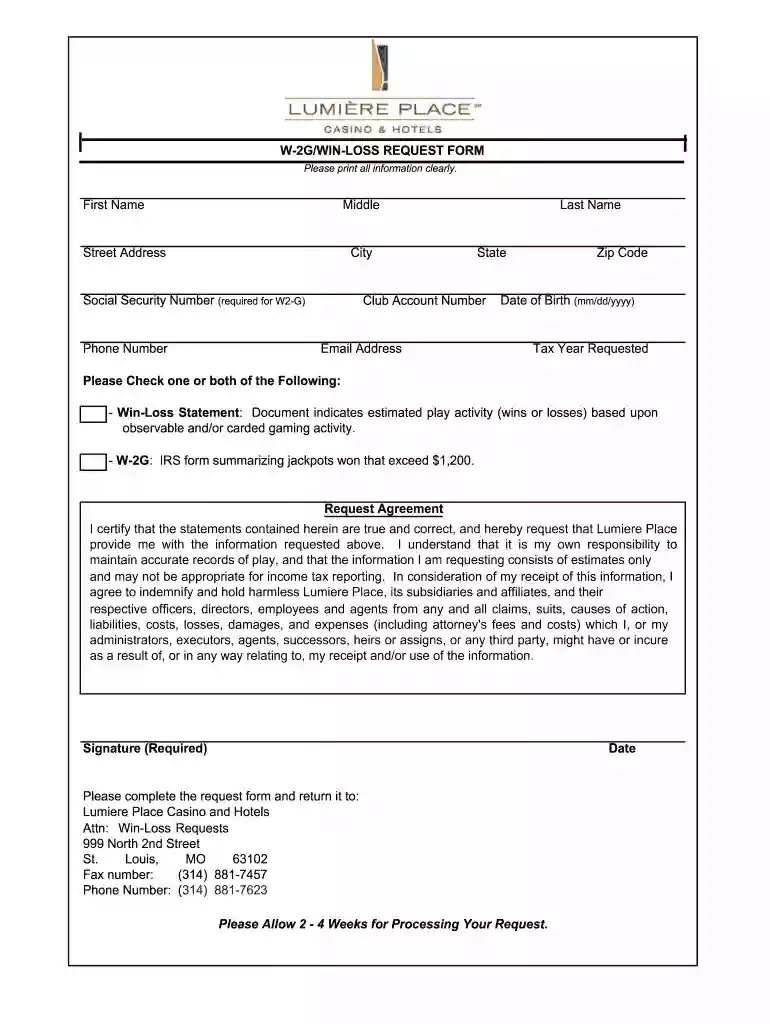
Begin by filling in your personal information. Enter your first name, last name, middle initial, and date of birth in the designated fields. Ensure that all entries are clear and legible.
Next, provide your contact details including your street address, city, state, zip code, phone number, and email address. This information is crucial for processing your request.
Input your Social Security Number as it is required for the W-2G form. Be cautious while entering this sensitive information.
Indicate the tax year requested and check one or both options for Win-Loss Statement and W-2G based on your needs.
Read through the Request Agreement carefully. By signing and dating the form at the bottom, you confirm that all provided information is accurate.
Once completed, save your document and return it to Lumiere Place Casino via fax or mail as instructed.
Start using our platform today to fill out your lumiere w 2g form easily and for free!
Lumiere w 2g form pdfLumiere w 2g form pdf downloadHow to fill out a w2g FormInstructions for Forms W-2G and 5754When is a w2g issuedLumiere w 2g form downloadW-2G gambling winnings tax FormLumiere w 2g form online
Security and compliance
At DocHub, your data security is our priority. We follow HIPAA, SOC2, GDPR, and other standards, so you can work on your documents with confidence.
Report of IAU Commission 21: Light of the night sky
by RH Giese 1985 ZODIACAL LIGHT Measurements General Observations of the Zodiacal Light Most observations have been space observations, especially with the. two HellosRead more
Cookie consent notice
This site uses cookies to enhance site navigation and personalize your experience.
By using this site you agree to our use of cookies as described in our Privacy Notice.
You can modify your selections by visiting our Cookie and Advertising Notice.