Form AWI-VPK 02 Eligibility and Enrollment 02-14-2007.doc-2026

Get Form
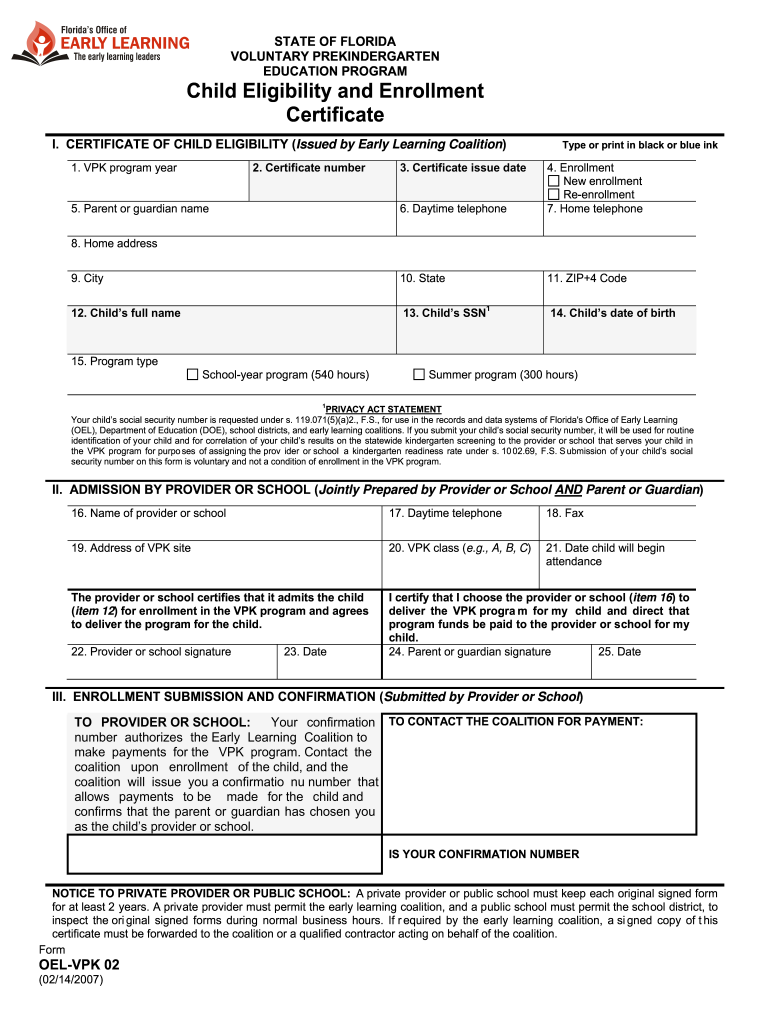
Form AWI-VPK 02 Eligibility and Enrollment 02-14-2007.doc Preview on Page 1

Here's how it works

01. Edit your form online
Type text, add images, blackout confidential details, add comments, highlights and more.
02. Sign it in a few clicks
Draw your signature, type it, upload its image, or use your mobile device as a signature pad.
03. Share your form with others
Send it via email, link, or fax. You can also download it, export it or print it out.

How to use or fill out Form AWI-VPK 02 Eligibility and Enrollment 02-14-2007.doc with our platform

Form edit decoration
9.5
Ease of Setup
DocHub User Ratings on G2
9.0
Ease of Use
DocHub User Ratings on G2
  1. Click ‘Get Form’ to open it in the editor.
  2. Begin by filling out the 'Certificate of Child Eligibility' section. Enter the VPK program year, certificate number, and issue date. Ensure you select whether this is a new enrollment or re-enrollment.
  3. Provide the parent or guardian's name, daytime and home telephone numbers, and complete the home address fields including city, state, and ZIP+4 code.
  4. Fill in the child's full name, social security number (if applicable), and date of birth. Choose the program type: either school-year or summer program.
  5. In the 'Admission by Provider or School' section, enter the provider or school's name, contact details, address of the VPK site, class designation, and start date for attendance.
  6. Ensure both provider/school and parent/guardian signatures are completed along with their respective dates.
  7. Finally, review all entries for accuracy before submitting. Save your completed form for your records.

Start using our platform today to easily fill out your forms online for free!

be ready to get more

Complete this form in 5 minutes or less

Get form

Got questions?

We have answers to the most popular questions from our customers. If you can't find an answer to your question, please contact us.
Contact us

Yes, you can use DocHub for signing any business and personal paperwork, including your Form AWI-VPK 02 Eligibility and Enrollment 02-14-2007.doc. All electronic signatures you create with our service are legally binding and court-admissible, as DocHub complies with criteria required by ESIGN and UETA. Save your completed document with a detailed Audit Trail if needed.

If you use Chrome, there are two simple methods to modify your Form AWI-VPK 02 Eligibility and Enrollment 02-14-2007.doc online. First, go to the DocHub website, add your file, and modify it using our toolbar. You may also install our Chrome extension and modify any document by dragging and dropping it in your web browser window.