




01. Edit your golf cart inspection form online
Type text, add images, blackout confidential details, add comments, highlights and more.

Type text, add images, blackout confidential details, add comments, highlights and more.

Draw your signature, type it, upload its image, or use your mobile device as a signature pad.

Send golf cart inspection checklist via email, link, or fax. You can also download it, export it or print it out.
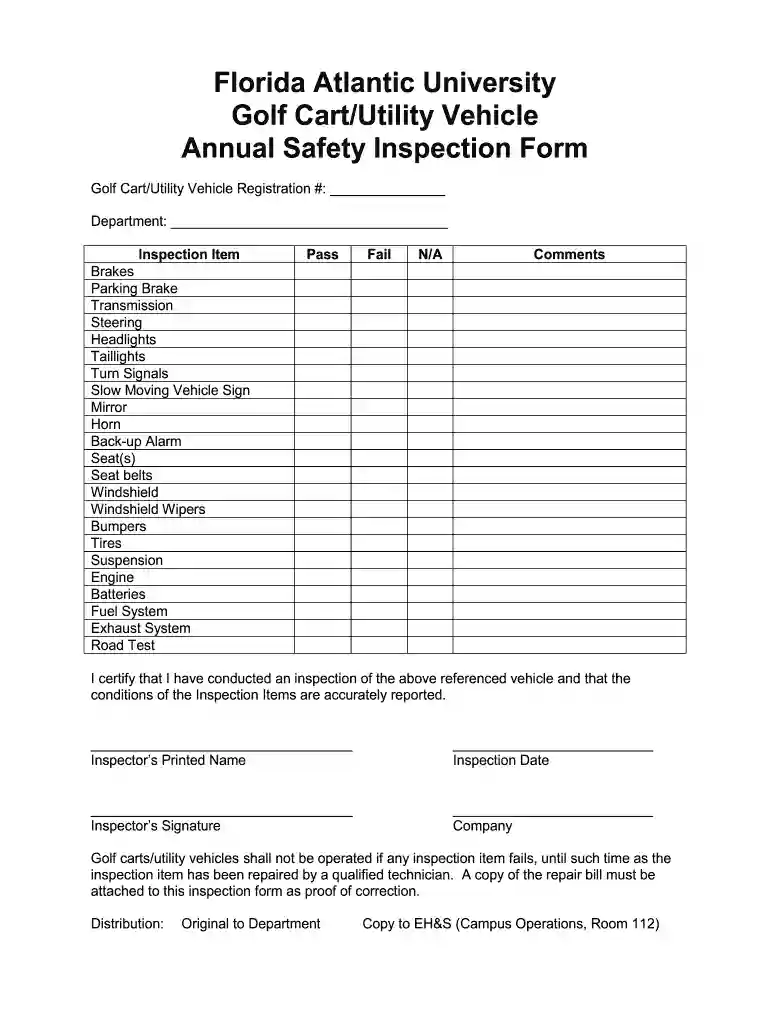
The golf cart inspection form serves as a crucial tool for ensuring the safe and efficient operation of golf carts and utility vehicles. This document outlines specific inspection items, providing a structured checklist to identify any issues or maintenance needs before the vehicles can be operated. Commonly used in contexts like golf courses, universities, and recreational facilities, this form can be essential for pre-use inspections and compliance with safety regulations.
The golf cart inspection form typically includes a variety of essential components, such as:
These elements collectively help in maintaining the operational integrity of golf carts.
Filling out the golf cart inspection form involves several clear steps:
Conducting regular inspections using the golf cart inspection form not only ensures safety but also prolongs the lifespan of the vehicle. Seen in many operational environments, including golf courses and facilities that manage utility vehicles, it plays a pivotal role in:
Different organizations may modify the golf cart inspection form to suit their specific needs. For instance, some might include detailed sections on electrical components or battery performance for electric golf carts. Variants can include:
These variants are useful in tailored applications to address different inspection frequency and detail levels.
The availability of the golf cart inspection form in both digital and print formats offers flexibility for various usage scenarios.
Using digital formats aligns with modern document management practices, enhancing efficiency while reducing paper waste.
Maintaining accurate records of inspections is critical not only for vehicle safety but also for meeting legal obligations. Key reasons to ensure diligent record-keeping include:
In conclusion, regular use of the golf cart inspection form PDF ensures that vehicles remain operationally safe, compliant with regulations, and monitored for their overall maintenance needs.
Sure, a typed name is recognized as a legitimate electronic signature when you add it to your paperwork utilizing a compliant solution like DocHub. Simply add your golf cart maintenance log sheet to our editor, click Sign in the top tool pane → Create your signature → Type your name in the appropriate tab, and select how it will appear on your document.
If you edit your free golf cart inspection checklist with DocHub, you will not need to look for other software or services to eSign it. An electronic signature is a component of DocHub’s comprehensive editing toolset, which allows you to apply changes in your form without switching between platforms. Just complete your form, double-check the correctness of the data and put your electronic signature at the end to make it submission-ready in minutes.
At DocHub, your data security is our priority. We follow HIPAA, SOC2, GDPR, and other standards, so you can work on your documents with confidence.
Please read also the following instruction manual. (electronic version on PDF file). For further details refer to the installation guide.Read more
If applicable, inspect all fluid levels. Verify there are no fluid leaks. Verify the maximum load capacity for the golf cart has not been exceeded.Read more


