Type text, add images, blackout confidential details, add comments, highlights and more.
02. Sign it in a few clicks
Draw your signature, type it, upload its image, or use your mobile device as a signature pad.
03. Share your form with others
Send seterus mortgage login via email, link, or fax. You can also download it, export it or print it out.
How to use or fill out seterus login with our platform
Ease of Setup
DocHub User Ratings on G2
Ease of Use
DocHub User Ratings on G2
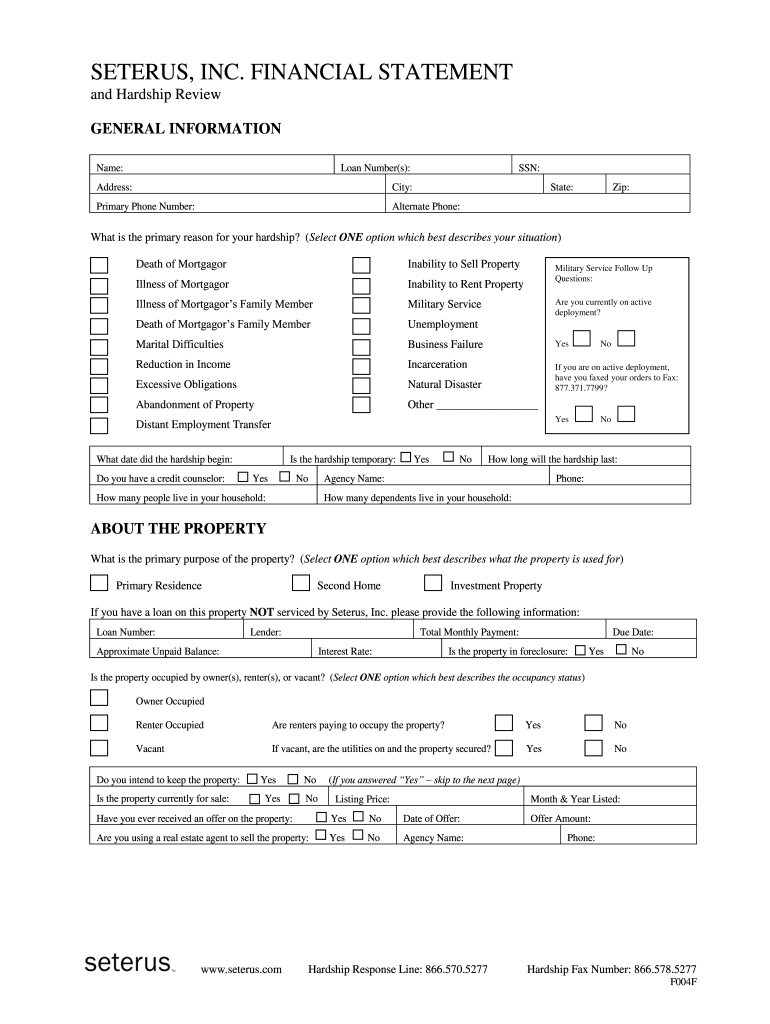
Click ‘Get Form’ to open the seterus login document in the editor.
Begin by entering your personal information in the 'GENERAL INFORMATION' section. Fill in your name, loan number(s), SSN, address, and contact details accurately.
In the 'HARDSHIP REASON' section, select one option that best describes your situation. This helps in assessing your request effectively.
Provide details about your property under the 'ABOUT THE PROPERTY' section. Indicate its primary purpose and occupancy status.
List all household income sources in the 'HOUSEHOLD INCOME' section. Be sure to include gross pay and deductions for each individual contributing to the mortgage.
Complete the 'MONTHLY EXPENSES' and 'ASSETS' sections by detailing your financial obligations and any other properties you own.
Finally, review all entered information for accuracy before signing in the 'AUTHORIZATION & ACKNOWLEDGEMENT' section.
Start using our platform today to streamline your seterus login process for free!
Fax their loss mitigation department at: 801-269-4459. Email documents to their loss mitigation department: relationship.manager@spservicing.com (this email address is used for documents only documents will be received and attached to your account but you will not receive email communication back from SPS)
What bank owns SPS servicing?
SPS was acquired by Credit Suisse Group AG (CS) in 2005.
What is the email address for SPS relationship manager?
As of July 2020, Select Portfolio Servicings current CEO and President is Randhir Gandhi.
How do I contact SPS servicing?
Ombudsman: First-time issues should be directed to the SPS Customer Service Department at 800-258-8602.
What is the phone number for SPS payment?
Payments can be made over the phone at (800) 258-8602. You may make a payment through our automated system or by speaking to a representative. Payments will be withdrawn from your bank account, so please have your account and routing number ready. Credit and debit cards are not accepted.
lakeview mr cooper login
My SPS loginMy SPS login appSelect Portfolio Servicing PAYMENT loginSelect Portfolio SPS loginMy SPS login with account numberSps servicing seterus loginSeterus login with account numberSeterus login app
Security and compliance
At DocHub, your data security is our priority. We follow HIPAA, SOC2, GDPR, and other standards, so you can work on your documents with confidence.
Homeowners are often transferred to SPS once they become delinquent on their mortgage payments. Many lenders try to protect their brand when it comes to foreclosing on homeowners.
mr cooper lakeview login
SETERUS, INC. * SETTLEMENT AGREEMENT NMLS #
WHEREAS, as of February 28, 2019, Seterus was sold, including all rights and certain liabilities, to Nationstar Mortgage LLC d/b/a Mr. Cooper (Purchaser) andRead more
Cookie consent notice
This site uses cookies to enhance site navigation and personalize your experience.
By using this site you agree to our use of cookies as described in our Privacy Notice.
You can modify your selections by visiting our Cookie and Advertising Notice.