Direct pay flyer.pub - Hudson Light and Power Department 2026

Get Form
hudson light Preview on Page 1

Here's how it works

01. Edit your hudson light online
Type text, add images, blackout confidential details, add comments, highlights and more.
02. Sign it in a few clicks
Draw your signature, type it, upload its image, or use your mobile device as a signature pad.
03. Share your form with others
Send it via email, link, or fax. You can also download it, export it or print it out.

How to use or fill out Direct pay flyer.pub - Hudson Light and Power Department

Form edit decoration
9.5
Ease of Setup
DocHub User Ratings on G2
9.0
Ease of Use
DocHub User Ratings on G2
  1. Click ‘Get Form’ to open it in the editor.
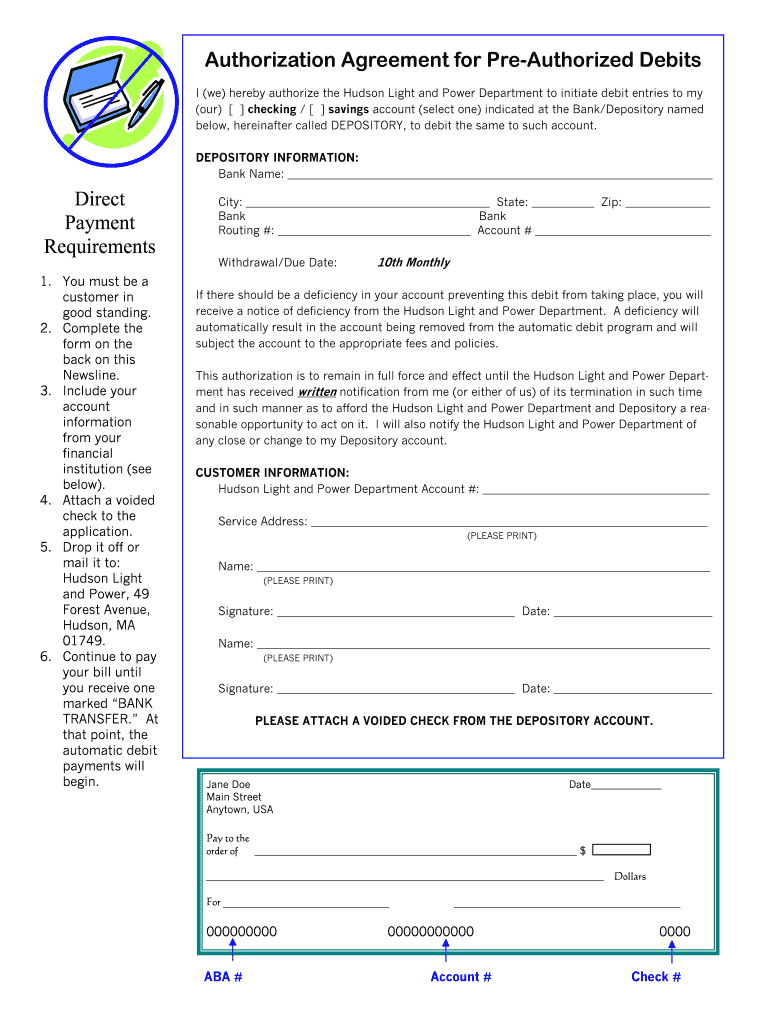
  2. Begin by selecting whether you want to authorize debit from your checking or savings account. Mark the appropriate box.
  3. Fill in the DEPOSITORY INFORMATION section with your bank's name, city, state, and zip code.
  4. Provide your bank routing number and account number in the designated fields.
  5. Indicate the withdrawal due date by selecting '10th Monthly' for automatic payments.
  6. Complete the CUSTOMER INFORMATION section with your Hudson Light and Power Department account number, service address, and your name printed clearly.
  7. Sign and date the form where indicated. If there are two signers, ensure both provide their information.
  8. Attach a voided check from your depository account as instructed.
  9. Finally, drop off or mail the completed form to Hudson Light and Power at 49 Forest Avenue, Hudson, MA 01749.

Start using our platform today to easily complete your Direct Pay flyer!

be ready to get more

Complete this form in 5 minutes or less

Get form

Got questions?

We have answers to the most popular questions from our customers. If you can't find an answer to your question, please contact us.
Contact us

Yes, and it’s really straightforward! DocHub is a web-based PDF editor with advanced document processing capabilities that allow you quickly adjust your documents, fill out empty fields and insert new ones for other people to fill out, and create eSignatures in several ways. Import your Direct pay flyer.pub - Hudson Light and Power Department, provide information as required, and decide how you want to eSign your template - by typing your name, drawing your signature, uploading its picture, or using a QR code.

With DocHub, you have several convenient ways to edit your Direct pay flyer.pub - Hudson Light and Power Department online. You can drag and drop the form and modify it straight at the DocHub site or use our browser extension to fill out your form immediately. On top of that, you can modify your PDF on your smartphone, as DocHub works with all the accessible mobile platforms.

Text PAY to 21880 or text BAL for your account balance. Reply 1 to confirm your account. If a credit/debit card is on file, you can proceed with the payment. If not on file, enter credit/debit card info when prompted.
Home Page. Your Home page (the view you see once youve logged in) provides an overview of your accounts. Here you can see your recent invoices for your accounts, your current balance due, and graphs illustrating your usage for the current month, the previous month and same month last year for power, gas or both.
Call 1-800-226-5885 a free service. Pay using your smartphone by visiting FPL.com on your mobile browser and selecting Pay Bill a free service.

Security and compliance

At DocHub, your data security is our priority. We follow HIPAA, SOC2, GDPR, and other standards, so you can work on your documents with confidence.

Learn more
ccpa2
pci-dss
gdpr-compliance
hipaa
soc-compliance
be ready to get more

Complete this form in 5 minutes or less

Get form

People also ask

Pay a bill On your mobile device, open the Google Pay app . Tap Pay Bills. Type in the name of a biller. Make payment.
Pay DIRECTV bill online at directv.com Go to Account Overview or Billing Payments. Select the Pay Bill button. Select the calendar icon to enter the payment date.
Go to att.com/pay. Sign in, if asked. Choose the account you want to pay (if you have multiple accounts). Review the payment amount and change if necessary. Follow the prompts to submit your payment. To pay more than one bill, repeat these steps for each account.

Related links