Fha addendum to sales contract pdf 2026

Get Form
fha purchase agreement addendum rocket mortgage Preview on Page 1

Here's how it works

01. Edit your fha purchase agreement addendum rocket mortgage online
Type text, add images, blackout confidential details, add comments, highlights and more.
02. Sign it in a few clicks
Draw your signature, type it, upload its image, or use your mobile device as a signature pad.
03. Share your form with others
Send fha purchase agreement addendum via email, link, or fax. You can also download it, export it or print it out.

How to use or fill out fha addendum to sales contract pdf with our platform

Form edit decoration
9.5
Ease of Setup
DocHub User Ratings on G2
9.0
Ease of Use
DocHub User Ratings on G2
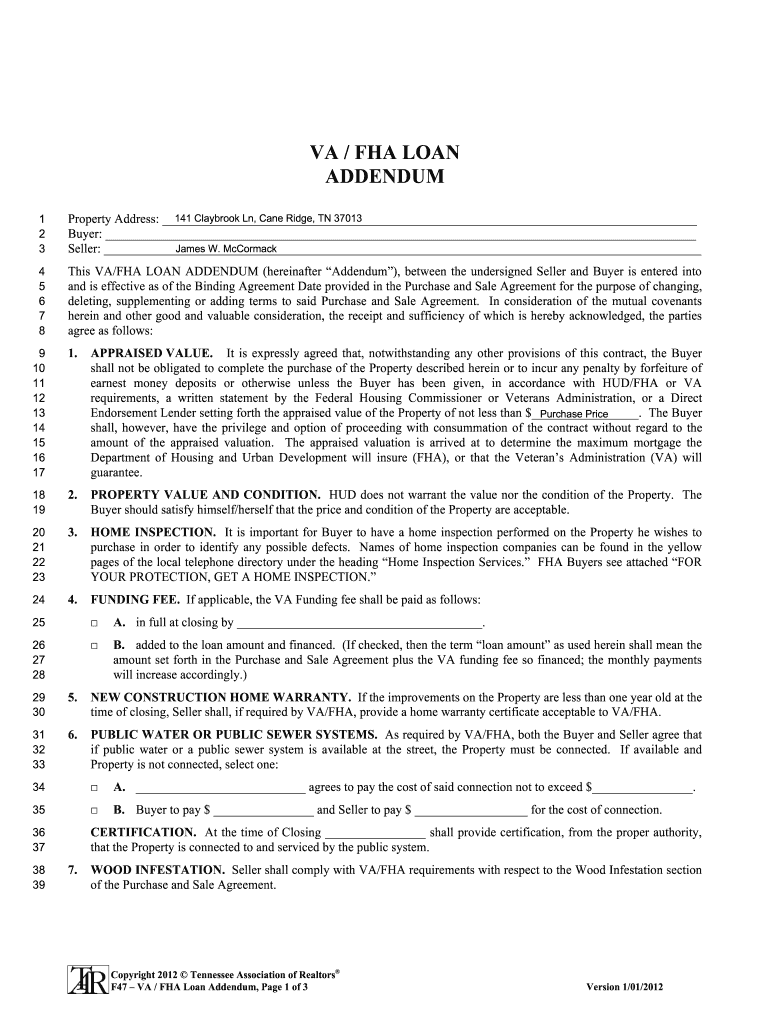
  1. Click ‘Get Form’ to open the fha addendum to sales contract pdf in the editor.
  2. Begin by entering the property address in the designated field at the top of the form. This ensures clarity regarding which property is being discussed.
  3. Next, fill in the names of both the Buyer and Seller in their respective fields. Accurate identification is crucial for legal purposes.
  4. Proceed to Section 1, where you will need to specify the appraised value of the property. This is essential for FHA/VA loan requirements.
  5. In Section 2, acknowledge that HUD does not guarantee property value or condition. It’s advisable for Buyers to verify these aspects independently.
  6. Complete Section 3 by indicating whether a home inspection has been performed, as this is vital for identifying potential defects.
  7. For Section 4, select how the VA funding fee will be handled—either paid at closing or financed into the loan amount.
  8. Continue filling out Sections 5 through 7 regarding warranties and public utility connections as applicable, ensuring all options are clearly marked.
  9. Finally, ensure all parties sign and date at the bottom of the document to validate this addendum as part of your Purchase and Sale Agreement.

Start using our platform today for free to streamline your document editing and signing process!

be ready to get more

Complete this form in 5 minutes or less

Get form

Got questions?

We have answers to the most popular questions from our customers. If you can't find an answer to your question, please contact us.
Contact us
Key Learnings. The amendatory clause allows buyers to cancel the purchase if the appraisal comes in lower than the agreed price, enabling them to recover their earnest money. This clause is required for all FHA-insured loans and must be signed by the buyer, seller, and all involved real estate agents.
Instead of drafting a whole new agreement, an addendum allows the parties to address specific changes while maintaining the original contracts validity. Addenda are legit - AKA - legally binding, provided they are written clearly, signed by all involved parties, and do not conflict with the original terms.
Essentially, the FHA amendatory clause allows you, the home buyer, to back out of the sale without any sort of penalty. The buyer, co-buyer, seller, buyers agent and sellers agent must sign the FHA amendatory clause. The FHA will not insure or guarantee the loan if its not signed.
It is added to the original purchase agreement to establish details such as the type of financing (e.g., balloon mortgage, adjustable rate mortgage, amortized loan), interest rate, and other relevant terms. Seller financing is also referred to as owner financing or a purchase-money mortgage.
The amendatory clause allows buyers to cancel the purchase if the appraisal comes in lower than the agreed price, enabling them to recover their earnest money. This clause is required for all FHA-insured loans and must be signed by the buyer, seller, and all involved real estate agents.

Security and compliance

At DocHub, your data security is our priority. We follow HIPAA, SOC2, GDPR, and other standards, so you can work on your documents with confidence.

Learn more
ccpa2
pci-dss
gdpr-compliance
hipaa
soc-compliance
be ready to get more

Complete this form in 5 minutes or less

Get form