Type text, add images, blackout confidential details, add comments, highlights and more.
02. Sign it in a few clicks
Draw your signature, type it, upload its image, or use your mobile device as a signature pad.
03. Share your form with others
Send it via email, link, or fax. You can also download it, export it or print it out.
How to use or fill out appeal marin with our platform
Ease of Setup
DocHub User Ratings on G2
Ease of Use
DocHub User Ratings on G2
Click ‘Get Form’ to open the appeal marin document in the editor.
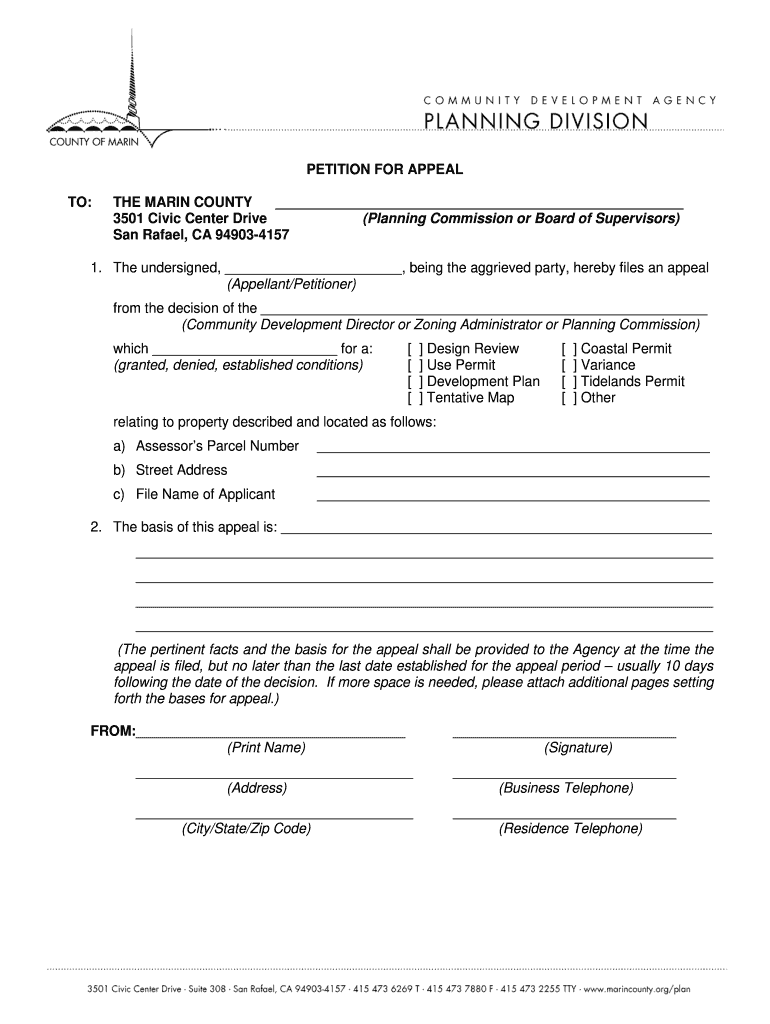
Begin by entering your name in the 'Appellant/Petitioner' field, identifying yourself as the aggrieved party.
Specify the decision you are appealing from by selecting the appropriate option (e.g., Design Review, Use Permit) and providing details about the decision made.
Fill in the property details, including Assessor’s Parcel Number, Street Address, and File Name of Applicant. Ensure accuracy for a smooth process.
In the section for 'basis of this appeal', clearly articulate your reasons for filing. Provide pertinent facts and any additional information necessary to support your case.
Finally, print your name, sign where indicated, and provide your contact information including address and telephone numbers.
Start using our platform today to complete your appeal marin form easily and efficiently!
Marin County Assessment Appeals BoardMarin County assessment appeal applicationMarin County property tax appealMarin County AssessorInformal assessment review marin countyMarin County parcel ViewerMarin County Tax Collector addressMarin County property tax rate
Security and compliance
At DocHub, your data security is our priority. We follow HIPAA, SOC2, GDPR, and other standards, so you can work on your documents with confidence.
Enrollment Priority and/or CCPG Waiver Appeal - College Forms
Appeals submitted without sufficient documentation will be denied. Submit all documents in a single packet to the Enrollment Services Office at either theRead more
Cookie consent notice
This site uses cookies to enhance site navigation and personalize your experience.
By using this site you agree to our use of cookies as described in our Privacy Notice.
You can modify your selections by visiting our Cookie and Advertising Notice.