Ex660 2026

Get Form
ex660 Preview on Page 1

Here's how it works

01. Edit your ex660 online
Type text, add images, blackout confidential details, add comments, highlights and more.
02. Sign it in a few clicks
Draw your signature, type it, upload its image, or use your mobile device as a signature pad.
03. Share your form with others
Send ex660 form via email, link, or fax. You can also download it, export it or print it out.

How to use or fill out ex660 with our platform

Form edit decoration
9.5
Ease of Setup
DocHub User Ratings on G2
9.0
Ease of Use
DocHub User Ratings on G2
  1. Click ‘Get Form’ to open the ex660 in our editor.
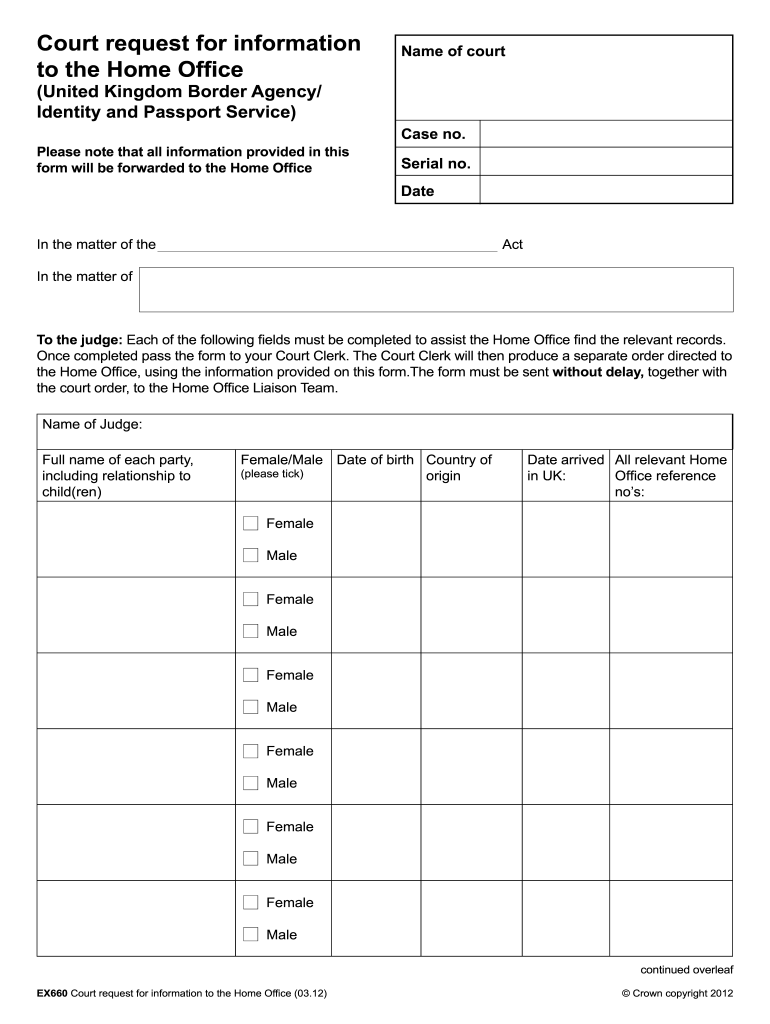
  2. Begin by entering the 'Name of court' and 'Case no.' at the top of the form. Ensure accuracy as this information is crucial for processing.
  3. Fill in the 'Full name of each party' along with their 'Date of birth' and 'Country of origin'. Use the checkboxes to indicate gender for each individual listed.
  4. Provide details regarding the arrival date in the UK and any relevant Home Office reference numbers, ensuring all fields are completed.
  5. In the section asking for questions to be answered by UKBA/IPS, clearly articulate your inquiries to facilitate a thorough response.
  6. Summarize your case briefly, including any pertinent immigration details. Attach supporting documents if necessary.
  7. Indicate whether leave has been granted to disclose supporting documentation and provide contact details for further inquiries.
  8. Finally, specify the required date for information and ensure that all sections are filled before submitting it to your Court Clerk.

Start using our platform today for free to streamline your document editing and submission process!

be ready to get more

Complete this form in 5 minutes or less

Get form

Got questions?

We have answers to the most popular questions from our customers. If you can't find an answer to your question, please contact us.
Contact us

Sure, electronically drawing your signature is acceptable, but only if you utilize a tool that complies with industry laws and regulations. Consider DocHub, which guarantees eSignature validity under ESIGN and UETA requirements. All you need to eSign your site dochub com is an account with DocHub and an internet connection. After you open your document in our editor, click Sign and select the Draw option.

You may complete and sign your ex660 online, even on a tight deadline. All you need to access top-notch editing instruments on any device is a DocHub account, which you can sign up in a few moments. After you sign up, add your file or find what you are searching for in our catalog, complete it using the editing instruments you want, and place your electronic signature on it at the end.

EX660 Court request for information to the Home Office.

Security and compliance

At DocHub, your data security is our priority. We follow HIPAA, SOC2, GDPR, and other standards, so you can work on your documents with confidence.

Learn more
ccpa2
pci-dss
gdpr-compliance
hipaa
soc-compliance
be ready to get more

Complete this form in 5 minutes or less

Get form