Franklin templeton application form 2026

Get Form
franklin templeton forms Preview on Page 1

Here's how it works

01. Edit your franklin templeton forms online
Type text, add images, blackout confidential details, add comments, highlights and more.
02. Sign it in a few clicks
Draw your signature, type it, upload its image, or use your mobile device as a signature pad.
03. Share your form with others
Send franklin forms via email, link, or fax. You can also download it, export it or print it out.

How to use or fill out franklin templeton application form with DocHub

Form edit decoration
9.5
Ease of Setup
DocHub User Ratings on G2
9.0
Ease of Use
DocHub User Ratings on G2
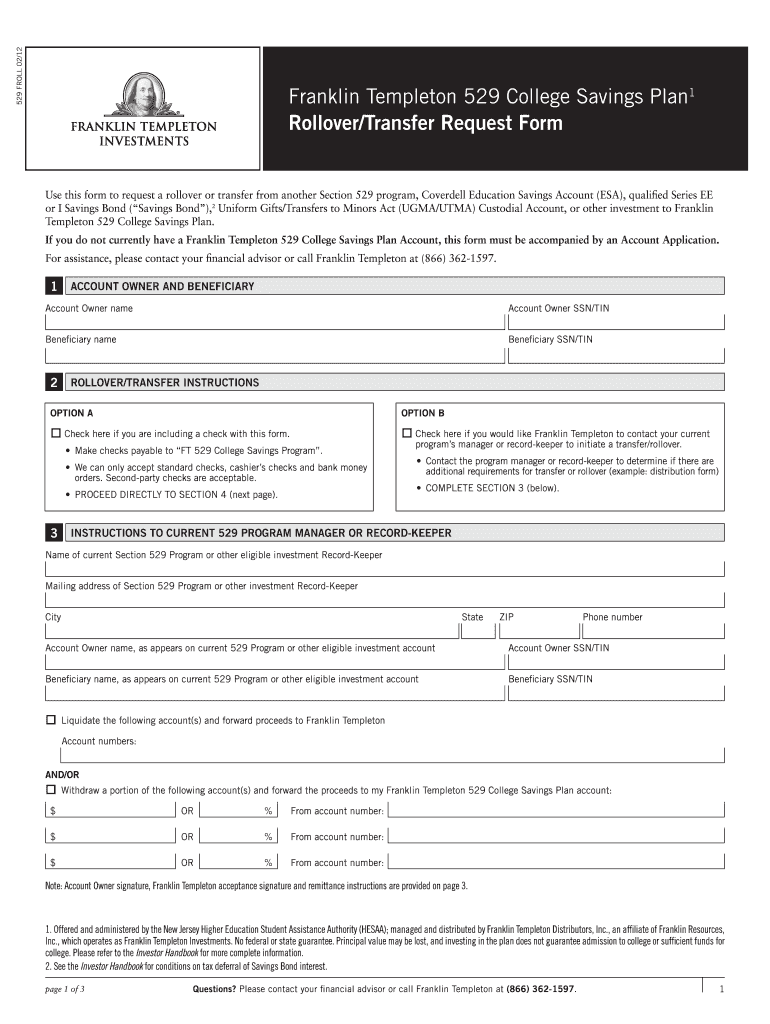
  1. Click ‘Get Form’ to open the Franklin Templeton 529 College Savings Plan Rollover/Transfer Request Form in our platform.
  2. Begin by filling out the 'Account Owner and Beneficiary' section. Enter the names and SSN/TIN for both the account owner and beneficiary accurately.
  3. Proceed to 'Rollover/Transfer Instructions'. Choose either Option A or B based on your situation. If including a check, ensure it is made payable to 'FT 529 College Savings Program'.
  4. In Section 4, provide details about the source of your rollover transfer. Attach any required documentation that shows the breakdown of principal and earnings.
  5. Complete the 'Investment Instructions' section by indicating how you want your contributions allocated among different investment options.
  6. Finally, sign and date the form in the 'Account Owner Signature and Certification' section, ensuring all information is correct before submission.

Start using our platform today to easily complete your Franklin Templeton application form for free!

be ready to get more

Complete this form in 5 minutes or less

Get form

Got questions?

We have answers to the most popular questions from our customers. If you can't find an answer to your question, please contact us.
Contact us

Most eSignature services require users to have a paid subscription. With DocHub, there are two ways for you to add an electronic signature to your franklin form without being charged:

  • You can do it during a 7-day trial period;
  • You can subscribe to a free plan.

The second option, though, has limitations on the number of signatures, sign requests, emails, and documents for adjusting available per month. You can check for full information here.

If you edit your franklin bank change form with DocHub, you only need a steady web connection and virtually any web browser installed on your device. No need to install any third-party software or study tutorials. Simply open a tab with DocHub, drag and drop your file, and edit it on the spot.

Once the sale has posted to your mutual fund account, you typically receive your money within two business days.
Meet the new Franklin Templeton App. The app that lets you buy, sell, track and manage your Franklin Templeton investments. Available for Apple® and Android\u2122 phones.
Great place to work with exceptionally talented people Franklin Templeton is a great place to work for. They have great benefits and work life balance. They are very active in the surrounding communities worldwide. They have a rich and diverse workforce.

Security and compliance

At DocHub, your data security is our priority. We follow HIPAA, SOC2, GDPR, and other standards, so you can work on your documents with confidence.

Learn more
ccpa2
pci-dss
gdpr-compliance
hipaa
soc-compliance
be ready to get more

Complete this form in 5 minutes or less

Get form

People also ask

Great place to work with exceptionally talented people Franklin Templeton is a great place to work for. They have great benefits and work life balance. They are very active in the surrounding communities worldwide. They have a rich and diverse workforce.
You simply have to log-on to the 'Online Transaction' page of the desired Mutual Fund and log-in using your Folio Number and/or the PAN, select the Scheme and the number of units (or the amount) you wish to redeem and confirm your transaction.
The evening of April 23, 2020 was a watershed moment in the history of mutual funds in India. Six Franklin Templeton debt funds were shut down by the management, due to redemption pressure and lack of liquidity in the secondary market for the underlying instruments.
You can either request a check or transfer to another bank via Automated Clearing House (ACH). All requests must be made by the account owner. Franklin Templeton does not take distribution instructions from a beneficiary.
Consolidated view of all Investments: Investments with Franklin Templeton will now be covered as part of CAMS Consolidated Account Statement.

franklin funds login