Fort volunteer nomination 2026

Get Form
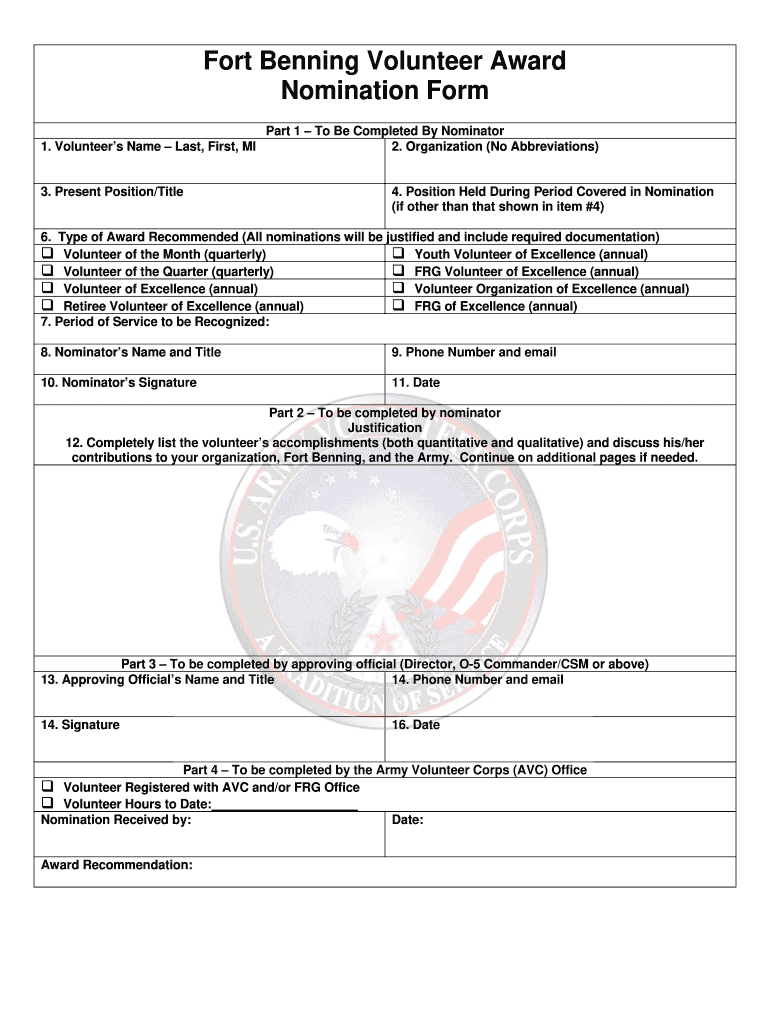
fort volunteer nomination Preview on Page 1

Here's how it works

01. Edit your form online
Type text, add images, blackout confidential details, add comments, highlights and more.
02. Sign it in a few clicks
Draw your signature, type it, upload its image, or use your mobile device as a signature pad.
03. Share your form with others
Send it via email, link, or fax. You can also download it, export it or print it out.

How to use or fill out fort volunteer nomination with our platform

Form edit decoration
9.5
Ease of Setup
DocHub User Ratings on G2
9.0
Ease of Use
DocHub User Ratings on G2
  1. Click ‘Get Form’ to open the fort volunteer nomination in the editor.
  2. Begin by entering the Volunteer’s Name in the designated field, ensuring you include their last name, first name, and middle initial.
  3. Fill in the Present Position/Title of the volunteer to provide context for their contributions.
  4. In Part 1, complete your details as the nominator. Enter your Organization's name without abbreviations and specify the Position Held by the volunteer during the nomination period.
  5. Select the Type of Award Recommended from the provided options, ensuring you justify your choice with required documentation.
  6. Indicate the Period of Service to be Recognized and provide your own Name, Title, Phone Number, and Email as the nominator.
  7. Sign and date the form to validate your nomination.
  8. In Part 2, detail the volunteer’s accomplishments in justification. Use additional pages if necessary for comprehensive coverage.
  9. Complete Part 3 with details from an approving official including their Name, Title, Phone Number, Email, Signature, and Date.
  10. Finally, ensure Part 4 is filled out by the Army Volunteer Corps Office for final processing.

Start using our platform today to streamline your fort volunteer nomination process for free!

be ready to get more

Complete this form in 5 minutes or less

Get form

Got questions?

We have answers to the most popular questions from our customers. If you can't find an answer to your question, please contact us.
Contact us
Nomination Writing Strategies Cite specific examples: use descriptive language and provide an example that shows the attribute. Be specific in how the nominee met the award criteria. Provide concrete examples. Avoid too many pronouns and run-on sentences.
To receive a Gold, Silver, or Bronze Presidents Volunteer Service Award, you must be a U.S. citizen or US Permanent Resident and have completed your service within the last twelve months.
Describe specific characteristics, qualities, or examples that you believe make the nominee stand out or demonstrate how they go above and beyond. Quality is appreciated more than quantity. A well-written and concise submission increases the likelihood of a positive outcome. Use an active voice in your writing.
Provide examples of how your nominee has demonstrated outstanding character and is a deserving candidate for the award. Show how they have: Encouraged and exemplified the virtue of good citizenship. Touched or enriched the lives of others, particularly those who are vulnerable or less able to help themselves.
Dont just say your nominee is outstanding prove it! Its important to use specific and concrete examples to illustrate how your nominee meets each of the eligibility and award criteria. Provide examples of how your nominee has demonstrated outstanding character and is a deserving candidate for the award.

Security and compliance

At DocHub, your data security is our priority. We follow HIPAA, SOC2, GDPR, and other standards, so you can work on your documents with confidence.

Learn more
ccpa2
pci-dss
gdpr-compliance
hipaa
soc-compliance