
Give every deal its own Room
Bring deal-specific documents, tasks, and people involved into one workspace. Add documents, assign tasks, track progress so everyone stays aligned and deals keep moving.
Aug 6th, 2022

0
forms filled out

0
forms signed

0
forms sent
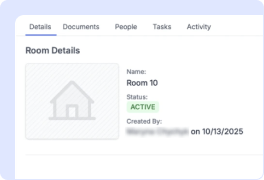
1. Create a Room
From your Organization dashboard, create a new Room, give it a name, choose its type, Real Estate or Custom, and add a description if needed.
From your Organization dashboard, create a new Room, give it a name, choose its type, Real Estate or Custom, and add a description if needed.
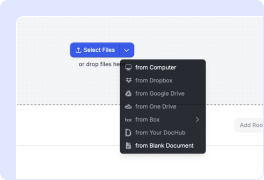
2. Add documents
Drop in contracts, NDAs, disclosures, and other deal documents. You can also find documents added to a Room from your Organization.
Drop in contracts, NDAs, disclosures, and other deal documents. You can also find documents added to a Room from your Organization.
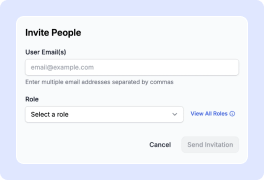
3. Invite everyone involved in the deal
Invite teammates and other participants to the Room. Assign roles and give each person the right level of access to documents and tasks.
Invite teammates and other participants to the Room. Assign roles and give each person the right level of access to documents and tasks.
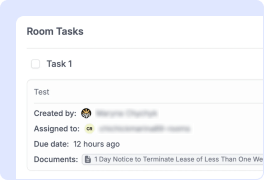
4. Assign tasks and track progress
Create tasks, set due dates, and assign owners to keep work moving. Track activity across the Room to see what's been done and what's next.
Create tasks, set due dates, and assign owners to keep work moving. Track activity across the Room to see what's been done and what's next.
Move deals faster with one shared workspace
Beat the patchwork
No more juggling emails, folders, and spreadsheets. Keep documents, tasks, and updates in one Room, so you spend less time switching between tools and more time closing deals.
Hit every deadline
Set tasks, owners, and due dates, and let auto-reminders do the nudging, so deals keep moving and nothing important slips through the cracks.
Keep every document in its place
Every contract, disclosure, and report stays with its Room, so you always know where the signed copy is. No more digging through your inbox to find the latest version.
Share without oversharing
Bring everyone involved in the deal into one Room and give them access to what they need, without sharing your entire drive or inbox.
See Rooms in action

Rooms for every kind of deal
Mortgage & lending
Keep applications, disclosures, and lender documents in one Room per borrower, with tasks for every approval step, so nothing gets stuck between your team, the borrower, and underwriting.
Property management & leasing
Give every lease its own Room — applications, agreements, and renewals in one spot, with tasks and signatures handled without the email back-and-forth.

Legal & corporate deals
Run M&A, due diligence, and other complex transactions from one shared workspace. Keep sensitive documents organized, control access, and track every step along the way.
Complex B2B sales
Bring contracts, security reviews, approvals, and sign-offs into one Room shared by your team and the buyer. Keep everyone aligned and avoid long email threads that slow deals down.
Get PDFs done faster – easier than ever
Explore the benefits of DocHub.

Edit PDFs from anywhere
DocHub's editing tools make it easy to keep your work flowing from anywhere. Add text and images, exchange comments, highlight important content, erase information, and underline or strike out text with ease. Rearrange, add, or delete pages or merge PDFs to create polished documents.

Get documents signed online
Close deals faster without chasing signatures for days and hassling with physical documents. Sign contracts and agreements electronically in seconds or send them for legally binding eSignature. With instant notifications and a detailed audit trail, you'll never lose sight of your deals.

Collect data with ease
Eliminate manual steps in your data collection process. Publish fillable PDFs online for quick completion on any device. Transform your documents into reusable templates, allowing recipients to easily fill out their copy in minutes.

Work seamlessly in Google apps
DocHub integrates with your favorite Google Workspace apps, allowing you to import, edit, sign, and save documents right from Google Drive, Gmail, Google Classroom, or Chrome without any back-and-forth.

Simplify document sharing
Share PDFs via public or private links and allow others to review, edit, or complete them online. Send documents with role-based permissions for quick and secure approvals. Additionally, you can share your documents by email or fax.

Use DocHub on any device
Stay productive even on the go. DocHub works on mobile devices just as smoothly as on desktop computers. With DocHub's mobile and web app, you can edit, annotate, and sign documents conveniently from your smartphone or tablet.






Drive efficiency with the DocHub add-on for Google Workspace
Access documents and edit, sign, and share them straight from your favorite Google Apps.
Install now
Got questions?
Here are some common questions from our customers that may provide you with the answer you're looking for. If you can't find an answer to your question, please don't hesitate to reach out to us.
Contact us
What is real estate transaction management software?
It's software that runs a deal from contract to close in one place: documents, eSignatures, tasks, deadlines, and a record of who did what. DocHub Rooms brings that workflow into DocHub, so the same platform that edits and signs your contracts also keeps the transaction organized.
What is a DocHub Room?
A Room is a dedicated workspace for one deal, with five tabs: Details, Documents, People, Tasks, and Activity. Choose the Real Estate type for property transactions — it includes an address section — or a Custom room for any other multi-party deal, from legal matters to procurement.
Can my clients access a Room without joining my organization?
Yes. Buyers, sellers, and other outside parties can be invited to a Room as external collaborators without becoming members of your organization. Their role — such as Viewer or Agent — controls exactly what they can see and do.
How do tasks work in Rooms?
Each task has a title, status, assignee, due date, and can link directly to the documents it concerns. DocHub sends an email when a task is assigned and another when it's completed, so nothing waits on a "just checking in" message.
Is DocHub Rooms an alternative to DocuSign Rooms?
Yes — DocHub Rooms covers the same job: a shared workspace per transaction with documents, people, tasks, and an activity log. The difference is that Rooms comes bundled with DocHub's full PDF editor and eSignatures on the Pro plan at $12 per user per month, rather than as a separate real estate product.
Which DocHub plan includes Rooms?
Rooms is available within Pro organizations and on the Site license plan — it isn't available on Free or Basic plans or on individual accounts. Pro also includes unlimited PDF editing, unlimited eSignatures, and Bulk Send.
See why our customers choose DocHub
Great solution for PDF docs with very little pre-knowledge required.

A Valuable Document Signer for Small Businesses.

I can create refillable copies for the templates that I select and then I can publish those.



