


Easily create PDFs with GIF attached

Drag and drop document here to upload

Upload documents of up to 31 MB in PDF, DOC, DOCX, RTF, PPT, PPTX, JPEG, PNG, or TXT

Aug 6th, 2022
Icon decoration
0
forms filled out
Icon decoration
0
forms signed
Icon decoration
0
forms sent
Service screenshot
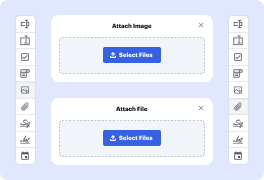
01. Drag and drop image or file attachment fields anywhere on the document.
Service screenshot
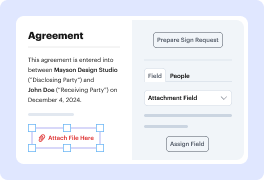
02. Change field properties, assign them to a specific recipient, or mark them as required.
Service screenshot
03. Attach files in the specified format, or ask the signer to upload them in the designated field.
Service screenshot
04. Download attachments as a separate PDF or bundle them with the document. Or view attachment fields in the audit trail.

Experience the benefits of attachment fields

icon
Simplify data and signature collection
Save time by collecting signatures and supporting information in one step. Ask your recipients to sign the document and upload the necessary attachments all at once.
icon
Boost teamwork and process visibility
Keep everyone updated on the signing process. Once the document is finalized, everyone can download attachments, and you can view attachment fields in the audit trail.
icon
Streamline workflows
Speed up the document turnaround by attaching all the necessary files right to the document. No more endless back-and-forth or long email threads.
icon
Simplify document management
Choose a preferred download option. Get the attached files as a single PDF, as separate PDF pages, or download all attachments and the main document in a compressed ZIP file.
!
Note: Attachment fields are available with the Pro plan or during a free trial. Upgrade your plan or start a free trial to use this feature.

See how easy it is to share and collect attachments

video background

How to easily create PDFs with GIF attached using DocHub functionality

Form edit decoration

Need to create an online form with .gif file upload? DocHub is the perfect tool for all your document creation and management needs. With an intuitive interface, DocHub allows users to easily embed Graphics Interchange Format pictures and various other image types into their paperwork, ensuring it is informative and visually engaging.

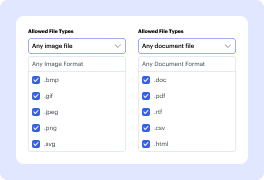
The list of image types allowed for attachments includes:

  • .bmp
  • .gif
  • .jpg
  • .jpeg
  • .png
  • .svg
  • .tiff
  • .webp

Take these quick steps to create a PDF with GIF files attached:

  1. Register an account with DocHub and start a free trial, or log in if you’re already registered.
  2. Click New Document to add PDFs from your storage or select the dropdown β€œπŸ”½β€ icon to draft a blank document.
  3. In the editor, make the necessary adjustments and click Manage Fields to create a fillable form.
  4. In the side panel, click Image, resize the field, and place it where you intend to gather visuals.
  5. Use the right sidebar to add field titles and the placeholder text and set the allowed file formats. You can select only .gif or leave all the formats checked.
  6. Click Sign in the toolbar to generate your electronic signature or request it from other parties.
  7. Go to the Menu to download your paperwork, export it to the cloud, share it with others, or convert it into a template.

Start streamlining your document management tasks and experience enhanced productivity. Sign up with DocHub now!

Get PDFs done faster – easier than ever

Explore the benefits of DocHub.

edit PDFs icon
Edit PDFs from anywhere
DocHub's editing tools make it easy to keep your work flowing from anywhere. Add text and images, exchange comments, highlight important content, redact information, and underline or strike out text with ease. Rearrange, add, or delete pages or merge PDFs to create polished documents.
documents signed icon
Get documents signed online
Close deals faster without chasing signatures for days and hassling with physical documents. Sign contracts and agreements electronically in seconds or send them for legally binding eSignature. With instant notifications and a detailed audit trail, you'll never lose sight of your deals.
data icon
Collect data with ease
Eliminate manual steps in your data collection process. Publish fillable forms online for quick completion on any device. Transform your documents into reusable templates, allowing recipients to easily fill out their copy in minutes.
document sharing icon
Simplify document sharing
Share PDFs via public or private links and allow others to review, edit, or complete them online. Send documents with role-based permissions for quick and secure approvals. Additionally, you can share your documents by email or fax.
Google apps icon
Work seamlessly in Google apps
DocHub integrates with your favorite Google Workspace apps, allowing you to import, edit, sign, and save documents right from Google Drive, Gmail, Google Classroom, or Chrome without any back-and-forth.
DocHub icon
Use DocHub on any device
Stay productive even on the go. DocHub works on mobile devices just as smoothly as on desktop computers. With DocHub's mobile and web app, you can edit, annotate, and sign documents conveniently from your smartphone or tablet.
dochub-logo
google-logo

Drive efficiency with the DocHub add-on for Google Workspace

Access documents and edit, sign, and share them straight from your favorite Google Apps.
Install now

Got questions about see attached gif?

Below are some common questions from our customers that may provide you with the answer you're looking for. If you can't find an answer to your question, please don't hesitate to reach out to us.
Contact us
Register an account with a paid subscription in DocHub. Add a file to the editor, click Manage Fields, drag the Image Field to the document canvas, and select .gif as the preferred file type. After editing, you can save and send your PDF or turn it into a template.
The allowed image formats for attachments are pre-defined in the Image Fields settings in the right sidebar. The platform enables you to add .jpg, .jpeg, .png, .bmp, .gif, .svg, .tiff, and .webp pictures to your document. You can select one or multiple formats for your file upload when drafting an online PDF form.
No, Attachment Fields is a premium option in DocHub. Only users with paid subscriptions can create PDFs with Graphics Interchange Format attachments. Non-paying users will need an upgrade to utilize this feature.
When you create an online form with .gif file upload, you can easily modify your attachments by clicking on the appropriate Image Field. Once the β€œEdit Image” dialog window appears, reset the field or create new attachments. Ensure to make all the required adjustments before you finish composing your PDF.
To compose a PDF from scratch in DocHub, use the New Document button in your Dashboard, click on the β€œπŸ”½β€ dropdown icon, and opt for β€œfrom Blank Document.” In the editor, click Manage Fields and add the appropriate fillable areas to collect all the necessary information. Use the Image Field to create an online form with .gif file upload.
Open the PDF in Acrobat. Select Convert from the global bar. From the Convert menu in the left pane, select Image format, and then from the drop-down menu, select JPEG or JPEG 2000. Select Convert to JPEG or Convert to JPEG 2000.
Thats because PDF is a fixed-layout flat document so it cant play animated GIF directly. If you want to play an animated GIF in PDF, youll need to embed the GIF in PDF as an external file.
In just four steps you can use the tools in docHub software to convert GIF images to PDF: Navigate to the Create PDF option from the Tools menu. Click on Select A File. Select the GIF from which you wish to make a PDF. Choose Create. Follow the prompts to save your new PDF to the desired location.
Microsoft Paint is a default program on any PC; you can easily convert a PDF into a GIF using Paints Save As feature. You can also use docHub, Photoshop, or any other intermediate photo-editing programs on your PC; however, Microsoft Paint is usually the simplest solution.
Can a PDF have a moving GIF? If you want to insert a GIF in its native file format, then the GIF will not be animated in the PDF. This is because a PDF is a flat document with a fixed layout, so cannot play an animated GIF as it is.

See why our customers choose DocHub

Great solution for PDF docs with very little pre-knowledge required.
"Simplicity, familiarity with the menu and user-friendly. It's easy to navigate, make changes and edit whatever you may need. Because it's used alongside Google, the document is always saved, so you don't have to worry about it."
Pam Driscoll F
Teacher
A Valuable Document Signer for Small Businesses.
"I love that DocHub is incredibly affordable and customizable. It truly does everything I need it to do, without a large price tag like some of its more well known competitors. I am able to send secure documents directly to me clients emails and via in real time when they are viewing and making alterations to a document."
Jiovany A
Small-Business
I can create refillable copies for the templates that I select and then I can publish those.
"I like to work and organize my work in the appropriate way to meet and even exceed the demands that are made daily in the office, so I enjoy working with PDF files, I think they are more professional and versatile, they allow..."
Victoria G
Small-Business
be ready to get more

Edit and sign PDF for free

Get started now



