What is the difference between DocHub vs. Adobe Acrobat vs. DigiSigner in Macos?
When it comes to document management and electronic signature solutions for macOS, there are several options available. Three popular choices you might consider are DocHub, Adobe Acrobat, and DigiSigner. Each of these tools brings its own unique features and benefits to the table. Let's explore their differences to help you decide which one is the best fit for your needs.
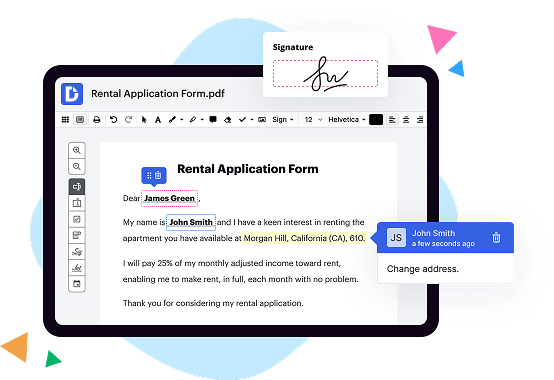
DocHub is an intuitive and user-friendly platform that allows you to edit, sign, and share PDF documents seamlessly. With its excellent compatibility with macOS, DocHub ensures a smooth experience for Mac users. Whether you're collaborating with colleagues or signing important contracts, DocHub offers a range of features to simplify your workflow. The platform's ease of use makes it an ideal choice for individuals and small teams who value efficiency and productivity.
Adobe Acrobat is a well-known name in the world of PDF software and offers a comprehensive suite of tools for document management. It provides a wide range of features, including editing, conversion, and collaboration capabilities. With Adobe Acrobat, you'll have access to advanced features such as OCR (Optical Character Recognition) technology to transform scanned documents into editable files. However, for some users, the complexity and extensive feature set of Adobe Acrobat may be overwhelming, and it may not be the most straightforward choice for everyday tasks.
DigiSigner, on the other hand, focuses primarily on electronic signatures and simplifies the signing process for macOS users. It offers a streamlined and user-friendly interface, enabling you to sign documents securely and hassle-free. While DigiSigner may lack some of the editing and collaboration features found in DocHub and Adobe Acrobat, its straightforward approach makes it an excellent option for those who prioritize the signing process above all else.
In summary, when considering DocHub, Adobe Acrobat, and DigiSigner for macOS, you'll find that each tool has its own strengths. DocHub stands out for its user-friendly interface and an array of features catering to everyday document management needs. Adobe Acrobat offers a comprehensive suite of tools, including advanced editing and collaboration functionalities. Comparatively, DigiSigner focuses primarily on electronic signatures, providing a simplified and efficient signing experience. Depending on your specific requirements and preferences, you can confidently select the solution that best aligns with your needs.
DocHub vs Adobe Acrobat vs DigiSigner in Macos: which is better for Enterprises?
While Adobe Acrobat and DigiSigner are good solutions to work with PDFs online, DocHub offers greater capabilities to help individuals and businesses digitize their documents and make them run smoothly across different devices and your favorite apps.
DocHub vs Adobe Acrobat vs DigiSigner in Macos: which is better for small businesses?
Adobe Acrobat and DigiSigner are good options for editing, signing, and sharing PDFs. However, DocHub offers a more comprehensive featureset that includes organizations, reusable templates, advanced eSignatures, seamless Google integrations, and more that are perfect for small businesses, helping them simplify and streamline document editing, sharing, signing, and form completition.
What is DocHub?
DocHub is a Google-integrated PDF editor and eSignature solution that helps you get your PDFs done online, using any device. DocHub comes with an online PDF editor, advanced eSignatures, PDF forms, reusable templates, and straightforward Google integrations so you can maximize your productivity when working within your favorite Google apps.
What is Adobe Acrobat and how does it work in Macos?
Adobe Acrobat is a versatile and powerful software that enables you to create, edit, and manage PDF files seamlessly on MacOs. With its user-friendly interface and wide range of features, Adobe Acrobat provides a reliable solution for all your PDF needs.
When you open Adobe Acrobat on your Mac, you'll be greeted by a clean and intuitive workspace. From here, you can easily access the various tools and functions available to you. Whether you need to convert files to PDF format, combine multiple documents, or add annotations and comments, Adobe Acrobat has got you covered.
One of the standout features of Adobe Acrobat is its ability to create PDF files from a variety of sources. You can convert documents, images, web pages, or even scanned paper documents into PDF format effortlessly. This makes it a valuable tool for sharing and distributing information securely, as PDFs retain their formatting across different devices and platforms.
Editing PDFs in Adobe Acrobat is a breeze. You can modify text and images, rearrange pages, insert or delete content, and even add watermarks or headers and footers. The software provides a comprehensive set of editing tools to ensure precision and accuracy in your document modifications.
In addition, Adobe Acrobat offers advanced collaboration features, allowing multiple users to review and comment on PDF files simultaneously. This makes it easy to gather feedback, make revisions, and ensure everyone is on the same page. The software also provides options for securing your PDFs with passwords, restricting permissions, and adding digital signatures for enhanced security.
Furthermore, Adobe Acrobat integrates seamlessly with other Adobe Creative Cloud applications, enabling you to enhance your PDFs with rich media, such as audio, video, and interactive elements. This feature opens up a world of possibilities for creating engaging and interactive presentations, portfolios, or e-books.
To sum it up, Adobe Acrobat is a fantastic PDF solution for MacOs users. Its user-friendly interface, comprehensive features, and seamless integration with other Adobe applications make it the go-to software for creating, editing, and managing PDF files. Give it a try, and unlock the full potential of PDFs on your Mac.
What is DigiSigner and how does it work in Macos?
DigiSigner is an amazing tool that can revolutionize the way you handle document signing in macOS. It allows you to sign documents electronically, making the entire process faster, more convenient, and eco-friendly. So, how exactly does DigiSigner work on macOS? Let me break it down for you in simple terms.
When you open DigiSigner on your macOS device, you'll first need to import the document that needs to be signed. Whether it's a PDF or Word document, DigiSigner can handle it all. Just drag and drop the file into the application, and it will be ready for signing.
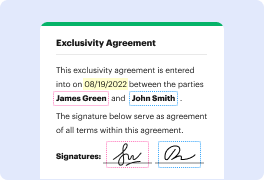
Next, you can effortlessly add your signature to the document. DigiSigner provides you with various options to create your signature, whether it's using a stylus or simply drawing it with your trackpad. You can also choose from a range of signature styles to personalize your signing experience.
Once your signature is added, you have the option to add additional information such as the date, your name, or even a custom message. This helps make your document even more professional and informative.
But what if you need multiple signatures on the same document? No worries! DigiSigner allows you to easily add multiple signers to a single document, ensuring that all parties involved can digitally sign without any hassle.
After you've finalized the signing process, simply save the document, and it's ready to be shared with others. DigiSigner generates a legally binding signature certificate that is embedded within the document. This way, you can be confident in the authenticity and integrity of the signed document.
With DigiSigner in macOS, you have the freedom to sign documents anytime, anywhere, without the need for printing, scanning, or physical transportation. It's a game-changer for businesses, professionals, and individuals looking for a more streamlined and efficient document signing solution.
In conclusion, DigiSigner is an intuitive and reliable electronic signature tool for macOS that simplifies the document signing process. It's user-friendly, secure, and environmentally friendly, allowing you to sign documents with ease and confidence. So, why wait? Give DigiSigner a try and witness the power of digital signatures for yourself.
Is DocHub free?
Yes. DocHub's free plan is a perfect fit for one-offs or occasional projects. You can start using DocHub’s Free Plan straight away after completing the quick account registration. No learning is needed. The DocHub Pro Plan has a 30-day free trial so you have enough time to test the product.
Is Adobe Acrobat free to use?
Yes, absolutely! Adobe Acrobat is indeed free to use. It's fantastic news for anyone who needs a reliable and versatile PDF tool. With Adobe Acrobat, you can view, create, edit, and share PDF files effortlessly. Isn't that amazing, dear user?
Now, let's delve into the details a bit more. Adobe Acrobat offers a range of features that make it an invaluable resource for managing your PDF documents. Whether you want to convert files to PDF format or combine multiple files into a single PDF, Acrobat has got you covered. That's not all – you can also rearrange pages, add comments, insert digital signatures, and protect your PDFs with passwords. The possibilities are endless!
Moreover, Adobe Acrobat ensures a seamless experience across different devices and platforms. You can access it not only on your desktop but also on your mobile devices, allowing you to work on your PDFs wherever you go. It's all about convenience and efficiency, my friend.
To sum it up, Adobe Acrobat is a free and exceptional tool for all your PDF needs. Its user-friendly interface, extensive range of features, and compatibility with various devices make it the go-to choice for millions of users worldwide. So, what are you waiting for? Start exploring the world of Adobe Acrobat and make your PDF management a breeze!
Is DigiSigner free to use?
Yes, DigiSigner is absolutely free to use! You can sign, send, and manage your documents online without any cost involved. It's a user-friendly and efficient electronic signature solution that allows you to easily add legally binding signatures to your important files. Whether you're a business professional or an individual, DigiSigner provides a seamless experience for all your document signing needs.
By utilizing DigiSigner, you can save both time and money. Say goodbye to the hassle of printing, signing, and scanning documents. With just a few clicks, you can digitally sign your contracts, agreements, and other paperwork. This not only streamlines your workflow but also helps reduce paper waste, contributing to a more sustainable environment.
Using DigiSigner is straightforward, even for those who are not tech-savvy. The user interface is intuitive, ensuring a smooth and hassle-free signing process. You can easily upload your document, add your signature, and send it to recipients to sign. Plus, DigiSigner offers a range of additional features, such as the ability to request multiple signatures, track the progress of your documents, and receive notifications when recipients have signed.
Rest assured, your documents are secured with DigiSigner. It adheres to the highest industry standards for data protection and encryption, ensuring the confidentiality and integrity of your files. DigiSigner is also compliant with various regulations, such as eIDAS, to provide you with legally binding signatures.
In conclusion, DigiSigner is an exceptional electronic signature solution that is completely free to use. Whether you need to sign business contracts, personal agreements, or any other document requiring a signature, DigiSigner simplifies the process and saves you time. Give it a try, and experience the convenience and efficiency of digital signing with DigiSigner today!
What is DocHub’s cost and pricing?
DocHub has straightforward pricing that includes one free plan and one paid plan. If you need to get documents done once in a while, the Free Plan is just the thing for you. It includes all the PDF tools to help you edit, sign, share, and organize your documents. For a growing document workflow, we recommend the DocHub Pro plan at $14 per user per month. It includes unlimited PDF capabilities and priority tech support. You can even test it free for 30 days before buying.
What are the plans and prices for Adobe Acrobat?
Adobe Acrobat offers a range of plans and prices to cater to your specific needs. Whether you're an individual or a business, Adobe Acrobat has got you covered. Let's take a closer look at the available options and the associated benefits.
For individuals, Adobe Acrobat offers a subscription-based pricing model called Adobe Acrobat DC. This includes different tiers such as Acrobat Standard DC and Acrobat Pro DC. Acrobat Standard DC is perfect for those who need essential PDF tools, while Acrobat Pro DC provides advanced features for professional users.
Now, let's talk about the prices. Adobe Acrobat DC subscriptions can be paid either monthly or annually. The monthly subscription for Acrobat Standard DC starts at $12.99, while Acrobat Pro DC is available for $14.99 per month. If you prefer an annual subscription, you can save by paying $155.88 for Acrobat Standard DC and $179.88 for Acrobat Pro DC per year.
But wait, there's more! Adobe Acrobat also offers business plans to meet the needs of organizations of all sizes. These plans include features like enterprise-level security, centralized license management, and collaboration tools. The business plans are available as part of Adobe Acrobat DC for teams, Adobe Acrobat DC for enterprise, and Adobe Document Cloud for enterprise.
To get specific pricing details for the business plans, it's best to contact Adobe directly, as they can provide tailored solutions based on your organization's requirements and scale.
In summary, Adobe Acrobat has flexible plans and competitive pricing to suit both individual and business needs. From essential PDF tools to advanced features, there's an Adobe Acrobat plan that's just right for you. Explore the options, choose the plan that fits your requirements, and unlock the full potential of Adobe Acrobat for your productivity and document management needs.
What are the plans and prices for DigiSigner?
DigiSigner offers a range of flexible plans and competitive pricing options to suit your document signing needs. Let me break it down for you.
First off, DigiSigner provides a free plan that allows you to sign up and start signing documents right away. This is an excellent option if you have occasional signing needs or simply want to try out the platform. It's always nice to have a free option, right?
If you find yourself requiring more advanced features and additional signing capacity, DigiSigner also offers paid plans. These plans come with various pricing options to accommodate different levels of usage and specific requirements.
With DigiSigner's paid plans, you gain access to a host of powerful features that enhance your document signing experience. Whether you need to sign documents in bulk, customize your signing workflows, or enjoy advanced authentication methods, DigiSigner has got you covered.
To give you an idea of the pricing, DigiSigner offers plans starting at just a few dollars per month. The exact cost depends on factors such as the number of users, documents, and any extra features you may require. It's worth mentioning that DigiSigner offers affordable plans to ensure you get the most value for your money.
To get detailed information on the plans and prices, I recommend visiting DigiSigner's official website. There, you'll find comprehensive information that will help you choose the plan that suits your specific needs and budget.
In summary, DigiSigner offers a variety of plans and pricing options to cater to different document signing requirements. From a free plan for occasional users to the advanced features provided in their paid plans, DigiSigner is committed to offering a seamless and efficient signing experience for all. So, why wait? Head to their website today to explore the plans and prices tailored just for you!
Is DocHub safe?
Absolutely! For DocHub, your data security is a top priority. DocHub complies with industry-leading regulations including GDPR, PCI DSS, CCPA, and more. DocHub offers 256-bit SSL encryption, OAuth 2.0 authentication, encrypted storage, and all signatures added using DocHub are legally-binding under the ESIGN Act. Additionally, all changes made in a document are recorded and available in a detailed audit trail.
Is Adobe Acrobat in Macos safe?
Adobe Acrobat is absolutely safe to use on macOS! With its robust security features and regular updates, Adobe has made sure that your documents and personal information are well-protected.
One of the key reasons why Adobe Acrobat is considered safe is its built-in encryption feature. This means that any document you create or edit using Acrobat is safeguarded with strong encryption algorithms, ensuring that only authorized individuals can access the content.
Moreover, Adobe Acrobat undergoes regular security updates, ensuring that any vulnerabilities or potential risks are promptly addressed. This commitment to maintaining the highest level of security is reassuring for users who prioritize the safety of their files.
Using active voice, Adobe takes user security seriously and actively implements measures to protect your privacy. The developers at Adobe are dedicated to creating a secure and reliable product that you can confidently use for all your document-related needs.
Additionally, Adobe has a solid reputation in the software industry, renowned for its commitment to user privacy and quality. Their attention to detail is evident in the way they prioritize security features and regularly engage in testing to ensure the software's integrity.
By employing Adobe Acrobat, you can have peace of mind knowing that your documents are in safe hands. The reliable encryption, consistent security updates, and Adobe's commitment to user privacy all contribute to a secure experience on macOS.
So go ahead and confidently use Adobe Acrobat on your Mac! Your documents deserve the best protection, and Adobe Acrobat delivers just that.
Is DigiSigner in Macos safe?
Yes, DigiSigner is completely safe to use on macOS. As a user, you can be confident in the security and reliability of this software. With its user-friendly interface and robust features, DigiSigner provides a trustworthy solution for all your digital signing needs on your Mac.
DigiSigner prioritizes your safety by employing advanced encryption protocols, ensuring that your documents and signatures are kept secure. With every signature you create using DigiSigner, you can be confident that your sensitive information is protected from unauthorized access.
One of the key advantages of using DigiSigner on macOS is its compatibility with other platforms. Whether you're collaborating with Windows users or working across different devices, DigiSigner ensures seamless integration, allowing you to effortlessly share, sign, and manage documents on various operating systems.
With DigiSigner's intuitive interface, you can navigate through the software with ease. It simplifies the digital signing process, making it convenient and time-efficient. Whether you are signing a contract, an agreement, or any other document, DigiSigner empowers you to complete the task quickly and effortlessly.
Moreover, DigiSigner's support team is always ready to assist you. If you ever encounter any issues or have any questions while using DigiSigner on your Mac, their dedicated support team is just a click away. They are committed to providing prompt and helpful assistance, ensuring a smooth experience for every user.
In conclusion, DigiSigner is a reliable and secure option for digitally signing documents on macOS. It offers a user-friendly interface, robust security measures, and compatibility with different platforms. With DigiSigner, your digital signing process on your Mac will be both efficient and worry-free.
What are the main DocHub alternatives in Macos?
The main DocHub alternatives are Lumin PDF, Small PDF, PDF escape, and others. However, DocHub’s ease of use, flexibility, affordability, and deep Google integrations are the reasons why DocHub is ahead of the competition.
What are the 10 best Adobe Acrobat alternatives in Macos?
Looking for the perfect Adobe Acrobat alternative for your Mac? Look no further! We've compiled a list of the top 10 alternatives that will empower you to create, edit, and manage your PDF files effortlessly. These options provide a user-friendly experience, making your PDF tasks a breeze. So, let's dive right in and explore the world of PDF alternatives!
1. DocHub: DocHub takes the number one spot on our list, and for good reason. With its intuitive interface, robust feature set, and seamless integration with popular cloud storage services, DocHub is a fantastic option. Whether you need to create fillable forms, add annotations, or collaborate with others, DocHub has got you covered.
2. PDFelement: This versatile software is renowned for its comprehensive editing capabilities. PDFelement allows you to easily modify text, images, and other elements within your PDFs. With its user-friendly design and powerful features, PDFelement is sure to impress.
3. Foxit PhantomPDF: A powerful contender, Foxit PhantomPDF offers a wide range of features, including secure document management and customizable form creation. Its excellent performance and robust functionality make it an ideal choice.
4. Nitro Pro: Nitro Pro excels in document conversion and collaboration. This feature-rich PDF alternative allows you to convert documents between various formats effortlessly. You can also collaborate and review documents with ease using its intuitive interface.
5. Preview: Although it comes pre-installed on every Mac, Preview is often overlooked. This lightweight PDF viewer offers basic editing features and is perfect for quick tasks. Its simplicity and speed make it a reliable alternative.
6. PDF Expert: As the name suggests, PDF Expert is an expert in handling PDF files. With its seamless navigation and annotation tools, PDF Expert makes reading and editing PDFs a delightful experience. Its polished interface and advanced features are a definite plus.
7. PDFpen: PDFpen caters particularly well to users who heavily rely on annotation and markup features. With its powerful editing tools, you can easily make changes to your PDFs and add your personal touch.
8. PDF Studio: PDF Studio is a feature-packed alternative that covers all your PDF needs. Standout features include form creation, OCR capabilities, and advanced annotation tools. PDF Studio brings a lot to the table for those seeking a comprehensive PDF solution.
9. FineReader OCR Pro: If OCR (Optical Character Recognition) is your primary concern, FineReader OCR Pro is the ideal choice. This software excels at converting scanned PDFs into editable and searchable formats, saving you valuable time and effort.
10. Skim: Rounding off our list is Skim, a lightweight PDF reader that focuses on annotation and markup features. Its simplicity and ease of use make it a valuable alternative for those who require basic PDF functionalities.
Now that you have an array of impressive Adobe Acrobat alternatives for your Mac, it's time to choose the one that best suits your needs. Each of these options presents unique features and capabilities, so take your time, explore their websites, and select the PDF solution that resonates with you. Say goodbye to the limitations of Adobe Acrobat and embark on a new PDF journey with these exceptional alternatives!
What are the 10 best DigiSigner alternatives in Macos?
When it comes to finding the perfect DigiSigner alternative for your MacOS, there are plenty of options out there to explore. While DigiSigner is undoubtedly a popular choice, there are other fantastic alternatives that can meet your needs and exceed your expectations. Today, we'll take a closer look at 10 of the best alternatives, each offering its own unique features and benefits.
First on our list is DocHub, a powerful and versatile solution that deserves a special mention. With its user-friendly interface and wide range of editing tools, DocHub allows you to effortlessly sign, edit, and share your documents. Its seamless integration with various cloud storage services like Dropbox and Google Drive makes it a top choice for MacOS users.
Next up, we have HelloSign, a reliable option that's renowned for its ease of use. With HelloSign, you can sign documents in just a few clicks, making it perfect for individuals and teams alike. It also offers advanced features like workflow management and template creation, ensuring your signing process is efficient and streamlined.
Another noteworthy alternative is Adobe Sign, which brings the power of Adobe's renowned document management tools to the signature process. With its robust security measures and extensive integration options, Adobe Sign is an excellent choice for businesses that prioritize document security and collaboration.
In the list of outstanding alternatives, we can't overlook PandaDoc, a versatile platform that includes not only eSignature functionality but also document creation and tracking features. Whether you want to create proposals, contracts, or agreements, PandaDoc has got you covered with its intuitive interface and comprehensive template library.
For those looking for a seamless integration with their existing project management tools, SignNow is an excellent option. It offers a wide range of features, including document templates, real-time notifications, and audit trails, helping you keep track of all your important documents in one place.
Next on our list is SignEasy, a popular choice for its simplicity and ease of use. With an intuitive mobile app and a straightforward web interface, SignEasy allows you to sign documents anytime, anywhere. It also provides features like in-person signing and bulk sending, ensuring that your signing process is efficient and hassle-free.
eSignLive, a solution from VASCO, is another standout alternative. With its robust security features and compliance options, eSignLive is a reliable choice for businesses that deal with sensitive and regulated documents. It also offers advanced customization options, allowing you to tailor the signing process to your specific needs.
Another alternative worth considering is SignRequest, an intuitive platform that focuses on simplicity and affordability. With its user-friendly interface and competitive pricing, SignRequest provides a hassle-free signing experience without breaking the bank.
Next up, we have Nitro Pro, a comprehensive solution that combines powerful document editing and signing capabilities. Nitro Pro offers a wide range of features, including PDF creation, editing, and conversion, making it a versatile choice for users who require more than just eSignature functionality.
Last but certainly not least, we have RightSignature, a reliable and feature-rich alternative that offers advanced signing options like in-person signing and signer attachments. With its user-friendly interface and robust security measures, RightSignature is a great choice for businesses that value flexibility and convenience.
In conclusion, while DigiSigner is a popular choice, there is a wide range of exceptional alternatives available for MacOS users. From DocHub's versatility to the simplicity of SignEasy and the comprehensive features of Adobe Sign, each of these alternatives has its own strengths and advantages. It's essential to consider your specific requirements and preferences to find the perfect fit for your digital signing needs.