






Definition & Purpose of Form 8
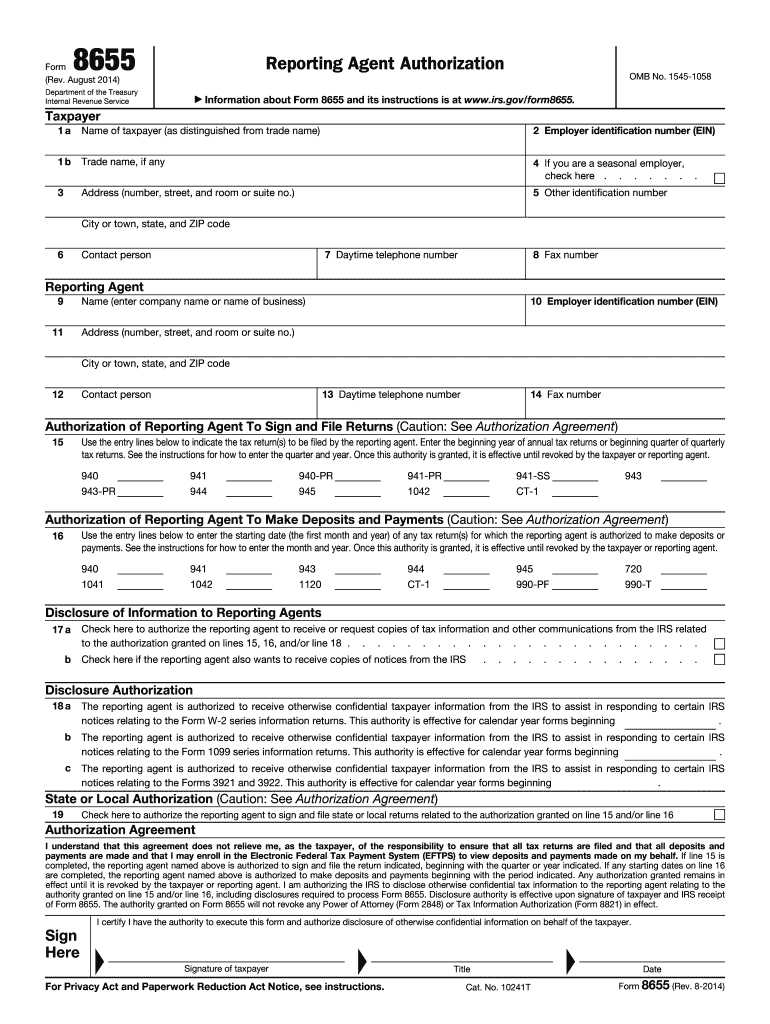
Form 8655, commonly referred to as an “Authorization to Act on Behalf of the Taxpayer,” is used by United States taxpayers to authorize a reporting agent to handle specific tax-related responsibilities. This includes the filing of tax returns, making deposits, and other activities like the receipt of tax information from the Internal Revenue Service (IRS). The form is designed to streamline the taxpayer's financial processes by officially allowing a representative to perform duties on their behalf.
Key Responsibilities Outlined in Form 8655
- Filing Tax Returns: The assigned agent can file certain tax returns, alleviating this burden from the taxpayer.
- Making Deposits and Payments: Agents are authorized to make tax deposits and payments, ensuring that these are handled with precision.
- Receiving Tax Information: With proper authorization, agents can receive confidential tax information directly from the IRS.
The form remains in effect until it is explicitly revoked by the taxpayer, allowing for ongoing management unless otherwise specified.
Steps to Complete Form 8
Completing Form 8655 accurately is crucial for ensuring that the reporting agent can fulfill their responsibilities without disruption. Here’s a breakdown of the steps involved:
-
Gather Necessary Information: Collect necessary details about both the taxpayer and the reporting agent, including contact information and tax identification numbers.
-
Fill Out Taxpayer Information: Complete the sections that require information about the taxpayer, such as name, address, and employer identification number (EIN).
-
Provide Agent Details: Enter the reporting agent’s name, address, and EIN. The agent must agree to the terms and responsibilities outlined in the form.
-
Designate Specific Authorizations: Specify the forms and periods for which the agent is authorized to act on behalf of the taxpayer. This includes forms like the 941 for quarterly tax filings.
-
Signatures: Ensure that both the taxpayer and the reporting agent sign the form to validate the authorization.
-
Submission: Submit the completed form to the IRS according to their current submission guidelines.
Who Typically Uses Form 8
Form 8655 is beneficial for a diverse set of individuals and organizations. Below are some typical users:
- Small Business Owners: Often delegate tax-related tasks to agents to focus on core business activities.
- Corporate Entities: Larger organizations may appoint agents to manage complex tax requirements.
- Tax Professionals: Accountants and tax professionals frequently use the form to manage multiple clients’ tax affairs simultaneously.
- Payroll Companies: Providers of payroll services use Form 8655 to legally manage payroll tax responsibilities for their clients.
IRS Guidelines for Form 8
The IRS provides comprehensive guidelines on using Form 8655 to ensure compliance and prevent misunderstandings:
- Authorization Duration: The form remains effective until revoked. Taxpayers must notify the IRS if they wish to cancel the authorization.
- Revocation Process: Taxpayers can withdraw the authorization using a written request or by filing a new Form 8655.
- Confidentiality: Reporting agents must handle all tax matters with the highest level of confidentiality and professionalism.
Important Terms Related to Form 8
Understanding the terminology associated with Form 8655 is crucial for effective use:
- Reporting Agent: An individual or firm that is authorized to act on behalf of the taxpayer in specified capacities outlined by the form.
- EIN: Employer Identification Number, a nine-digit number assigned by the IRS used for the administration of tax laws.
- Taxpayer Identification Number (TIN): Number that identifies the taxpayer, which can be a Social Security Number or EIN.
Filing Deadlines for Form 8
Though there are no specific deadlines for filing Form 8655, timely submission is essential to ensure that tax filings and payments are not disrupted:
- Effective Use: To prevent gaps in service, file the form as soon as an agent is appointed.
- Annual Review: Regular reviews of the authorization may be necessary to confirm that it remains current and accurate.
Required Documents for Completing Form 8
When preparing to complete Form 8655, gather pertinent documents to facilitate an accurate and complete submission:
- Identification Numbers: Ensure that taxpayer and agent EINs and TINs are correct and current.
- Completed and Signed Forms: Verify that the form includes all necessary signatures before submission to the IRS.
Penalties for Non-Compliance
Failing to adhere to guidelines associated with Form 8655 can result in penalties or complications in tax administration:
- Agent Misconduct: If an agent misrepresents, the taxpayer could face legal or financial consequences.
- Unauthorized Tax Actions: Actions taken without proper authorization can lead to fines or further scrutiny from the IRS.
Ensuring compliance helps maintain smooth operation of authorized duties and safeguards both the taxpayer and the reporting agent from potential penalties.