
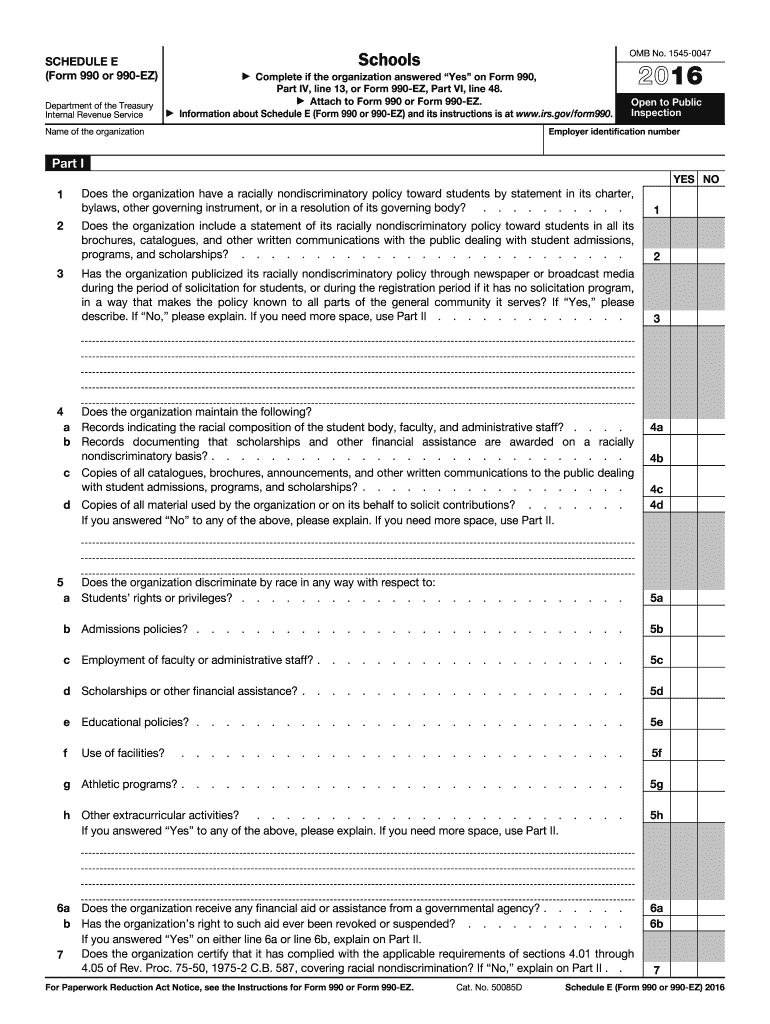







Definition and Purpose of the 2016 990 Schedule E Form
The 2016 990 Schedule E Form is utilized by private schools in the United States to report compliance with racially nondiscriminatory policies as required by the Internal Revenue Service (IRS). This form collects specific data about a school's admissions procedures, scholarship policies, and how they publicly communicate their nondiscrimination policy. It's essential for these educational institutions to adhere to this form to maintain tax-exempt status and ensure all students have equal opportunities.
Compliance with Nondiscriminatory Policies
- Admissions and Scholarships: Schools must disclose how they ensure that admissions and financial aids are offered without discrimination.
- Record Keeping: Institutions are required to maintain records on the racial composition of their student body to demonstrate adherence to nondiscriminatory practices.
Obtaining and Accessing the 2016 990 Schedule E Form
- Accessing the Form: The form can be downloaded from the IRS website or obtained through tax software that includes IRS forms.
- Required Information: Ensure you have data on the school's racial composition, public notices, and operational policies ready for accurate completion.
Online vs. Paper Forms
- Digital Accessibility: Schools can complete and file the form electronically, facilitating easier submission and record-keeping.
- Paper Copies: Hard copies are available for those who prefer or require a manual submission, though digital filing is often more efficient.
Steps to Complete the 2016 990 Schedule E Form
- Collect Necessary Information: Gather all relevant data required for the form, such as records of admissions practices and public advertisements of nondiscrimination policies.
- Fill Out the Form: Input the gathered information, answering all questions about policies and procedures accurately to reflect compliance.
- Review and Submit: Double-check for accuracy and completeness, then submit through your chosen method, whether online or by mail.
Submission Methods
- Online Filing: Often preferred for speed and efficiency using IRS-approved e-filing systems.
- Mailing the Form: Can be submitted via postal services, though processing times may be longer compared to digital submission.
Key Elements of the 2016 990 Schedule E Form
- Public Availability of Policy: Schools must confirm their nondiscrimination policy is publicly and clearly announced, ensuring transparency.
- Scholarship and Admissions Information: Detailed reporting on how scholarships and admissions comply with nondiscriminatory mandates.
Disclosure Requirements
- Public Inspection: The form must be available for public inspection upon request, ensuring transparency and accountability in the school's practices.
IRS Guidelines and Important Considerations
- Regulatory Framework: The IRS provides detailed guidelines to ensure schools understand compliance requirements.
- Penalties for Non-Compliance: Failure to accurately report or submit the form may result in penalties or loss of tax-exempt status.
Who Typically Uses the 2016 990 Schedule E Form
- Private Educational Institutions: Primarily targeted at private schools and educational organizations claiming tax-exempt status under IRS regulations.
- Administrators and Compliance Officers: Individuals responsible for regulatory compliance within educational institutions usually oversee the completion of this form.

Legal Use and Implications of the 2016 990 Schedule E Form
- Tax-Exemption Verification: Essential for maintaining an institution's tax-exempt status and demonstrating adherence to federal nondiscrimination requirements.
- Legal Compliance: Submitting this form accurately is crucial for legal compliance, ensuring the institution follows federal mandates effectively.
Practical Examples and Case Studies
- Example of Compliance: A private school publicly posts their nondiscrimination policy on their website and in student handbooks, ensuring compliance with IRS requirements.
- Non-Compliance Scenario: A school failing to disclose its nondiscrimination policy or to maintain proper records risks losing tax-exempt status.
These blocks create a structured guide on the 2016 990 Schedule E Form, offering educational institutions the information needed to ensure compliance and maintain good standing with the IRS.




