







Definition & Meaning
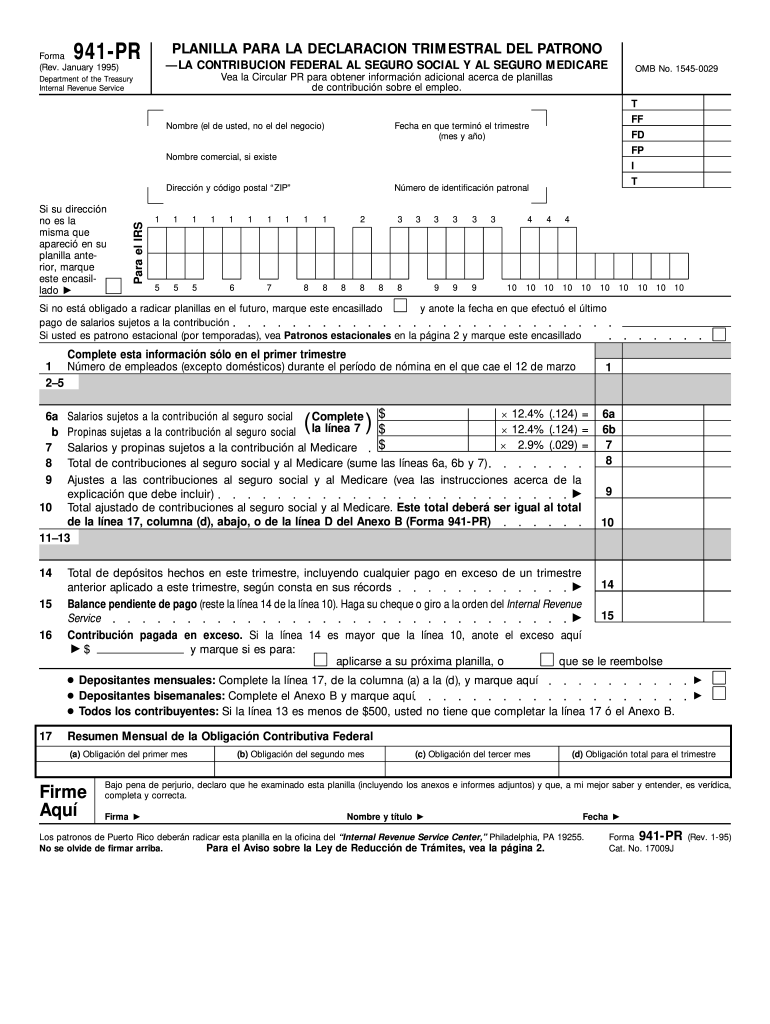
The Planilla 941-PR is a quarterly federal tax return for employers in Puerto Rico. It is specifically used to report Social Security and Medicare taxes withheld from employees' wages. The 1995 version refers to the form used during that year, which may have specific instructions or requirements different from more current versions. The form is crucial for ensuring employers meet their tax obligations to the Internal Revenue Service (IRS), thereby contributing to federal programs like Social Security. Understanding its purpose and usage is vital for compliance and accurate tax reporting.
How to Use the Planilla 941-PR Online 1995 Form
Using the Planilla 941-PR online involves understanding both the technical and procedural requirements for completing and submitting the form. While the 1995 form may not have been available digitally originally, modern systems allow historic forms to be filled online for record-keeping purposes. Import the form into an editing tool like DocHub, which allows for easy addition of required information such as employee wages, taxes withheld, and employer contributions. Upon completion, ensure that the form is saved and securely submitted as per IRS guidelines for historical records.
How to Obtain the Planilla 941-PR Online 1995 Form
To access the Planilla 941-PR for 1995, you can search online archives or request a copy from the IRS directly if necessary for reference or audit purposes. Many document management platforms, such as DocHub, provide access to historical tax forms in various formats. It's important to use a reliable source to ensure the accuracy of the document. Additionally, consult with tax professionals or use platforms that offer integration with IRS resources to retrieve the accurate version of the form.
Steps to Complete the Planilla 941-PR Online 1995 Form
- Gather Required Information: Collect employee information, total wages paid, and the amounts deducted for Social Security and Medicare.
- Download the Form: Access the 1995 version of Form 941-PR from a reputable platform or archive.
- Fill Out Employer Information: Enter the employer identification number (EIN), company name, address, and contact details.
- Input Financial Data: Record total employee wages, tips, taxable wages, and the computed amounts for Social Security and Medicare taxes.
- Verify Entries: Double-check all entries for accuracy.
- Sign and Date the Form: Ensure that the responsible party signs and dates the document to validate the submission.
- Submit the Form: Depending on the requirement, submit the completed form electronically or send a paper copy to the IRS.
Key Elements of the Planilla 941-PR Online 1995 Form
- Employer Information: Details such as EIN, name, and address.
- Employee Wages and Tips: Total wages paid during the quarter.
- Social Security and Medicare Taxes: Amounts withheld by the employer.
- Adjustments: Details of any corrections or adjustments from previous periods.
- Signature Section: Certification by the employer or authorized representative confirming the accuracy of the information.
IRS Guidelines
The IRS provides comprehensive guidelines for completing and submitting the Planilla 941-PR, covering the specific reporting requirements for Puerto Rico-based employers. These guidelines help ensure compliance with federal tax laws, detailing how to calculate Social Security and Medicare taxes accurately. Additionally, IRS instructions explain how to handle adjustments, late submissions, and necessary documentation, ensuring that employers submit an error-free form.
Filing Deadlines / Important Dates
Filing deadlines for the Planilla 941-PR are generally aligned with quarterly tax reporting requirements. Employers must submit their returns by the last day of the month following the end of each quarter. For the 1995 form, these would have been April, July, October, and January of the following year. Missing these deadlines can lead to penalties, thus timely submission is crucial.
Penalties for Non-Compliance
Employers failing to accurately file the Planilla 941-PR or missing submission deadlines may face financial penalties. The IRS imposes fines depending on the severity of the oversight, which can include failure to deposit taxes properly. Employers are advised to follow exact instructions and ensure timely filing to avoid unnecessary costs and potential legal issues.
Who Typically Uses the Planilla 941-PR Online 1995 Form
This form is primarily used by employers operating in Puerto Rico. Companies with employees earning Social Security and Medicare eligible wages are required to file this form to report federal contributions. This also includes businesses of different sizes and structures, from large corporations to small local businesses, ensuring they comply with federal tax obligations.






