




01. Edit your form online
Type text, add images, blackout confidential details, add comments, highlights and more.

Type text, add images, blackout confidential details, add comments, highlights and more.

Draw your signature, type it, upload its image, or use your mobile device as a signature pad.

Send it via email, link, or fax. You can also download it, export it or print it out.
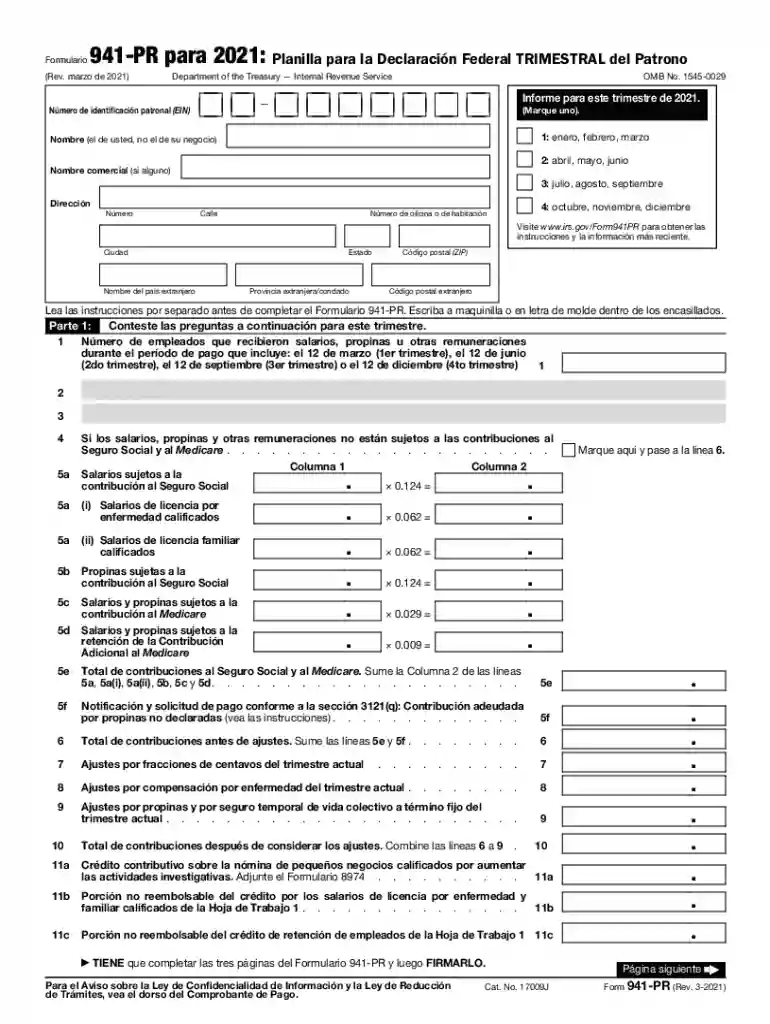
The "IRS planilla" refers to forms used by U.S. taxpayers for reporting purposes, particularly those associated with the IRS for federal income tax obligations. These forms play a crucial role in ensuring compliance with tax laws. Understanding the intricacies of these forms can be essential for individuals and businesses that want to adhere to legal guidelines and fulfill their tax responsibilities efficiently.
Securing the IRS planilla is straightforward. These forms can be downloaded directly from the IRS website, ensuring you have the most current version. Additionally, tax preparation software like TurboTax and QuickBooks often include these forms within their platforms, simplifying the process for users who prefer digital solutions. For those who prefer physical copies, these forms can be obtained at local IRS offices or requested via mail.
Filling out the IRS planilla involves a few key steps. Begin by gathering all necessary financial documentation such as W-2s, 1099s, and other income statements. Next, carefully follow the form's instructions, entering personal and financial information accurately. Use the provided worksheets within the instructions to calculate your tax obligations or potential refunds. Ensure all sections are complete, as omissions can lead to processing delays.
The IRS planilla is widely used across various taxpayer scenarios, including self-employed individuals, businesses, retirees, and students. Each of these groups may have different requirements and sections specific to their financial situations. For example, self-employed individuals will need to report income and expenses differently compared to retired persons or students. Identifying the correct sections and requirements for each category is critical for precision and compliance.
Using the IRS planilla comes with certain legal obligations. The form itself represents a binding declaration of your financial activity to the IRS. Errors or misrepresentations, whether intentional or not, can lead to penalties or audits. Therefore, it is essential to review the information carefully before submission. Consulting a tax professional can provide additional security and ensure that all data presented is accurate and in compliance with IRS rules.
Understanding the terminology within the IRS planilla is pivotal for accurate completion. Terms such as "adjusted gross income," "tax credit," "deduction," and "tax liability" have specific meanings and direct impact on your tax calculations. Familiarizing yourself with these terms can prevent common errors and ensure that you are maximizing potential deductions or credits available to you.
The IRS provides multiple avenues for submitting the planilla, including online through the IRS e-file system, by mail, or in person at IRS service centers. Filing electronically is often recommended for its speed and reliability. The IRS stipulates strict deadlines for submission, usually by April 15th each year, unless extensions are granted. Missing these deadlines can incur penalties or interest charges on unpaid taxes.
Non-compliance with IRS filing responsibilities can lead to significant penalties. This includes failure-to-file and failure-to-pay penalties, both of which accrue over time. The IRS may also charge interest on any unpaid taxes. In severe cases of fraud or negligence, taxpayers may face audits or legal action. It is crucial to stay informed about these risks to avoid unnecessary financial and legal complications.
Modern solutions like TurboTax and QuickBooks offer robust features that integrate with IRS planilla requirements. These platforms are designed to streamline the process, providing guidance and error-checking mechanisms. They can import financial data, calculate taxes owed, and suggest possible deductions, helping users to submit accurate and complete forms with confidence.
Consider a self-employed graphic designer who uses the IRS planilla to report annual income. By understanding allowable deductions for home office expenses and operational costs, the designer can reduce taxable income significantly. Similarly, a small LLC may use the form to report employee wages and claim applicable tax credits, ensuring compliance while optimizing tax obligations. Each scenario highlights the planilla's importance in varied taxpayer contexts.
The choice between digital and paper versions of the IRS planilla depends on personal preference and resource availability. Digital versions offer convenience, ease of correction, and faster IRS processing, while paper versions may be favored by those less comfortable with technology or without internet access. It's important to choose the method that ensures accuracy and timeliness in submission.
We've got more versions of the irs planilla form. Select the right irs planilla version from the list and start editing it straight away!
| Versions | Form popularity | Fillable & printable |
|---|---|---|
| 2023 | 4.7 Satisfied (57 Votes) | |
| 2022 | 4.6 Satisfied (34 Votes) | |
| 2022 | 4.8 Satisfied (105 Votes) | |
| 2022 | 4.8 Satisfied (66 Votes) | |
| 2021 | 4 Satisfied (29 Votes) | |
| 2021 | 4.1 Satisfied (61 Votes) | |
| 2020 | 4.3 Satisfied (106 Votes) | |
| 2020 | 4.3 Satisfied (105 Votes) | |
| 2019 | 4.4 Satisfied (73 Votes) | |
| 2018 | 4.4 Satisfied (136 Votes) | |
| 2017 | 4.4 Satisfied (85 Votes) | |
| 2016 | 4.4 Satisfied (425 Votes) | |
| 2015 | 4.3 Satisfied (116 Votes) | |
| 2014 | 4.2 Satisfied (53 Votes) | |
| 2003 | 4 Satisfied (40 Votes) |
At DocHub, your data security is our priority. We follow HIPAA, SOC2, GDPR, and other standards, so you can work on your documents with confidence.
Dec 8, 2025 Complete Form W-4 so that your employer can withhold the correct federal income tax from your pay. Give Form W-4 to your employer. YourRead more
Sep 5, 2025 Check only one box. Single. Married filing jointly (even if only one had income). Married filing separately (MFS). Enter spouses SSNRead more


