




01. Edit your form online
Type text, add images, blackout confidential details, add comments, highlights and more.

Type text, add images, blackout confidential details, add comments, highlights and more.

Draw your signature, type it, upload its image, or use your mobile device as a signature pad.

Send it via email, link, or fax. You can also download it, export it or print it out.
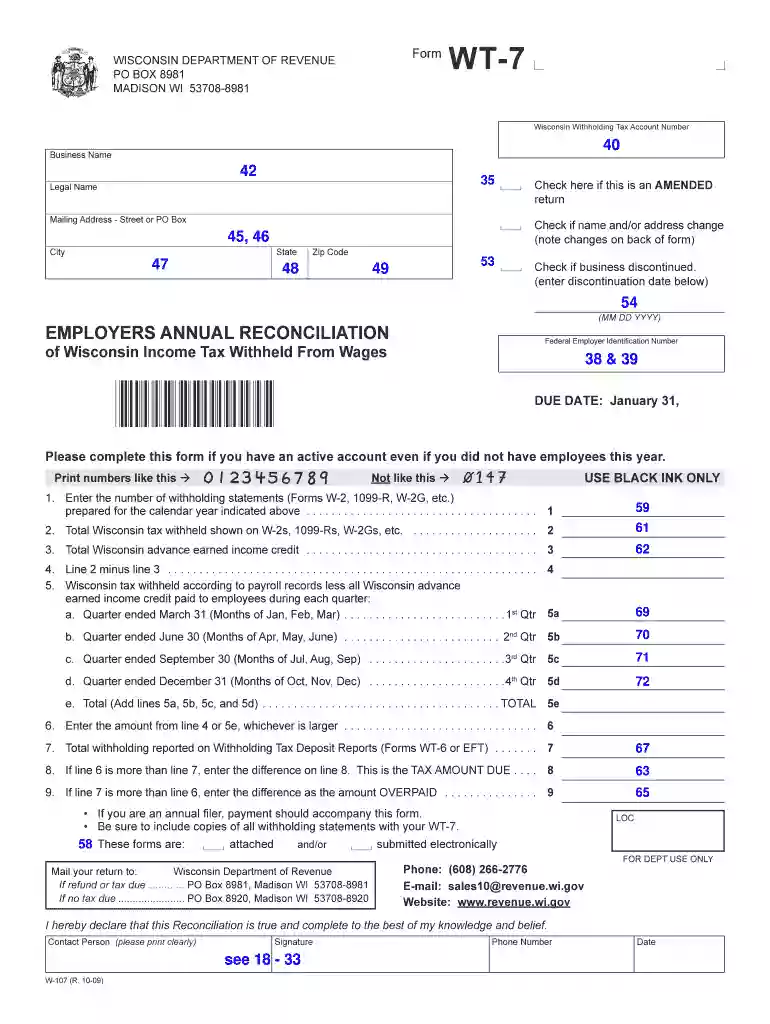
Form WT-7, or the Wisconsin Withholding Tax Annual Reconciliation Form, is used by businesses to report the total income tax withheld from employees' wages throughout the tax year. It includes sections for entering business details, total withholding amounts, and any business status changes. Additionally, this form ensures compliance with the Wisconsin Department of Revenue requirements by providing a comprehensive summary of the withholding activities conducted by a business.
Form WT-7 contains critical elements necessary for accurate reporting. These include:
Business Identification Information: This includes the business name, address, Federal Employer Identification Number (FEIN), and Wisconsin Tax Account Number.
Total Withholding Amounts: Businesses must report the total amount of income tax withheld from employees during the year.
Business Status Changes: Any significant changes in the business's operational status, such as mergers, dissolutions, or changes in ownership, should be reported here.
These components ensure that the Wisconsin Department of Revenue receives detailed and accurate information for tax reconciliation purposes.
Completing Form WT-7 involves several steps:
Gather Necessary Documents: Ensure you have all payroll records, prior filing information, and any documents detailing business changes.
Fill Out Business Information: Enter the business's name, address, FEIN, and Wisconsin Tax Account Number accurately.
Report Total Withholding: Calculate and document the total income tax withheld from employee wages within the given year.
Indicate Business Status Changes: If applicable, record any changes that occurred in the business structure or operations during the year.
Review and Validate Information: Double-check all entries for accuracy and completeness before submission.
Form WT-7 can be submitted through multiple methods. Most businesses prefer electronic submission due to its efficiency and reliability. The three primary filing options include:
Online Submission: Use the Wisconsin Department of Revenue's online portal for a straightforward filing process.
Mailing the Form: Physical copies can be mailed to the department, but ensure timely mailing to meet deadlines.
In-Person Submission: Although less common, forms can be delivered directly to the Department of Revenue office.
The Wisconsin Department of Revenue mandates specific deadlines for submitting Form WT-7. It is crucial to adhere to these timelines to avoid potential penalties or non-compliance issues.
Form WT-7 is primarily used by employers across various industries who operate in Wisconsin and have a requirement to withhold state income tax from their employees. This includes:
Corporations: Both large and small corporations that employ Wisconsin residents.
Limited Liability Companies (LLCs): LLCs with employees in Wisconsin fulfilling withholding tax obligations.
Partnerships: Partnerships that have wage-paying employees in the state.
Businesses such as manufacturing firms, retail companies, and service providers stand to benefit the most from regular and accurate submission of Form WT-7, as it ensures compliance with state requirements and facilitates smooth annual reconciliation.
Ensuring the accurate completion and timely submission of Form WT-7 is not only a regulatory necessity but also a legal requirement under Wisconsin law. Failure to comply can result in penalties and legal scrutiny from the Wisconsin Department of Revenue.
Businesses failing to submit the form by the deadline or providing inaccurate information may face penalties, which could include fines, interest on unpaid taxes, and potential legal action from state authorities.
Various tax preparation and business management software platforms such as TurboTax and QuickBooks are compatible with the electronic filing of Form WT-7, streamlining the process for businesses. These platforms can help:
Automate Calculations: Ensure accuracy and reduce manual errors.
Facilitate Direct Submission: Enable seamless electronic filing directly from the software interface.
Maintain Records: Store copies of submitted forms for future reference and audits.
Leveraging such tools can significantly reduce administrative burdens and enhance compliance accuracy.
While Form WT-7 is specific to Wisconsin, state-specific rules must be considered to ensure compliance. Wisconsin's policies regarding withholding tax and reconciliation may differ from those of other states, so it's crucial to understand and abide by these local regulations to avoid complications.
Withholding Rates: Ensure you are using the correct Wisconsin withholding tax rates.
State Filings Coordination: Coordinate WT-7 submissions with other state-required filings.
Understanding and keeping up-to-date with these rules ensures businesses remain compliant and avoid unnecessary penalties.
We've got more versions of the Form WT-7 Electronic Filing Mandate - 3 Options - Wisconsin - revenue wi form. Select the right Form WT-7 Electronic Filing Mandate - 3 Options - Wisconsin - revenue wi version from the list and start editing it straight away!
| Versions | Form popularity | Fillable & printable |
|---|---|---|
| 2025 | 4.8 Satisfied (40 Votes) | |
| 2024 | 4.6 Satisfied (26 Votes) | |
| 2022 | 4.1 Satisfied (31 Votes) | |
| 2021 | 4.8 Satisfied (85 Votes) | |
| 2020 | 4.4 Satisfied (299 Votes) | |
| 2017 | 4.3 Satisfied (194 Votes) | |
| 2016 | 4.3 Satisfied (164 Votes) | |
| 2015 | 4.4 Satisfied (551 Votes) | |
| 2014 | 4 Satisfied (29 Votes) | |
| 2011 | 4.1 Satisfied (43 Votes) | |
| 2009 | 4 Satisfied (38 Votes) | |
| 2003 | 4 Satisfied (56 Votes) |
At DocHub, your data security is our priority. We follow HIPAA, SOC2, GDPR, and other standards, so you can work on your documents with confidence.
Form WT-7 (Fill-In Form), Employers Annual Reconciliation of Wisconsin Income Tax Withheld ; Form WT-7 (Fill-In Form), Employers Annual Reconciliation of
Sep 30, 1988 This report describes the results of that field demonstration. Composting is a process by which organic materials are biode- 7-tetranlitro-l,
What electronic filing options are available for Form WT-7? WT-7, Employers Annual Reconciliation of Wisconsin Income Tax Withheld. These returns can be filed


