




Here's how it works

01. Edit your lehman formula finders fee online
Type text, add images, blackout confidential details, add comments, highlights and more.

02. Sign it in a few clicks
Draw your signature, type it, upload its image, or use your mobile device as a signature pad.

03. Share your form with others
Send wt 7 2022 via email, link, or fax. You can also download it, export it or print it out.
How to use or fill out wt 7 form with our platform

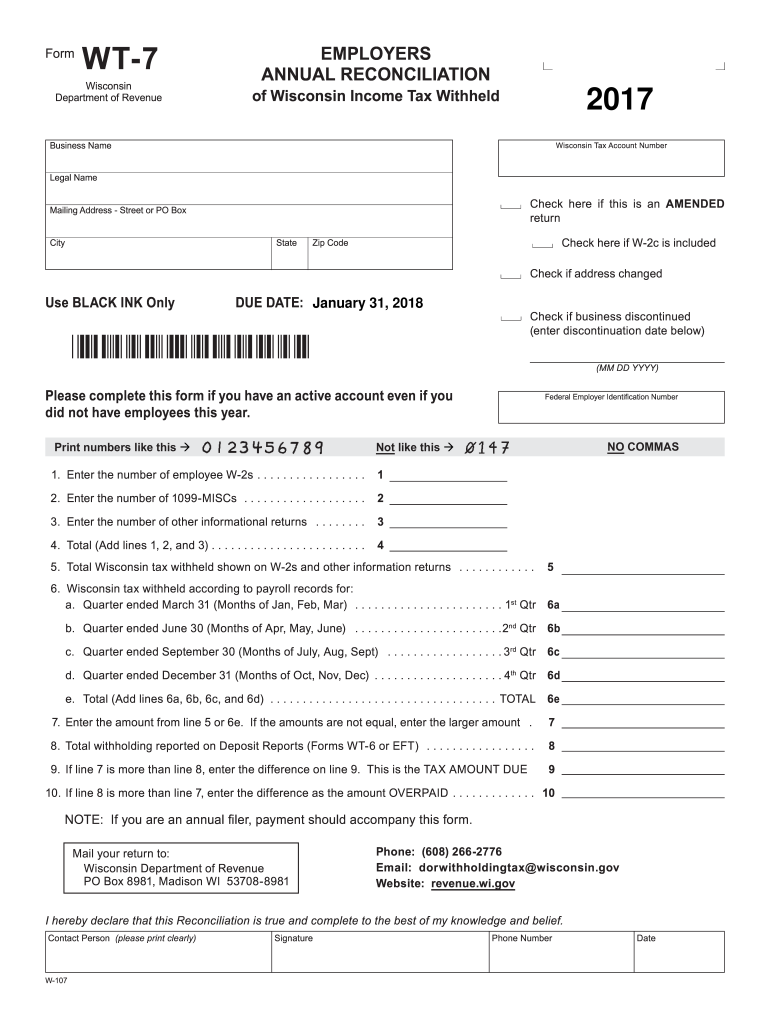
- Click ‘Get Form’ to open the wt 7 form in the editor.
- Begin by entering your Business Name and Wisconsin Tax Account Number. Ensure you use black ink for clarity.
- Fill in your Legal Name and Mailing Address, including City, State, and Zip Code. If there are any changes to your address, check the appropriate box.
- Indicate if this is an amended return by checking the corresponding box. If applicable, also check if a W-2c is included.
- Complete the sections regarding employee W-2s and 1099-MISCs by entering the respective numbers in lines 1 and 2.
- For tax withheld according to payroll records, fill out lines 6a through 6d for each quarter, then calculate the total on line 6e.
- Follow through with lines 7 to 10 to finalize your tax amount due or overpaid based on previous entries.
- Once completed, print the form and ensure you add your signature along with contact details before submission.
Start using our platform today for free to streamline your wt 7 form completion!
Fill out wt 7 form online
It's free
It's free
See more wt 7 form versions
We've got more versions of the wt 7 form form. Select the right wt 7 form version from the list and start editing it straight away!
| Versions | Form popularity | Fillable & printable |
|---|---|---|
| 2025 | 4.8 Satisfied (40 Votes) | |
| 2024 | 4.6 Satisfied (26 Votes) | |
| 2022 | 4.1 Satisfied (31 Votes) | |
| 2021 | 4.8 Satisfied (85 Votes) | |
| 2020 | 4.4 Satisfied (299 Votes) | |
| 2017 | 4.3 Satisfied (194 Votes) | |
| 2016 | 4.3 Satisfied (164 Votes) | |
| 2015 | 4.4 Satisfied (551 Votes) | |
| 2014 | 4 Satisfied (29 Votes) | |
| 2011 | 4.1 Satisfied (43 Votes) | |
| 2009 | 4 Satisfied (38 Votes) | |
| 2003 | 4 Satisfied (56 Votes) |
Security and compliance
At DocHub, your data security is our priority. We follow HIPAA, SOC2, GDPR, and other standards, so you can work on your documents with confidence.
Learn more


