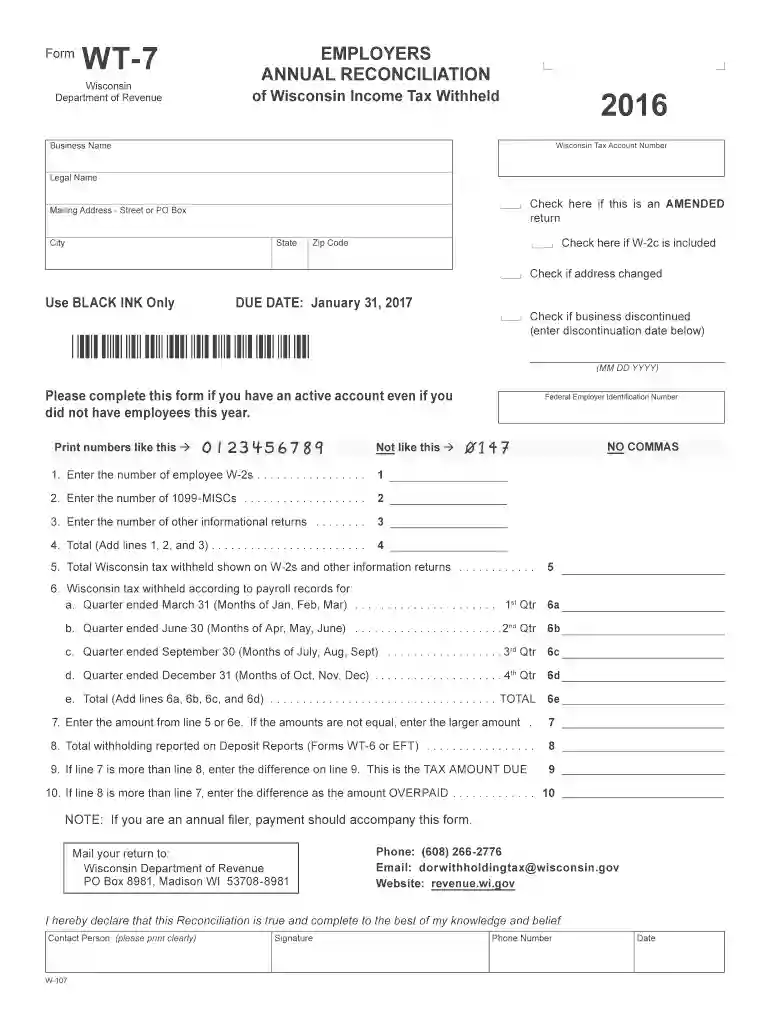
Wisconsin form wt 7 2016-2026

Get Form
wt 7 2022 Preview on Page 1

Here's how it works

01. Edit your wt 7 2022 online
Type text, add images, blackout confidential details, add comments, highlights and more.

02. Sign it in a few clicks
Draw your signature, type it, upload its image, or use your mobile device as a signature pad.

03. Share your form with others
Send it via email, link, or fax. You can also download it, export it or print it out.

How to use or fill out Wisconsin Form WT-7 2016 with DocHub

Form edit decoration
9.5
Ease of Setup
DocHub User Ratings on G2
9.0
Ease of Use
DocHub User Ratings on G2
  1. Click ‘Get Form’ to open the Wisconsin Form WT-7 in our editor.
  2. Begin by entering your Business Name and Wisconsin Tax Account Number. Ensure you input the 15-digit number without dashes.
  3. Fill in your Legal Name and Mailing Address, including Street or PO Box, City, State, and Zip Code. Check the box if your address has changed.
  4. Indicate if this is an amended return by checking the appropriate box. If applicable, check if a W-2c is included.
  5. Complete the sections for employee W-2s, 1099-MISCs, and other informational returns as instructed. Make sure to add totals where required.
  6. Review the tax withheld according to payroll records for each quarter and ensure all calculations are accurate before proceeding.
  7. Finally, print the completed form directly from our platform, sign it, and mail it to the Wisconsin Department of Revenue at the provided address.

Start using our platform today for free to streamline your form completion process!

See more wisconsin form wt 7 2016 versions

We've got more versions of the wisconsin form wt 7 2016 form. Select the right wisconsin form wt 7 2016 version from the list and start editing it straight away!
Versions Form popularity Fillable & printable
2022 4.1 Satisfied (31 Votes)
2021 4.8 Satisfied (85 Votes)
2020 4.4 Satisfied (299 Votes)
2017 4.3 Satisfied (194 Votes)
2016 4.3 Satisfied (164 Votes)
2015 4.4 Satisfied (551 Votes)
2014 4 Satisfied (29 Votes)
2011 4.1 Satisfied (43 Votes)
2009 4 Satisfied (38 Votes)
2003 4 Satisfied (56 Votes)
be ready to get more

Complete this form in 5 minutes or less

Get form

Got questions?

We have answers to the most popular questions from our customers. If you can't find an answer to your question, please contact us.
Contact us
For those who do not have internet access or the ability to print, paper forms and instructions are available upon request. Call or visit any of the Department of Revenue offices located throughout the state. Call (608) 266-2486.
It is a secure process developed by the Department of Revenue (DOR) for employers and/or their representatives to transmit their Employers Annual Reconciliation of Wisconsin Income Tax Withheld from Wages (Form WT-7) data to DOR via an electronic file over the Internet.
The Wisconsin Withholding Exemption Certificate (Form WT-4) is used to determine the amount of Wisconsin income tax to be withheld from employee wages. Every Wisconsin employee must give Form WT-4 to their employer.
You can claim as many exemptions as youd like. Claiming the most accurate number of exemptions will most likely result in the smallest amount of refund or taxes due. Generally, if you are not claimed as a dependent on another taxpayers tax return, you claim one personal tax exemption.
You are required to file a Wisconsin income tax return if your Wisconsin gross income is $2,000 or more. Gross income means income before deducting expenses. While net income reported to you may be less than $2,000, gross income may be over that amount, requiring that a Wisconsin income tax return be filed.
be ready to get more

Complete this form in 5 minutes or less

Get form

People also ask

FreeTaxUSA is offering free electronic preparation and filing services for both federal and Wisconsin tax returns to eligible Wisconsin taxpayers.
How do I request copies of tax records? Request copies online. If you are unable to use the online application, request copies by calling customer service at (608) 266-2772. You may also visit one of our offices to complete this request.

Related links