
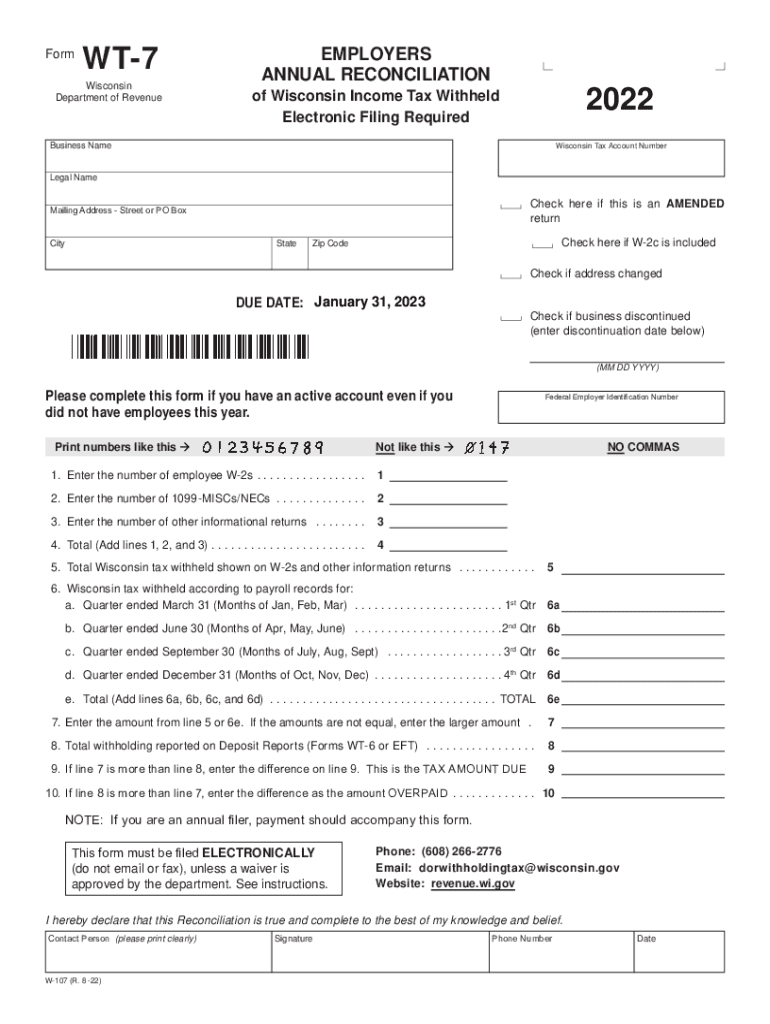







Definition & Importance of the WT-7 Form
The WT-7 form is an annual reconciliation document issued by the Wisconsin Department of Revenue. This form is essential for employers as it provides a means to reconcile the total Wisconsin income tax withheld from employees throughout the year. It ensures that the amounts withheld match what has been reported on individual W-2 and 1099 forms. Without this reconciliation, employers may face discrepancies that could lead to audits or penalties. The form includes vital information such as your business name, tax account number, and employee details, which are necessary for accurate reporting.
What Employers Need to Report
- Business Details: Include your official business name and tax account number to ensure proper identification by the Wisconsin Department of Revenue.
- Employee Information: Report the total number of W-2s and 1099 forms issued to employees, reflecting the total workforce and contracted professionals.
- Withholding Amounts: Detail the total Wisconsin tax withheld over the year to ensure it matches amounts reported on individual employee forms.
How to Use the WT-7 Form
Completing the WT-7 form requires careful attention to detail and accurate calculations. It serves as a summary of the year’s tax withholding activities and requires alignment with other submitted documents like W-2 and 1099 forms.
Step-by-Step Completion Guide
- Gather Required Information: Collect all necessary employee data, including W-2s and 1099s, to ensure accurate reporting.
- Complete Business Details Section: Fill in your business name, tax account number, and any additional identification numbers required by the Wisconsin Department of Revenue.
- Reconcile Withholdings: Check that the total tax withheld as shown in your payroll records matches the total reflected on individual employee forms.
- Submit the Form: Complete the electronic submission process by January 31, unless you have been granted a filing waiver.
How to Obtain the WT-7 Form
The WT-7 form is available through the Wisconsin Department of Revenue’s official website. Employers can download, print, and fill the form electronically or manually, depending on their preference.
Online Acquisition Process
- Visit the Department’s Website: Access the Wisconsin Department of Revenue online to find the latest WT-7 form, available under the tax forms section.
- Download and Print: Choose to download a PDF version for electronic completion or print a copy for manual entry.
Filing Deadlines and Important Dates
Ensuring timely submission of the WT-7 is crucial to avoid penalties. For the 2022 tax year, employers must submit the completed form by January 31, 2023.
Key Timeline Considerations
- End of Tax Year: Align record-keeping and reconciliation processes to close at the tax year’s end, December 31, 2022.
- Submission Deadline: Ensure online or postal submissions are completed by January 31 to meet compliance requirements.
- Waiver Conditions: If applicable, secure a waiver from the department to prevent penalties due to delayed filing.
Legal Use and Compliance
The WT-7 form complies with state laws governing tax withheld on employee earnings. Employers must file it accurately to align with Wisconsin’s legal requirements. Misreporting or failure to submit can result in fines and potential audits.
Compliance Guidelines
- Accuracy in Reporting: Ensure all figures match employee W-2 and 1099 forms.
- Timeliness: Submit by the deadline to avoid categorization as non-compliant.
- Submitted Electronically: Use electronic filing methods unless a waiver is obtained permitting manual submission.
Key Elements of Completing the WT-7 Form
Each section of the WT-7 form requires detailed attention, and missing elements can compromise your reconciliation process.
Essential Components to Focus On
- Personal and Business Information: Complete all fields related to your business identity and employee count.
- Tax Withholds Matching: Verify that your records and the form totals align accurately.
- Corrections Process: Be prepared to make amendments if discrepancies are identified post-submission.
Penalties for Non-Compliance
Failing to accurately complete and timely submit the WT-7 can lead to significant penalties. Understanding these consequences is vital for maintaining your business’s financial health.
Potential Penalties
- Fines and Interests: Delayed submissions or underreported withholding can incur fines and accrued interest, affecting your financial standings.
- Audits: Inaccurate reporting raises the likelihood of audits, leading to increased scrutiny of your business financials.
Examples of Using the WT-7 Form
Different scenarios illustrate the common situations where the WT-7 form proves vital for employers in Wisconsin.
Practical Scenarios
- Small Business Adjustments: A small business may need to reconcile withheld taxes after changing payroll services mid-year; the WT-7 ensures consistent reporting.
- Large Corporations: Corporations might use WT-7 as an internal audit tool to verify that tax withholdings match expansive employee records before filing.


