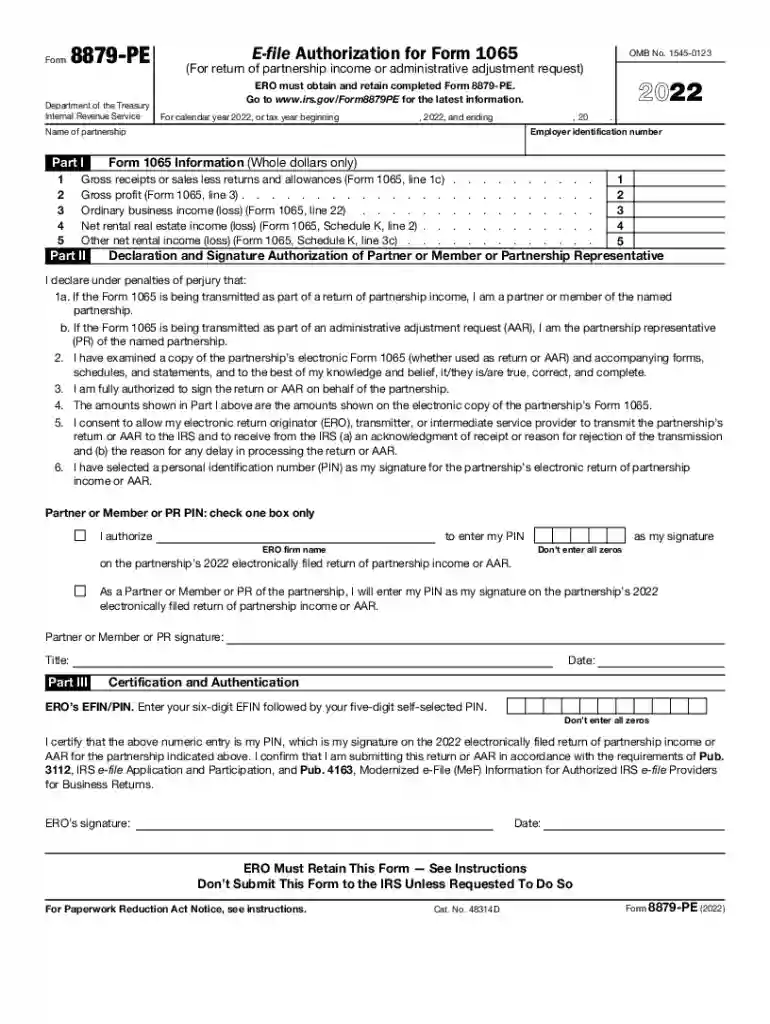
2022 Form 8879-PE. E-file Authorization for Form 1065-2026

Get Form
8879 pe Preview on Page 1

Here's how it works

01. Edit your 8879 pe online
Type text, add images, blackout confidential details, add comments, highlights and more.

02. Sign it in a few clicks
Draw your signature, type it, upload its image, or use your mobile device as a signature pad.

03. Share your form with others
Send form 8879 pe via email, link, or fax. You can also download it, export it or print it out.

Definition and Purpose of the 2022 Form 8879-PE

Form 8879-PE, formally known as the E-file Authorization for Form 1065, serves a critical role in the electronic filing process for partnerships in the United States. Specifically, this form allows partners or members of a partnership to electronically sign and authorize the transmission of Form 1065 to the IRS. This process simplifies compliance for partnerships by enabling the secure electronic submission of tax returns.

This form clarifies the responsibilities of both the Electronic Return Originator (ERO) and the partner/member. It ensures that all parties verify the accuracy of the information on Form 1065 before submission. The completion and retention of Form 8879-PE are essential as the IRS may request this document to verify the legitimacy of the e-filing process.

Validating the information provided in this form and understanding its implications is crucial for avoiding issues and penalties related to tax compliance. Form 8879-PE must be maintained in a secure location, as it may not be submitted to the IRS unless specifically requested.

Steps to Complete the 2022 Form 8879-PE

Completing Form 8879-PE involves several key steps that ensure its accuracy and compliance with IRS guidelines.

  1. Gather Required Information: Before starting, gather all necessary documents, including the partnership’s tax information, and the details of partners or members involved.

  2. Input the Partnership’s Details: This includes the partnership’s name, address, and tax identification number. Accurate data entry for these fields is necessary for IRS recognition.

  3. Confirm Partner Information: Each partner or member needs to provide their name, Social Security number or Individual Taxpayer Identification Number, and other relevant information to authorize the e-filing.

  4. Signature Section: The designated partner must electronically sign the form, affirming that they authorize the ERO to file Form 1065 on their behalf.

  5. Save and Store: Once completed, save Form 8879-PE securely. It should be kept in accordance with IRS recordkeeping guidelines to ensure it can be produced if requested.

Neglecting any of these steps could result in submission issues or IRS penalties. Therefore, attention to detail is paramount throughout the completion process.

Legal Use of the 2022 Form 8879-PE

The legal significance of Form 8879-PE lies in its compliance with IRS regulations regarding electronic tax filings. This form is legally binding, confirming that the partnership and its partners have authorized the ERO to submit their tax return electronically.

The form serves several legal purposes, including:

  • Verification of Authorization: It confirms that all parties named in the partnership agree to the electronic submission of Form 1065.
  • Protection Against Fraud: The use of Form 8879-PE helps combat fraudulent filings by requiring authorized signatures from partners.
  • Retention Requirement: The ERO is mandated to keep Form 8879-PE for three years from the return's date, ensuring accountability in case of audits.

Failure to adhere to these legal standards may lead to penalties, including potential audits or rejection of electronic filings. Therefore, partnerships must ensure the proper execution of this authorization form.

Important Terms Related to the 2022 Form 8879-PE

Familiarity with key terms associated with Form 8879-PE can aid in understanding its function and handling. Some essential terms include:

  • Electronic Return Originator (ERO): An authorized individual or entity responsible for electronically filing tax returns on behalf of taxpayers.
  • Tax Identification Number (TIN): A unique number assigned to individuals and businesses for tax purposes, necessary when filling out tax forms.
  • Partner Authorization: The consent provided by each partner or member to allow an ERO to file their tax returns on their behalf.
  • IRS e-file Signature: The digital representation of a taxpayer's signature, required for the approval of electronic filings.

Grasping these terms is crucial in ensuring that all involved parties understand their responsibilities and the significance of the document they are completing.

Key Elements of the 2022 Form 8879-PE

Understanding the key elements of Form 8879-PE enhances its effective use. The form comprises several components that together facilitate electronic filing:

  • Partnership Information Section: This part collects essential details about the partnership, such as its legal name, address, and TIN.
  • Partner Information Section: Each partner’s details—including name, TIN, and signature—are necessary for authorizing e-filing.
  • Signature Block: A crucial section where the designated partner lays their electronic signature, providing consent for the ERO to file Form 1065.
  • Certification Statement: This part requires the partner to affirm the accuracy of the return and their understanding of their responsibilities.

Each section must be completed meticulously, as any discrepancies may result in processing delays or penalties. Recognizing these key components is essential for ensuring compliance and accurate submission.

See more 2022 Form 8879-PE. E-file Authorization for Form 1065 versions

We've got more versions of the 2022 Form 8879-PE. E-file Authorization for Form 1065 form. Select the right 2022 Form 8879-PE. E-file Authorization for Form 1065 version from the list and start editing it straight away!
Versions Form popularity Fillable & printable
2023 4.7 Satisfied (47 Votes)
2022 4.6 Satisfied (49 Votes)
2021 4.8 Satisfied (91 Votes)
2020 4.3 Satisfied (120 Votes)
2019 4.4 Satisfied (75 Votes)
2018 4.3 Satisfied (62 Votes)
2017 4.3 Satisfied (91 Votes)
2016 4.4 Satisfied (90 Votes)
2015 4 Satisfied (53 Votes)
2014 4.4 Satisfied (38 Votes)
2013 4 Satisfied (66 Votes)
2011 4 Satisfied (42 Votes)
2010 4.1 Satisfied (59 Votes)
be ready to get more

Complete this form in 5 minutes or less

Get form

Got questions?

We have answers to the most popular questions from our customers. If you can't find an answer to your question, please contact us.
Contact us
How do I sign my tax return when I e-file? You can sign your tax return electronically by using a Self-select PIN, which serves as your digital signature when using tax preparation software, or a Practitioner PIN when using an Electronic Return Originator (ERO).
The ERO must retain Forms 8879 and 8878 for three years from the return due date or the IRS received date, whichever is later.
A partner or member or PR and an electronic return originator (ERO) use Form 8879-PE when the partner or member or PR wants to use a personal identification number (PIN) to electronically sign a partnerships electronic return of partnership income or AAR.
Form 8879 is the declaration document and signature authorization for an e-filed return filed by an electronic return originator (ERO). Complete this form when: The Practitioner PIN method is used.
If the partnership is required to e-file their Form 1065, are they also required to e-file their extension and employment tax returns? A2. No, the requirement to e-file applies only to the Form 1065. Forms 7004, and the 94x family are not required to be e-filed.
be ready to get more

Complete this form in 5 minutes or less

Get form

People also ask

Form 8879 is an electronic signature document that is used to authorize e-filing. It is generated by the software using both the taxpayers self-selected PIN and the Electronic Return Originators (EROs) Practitioner PIN. Form 8879 does not need to be mailed to the IRS, but instead is retained by the ERO.
If the taxpayer is signing the e-filed return using a PIN, use Form 8879, California e-file Signature Authorization for Individuals. If by handwritten signature, use Form 8453, California e-file Return Authorization for Individuals.

irs efile signature