



Kaiser medical records 2026

Get Form
kaiser fmla Preview on Page 1

Here's how it works

01. Edit your kaiser fmla online
Type text, add images, blackout confidential details, add comments, highlights and more.

02. Sign it in a few clicks
Draw your signature, type it, upload its image, or use your mobile device as a signature pad.

03. Share your form with others
Send kaiser fmla form via email, link, or fax. You can also download it, export it or print it out.

How to use or fill out kaiser medical records with our platform

Form edit decoration
9.5
Ease of Setup
DocHub User Ratings on G2
9.0
Ease of Use
DocHub User Ratings on G2
  1. Click ‘Get Form’ to open the kaiser medical records in the editor.
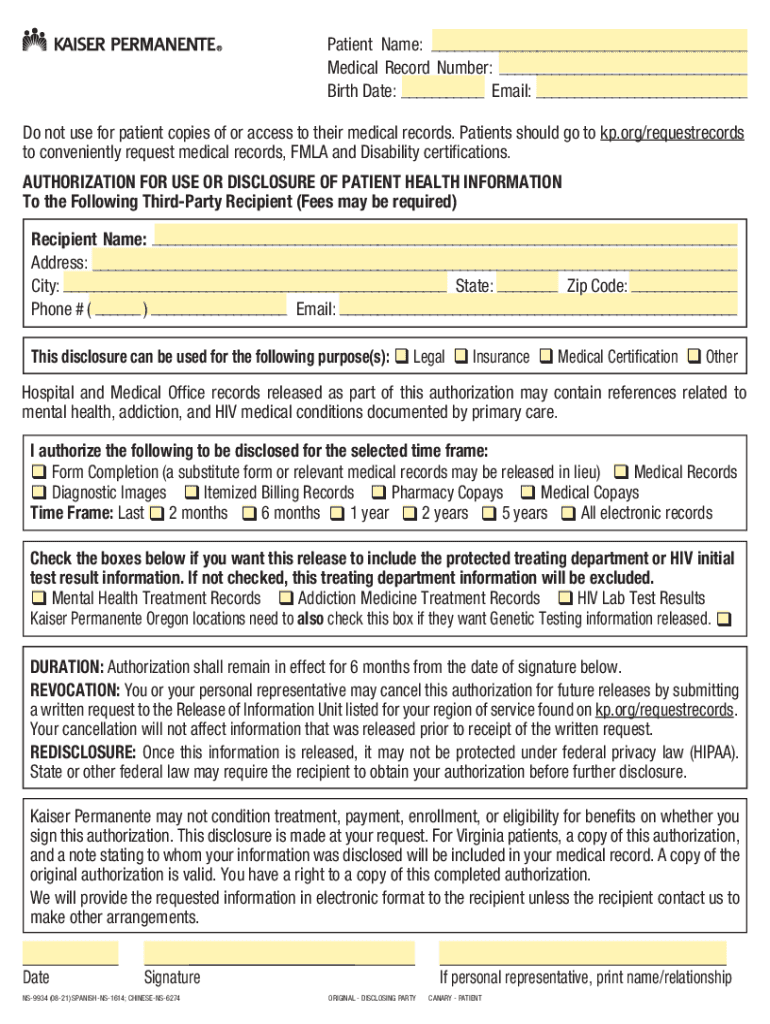
  2. Complete the patient identification information at the top right-hand corner, including your name, medical record number, birth date, and email.
  3. Fill in all required information for the recipient, ensuring you include a valid email address for communication.
  4. Select the purpose of disclosure by checking the appropriate box (e.g., Legal, Insurance).
  5. Indicate the type of information to be disclosed by checking relevant boxes and select a timeframe for the records.
  6. If applicable, check any boxes for specially protected information you wish to include.
  7. Enter the date you are signing the authorization and provide your signature.
  8. If you are a personal representative, print your name and relationship in the designated area.
  9. Submit this form to the third party you are authorizing to obtain records.
  10. Keep a copy of this completed authorization for your records.

Start using our platform today to easily fill out your kaiser medical records online for free!

See more kaiser medical records versions

We've got more versions of the kaiser medical records form. Select the right kaiser medical records version from the list and start editing it straight away!
Versions Form popularity Fillable & printable
2021 4.8 Satisfied (125 Votes)
2016 4.4 Satisfied (236 Votes)
2015 4.4 Satisfied (162 Votes)
2015 4.2 Satisfied (98 Votes)
2011 4 Satisfied (60 Votes)
2003 4.3 Satisfied (68 Votes)
be ready to get more

Complete this form in 5 minutes or less

Get form

Got questions?

We have answers to the most popular questions from our customers. If you can't find an answer to your question, please contact us.
Contact us
Online Access to Your Health Information Check with your health care providers or doctors to see if they offer online access to your medical records. Terms sometimes used to describe electronic access to these data include personal health record, or PHR, or patient portal.
Visit the My Record section under the Menu in MyChart for immediately downloadable health information to view and print you or your family members most commonly requested medical records and reports including: Health summary: Medications, Allergies, Immunizations, Preventative care, and Current health issues.
MyChart is already available through kp.org and the Kaiser Permanente app, so you dont need to create a separate MyChart account. When you sign in to your kp.org account, youll see your MyChart updates under Health feed. They include important new information about your care, like: Messages from your care team.
If your provider has a designated medical records department, contact them directly. Provide any reference numbers, confirmations, or details you received when submitting your request. It will help your provider quickly locate your file.
You can make a written request to either review or obtain a copy of your medical records pursuant to Health and Safety Code sections 123100 through 123149.5. You can view these laws on the California Legislative Information website.

Security and compliance

At DocHub, your data security is our priority. We follow HIPAA, SOC2, GDPR, and other standards, so you can work on your documents with confidence.

Learn more
ccpa2
pci-dss
gdpr-compliance
hipaa
soc-compliance

