Kaiser permanente forms medical release forms 2003-2026

Get Form
kaiser immunization record pdf Preview on Page 1

Here's how it works

01. Edit your kaiser immunization record pdf online
Type text, add images, blackout confidential details, add comments, highlights and more.

02. Sign it in a few clicks
Draw your signature, type it, upload its image, or use your mobile device as a signature pad.

03. Share your form with others
Send kaiser permanente discharge papers via email, link, or fax. You can also download it, export it or print it out.

How to use or fill out Kaiser Permanente Forms Medical Release Forms 2003

Form edit decoration
9.5
Ease of Setup
DocHub User Ratings on G2
9.0
Ease of Use
DocHub User Ratings on G2
  1. Click ‘Get Form’ to open it in the editor.
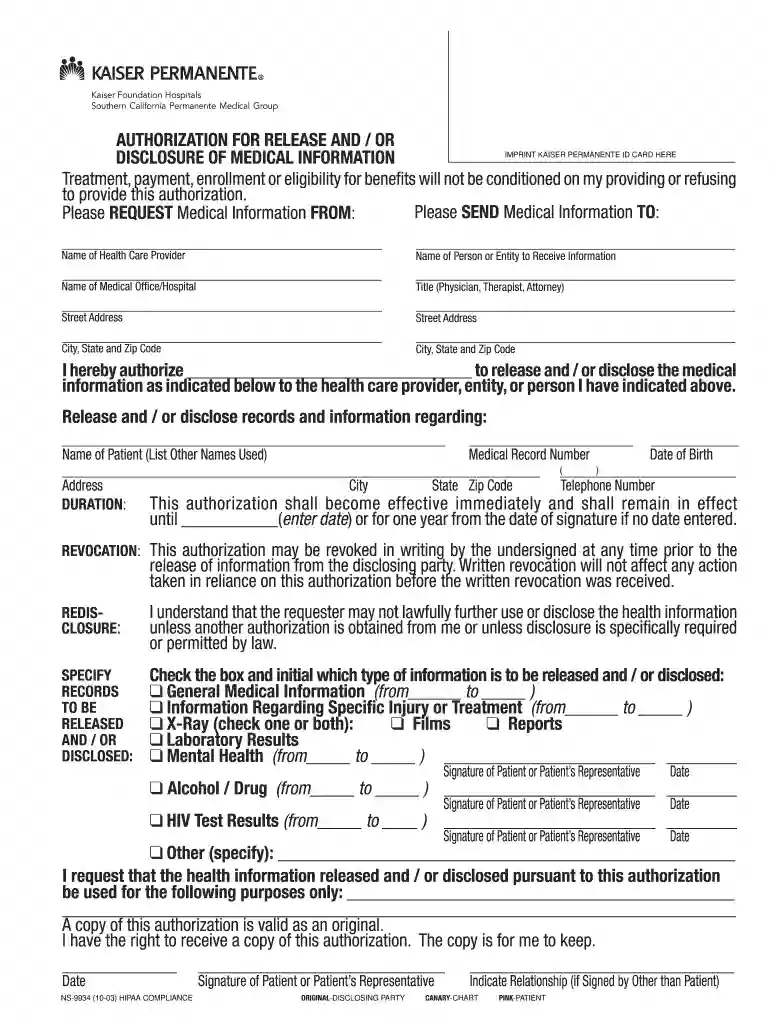
  2. Begin by entering the name of the health care provider and the entity or person who will receive the medical information in the designated fields.
  3. Fill in your personal details, including your name, medical record number, date of birth, address, and telephone number.
  4. Specify the records to be released by checking the appropriate boxes for general medical information, specific injuries, X-ray results, laboratory results, mental health information, or HIV test results. Be sure to indicate any relevant dates.
  5. Sign and date the authorization at the bottom of the form. If you are signing on behalf of someone else, indicate your relationship to the patient.
  6. Review all entered information for accuracy before submitting. This ensures that your request is processed without delays.

Start using our platform today to easily fill out and manage your Kaiser Permanente forms for free!

See more kaiser permanente forms medical release forms 2003 versions

We've got more versions of the kaiser permanente forms medical release forms 2003 form. Select the right kaiser permanente forms medical release forms 2003 version from the list and start editing it straight away!
Versions Form popularity Fillable & printable
2021 4.8 Satisfied (125 Votes)
2016 4.4 Satisfied (236 Votes)
2015 4.4 Satisfied (162 Votes)
2015 4.2 Satisfied (98 Votes)
2011 4 Satisfied (60 Votes)
2003 4.3 Satisfied (68 Votes)
be ready to get more

Complete this form in 5 minutes or less

Get form

Got questions?

We have answers to the most popular questions from our customers. If you can't find an answer to your question, please contact us.
Contact us
Log in to kp.org. Scroll down to the directory at the bottom of the page. Under Member support, click Medical Information Requests. You will be directed to a page titled Records, forms and certifications.
A HIPAA release form is valid until the expiration date or event listed on the form. The expiration can be a specific calendar date (e.g., December 31, 2025) or an event (e.g., end of legal proceedings or completion of treatment).
CMS requires Medicare managed program providers to retain medical records for 10 years. Kaiser Permanente follows CMS standards for medical records retention.
CMS requires that providers submitting cost reports retain all patient records for at least five years after the closure of the cost report. And if youre a Medicare managed care program provider, CMS requires that you retain the patient records for 10 years. How should medical records be retained?
How you make your request will depend on your providers processes. You may be able to request your record through your providers patient portal. You may have to fill out a form called a health or medical record release form, or request for accesssend an email, or mail or fax a letter to your provider.

Security and compliance

At DocHub, your data security is our priority. We follow HIPAA, SOC2, GDPR, and other standards, so you can work on your documents with confidence.

Learn more
ccpa2
pci-dss
gdpr-compliance
hipaa
soc-compliance
be ready to get more

Complete this form in 5 minutes or less

Get form