DocHub vs. Zmest vs. Bigle Legal; how DocHub benefits your business?
Switch to DocHub’s online storage alternative and compare DocHub vs. Zmest vs. Bigle Legal. Get the best solution for your business today.
Create free account
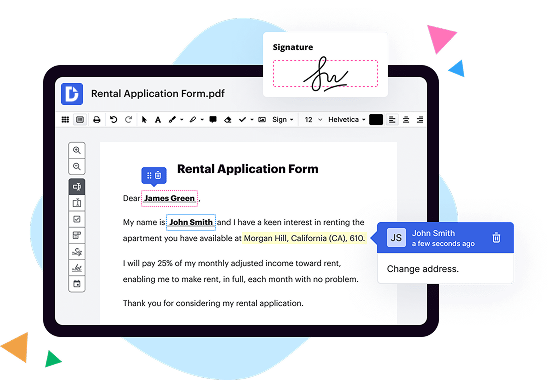
A quick comparison of DocHub vs. Zmest vs. Bigle Legal key features

|
Other Solutions | |
|---|---|---|
| No Downloads | ||
| New Form and Document Creator | ||
| Host Fillable Forms | ||
| Edit PDF | ||
| Fill Online | ||
| Search text in PDF | ||
| Track Sending Documents | ||
| Get DocHub for free |

DocHub vs. Zmest vs. Bigle Legal, which is better?
Although Zmest and Bigle Legal offer vast features and integrations, DocHub provides full control of document management: editing, signature collection, and safe storage of documents with an opportunity to create reusable Templates.
Move from Zmest and Bigle Legal to DocHub in a few steps
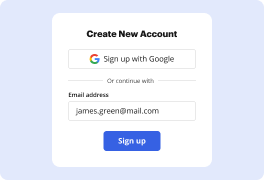
01. Register with DocHub using your email address or Google account. It's fast and easy. No credit card required.
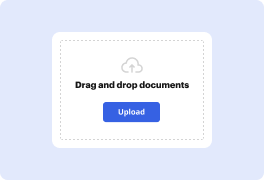
02. Upload the document you need or create it from scratch. Then, customize it by adding images, drawings, and different types of fillable fields.
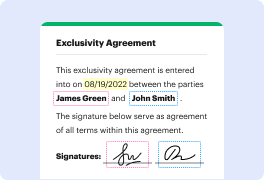
03. Customize your PDF in minutes. Type, highlight, underline, whiteout text, add comments, and sign your document.
04. Share your PDF with others to collaborate in real-time. Export your document, download or print it out.
Switch to DocHub from Zmest and Bigle Legal to enjoy premium PDF customization

Online PDF creator and editor
Get your perfect document in minutes without hassle. Start with a blank document or modify an existing one. Type text, add shapes, drawings, images, and highlight or whiteout information. Whatever you do with a PDF, the result is always high quality, without rasterized text or removed fields.

Diverse PDF management tools
Manage your PDF to perfection. Add, delete, and rearrange document pages or merge them to create a new document. DocHub supports a variety of file types including PDF, DOC, PPT, XLS, TXT, DOCX, and PPTX, which you can easily convert to a PDF — all without leaving your account and switching between different apps.

Powerful PDF tools on your mobile device
Keep your work flowing from any location. Get DocHub capabilities on your mobile device so you can edit, annotate, manage, sign, and share PDFs just as easily as you would on desktop. No need to install the app.

Google integrations
Boost your productivity and deliver an amazing customer experience by managing your PDFs from your favorite Google apps. Import, edit, and sign your documents directly from your Gmail, Google Drive, and Dropbox. When finished, export documents to Google Drive or import your Google Address Book and share the document with your contacts.

Interactive PDF forms and templates
Get an intuitive and interactive experience when creating PDF forms and reusable document templates. With the easy-to-use field manager, you can modify existing fields or create new ones for checkboxes, signatures, initials, and more. Publish forms on your website, social media, or share them via URL to collect data.

Real-time collaboration
Collaborate effectively and securely on documents in real-time. Set document permissions to let others view, comment on, edit, and sign your documents. Stay in the loop with instant email notifications or track the status of your documents with court-admissible audit trails.
Industry-leading security and compliance
DocHub complies with industry-leading standards, regulations, and certifications to ensure the most effective and secure workflows.

GDPR compliance
Regulates the collection, use, and holding of personal data for EU residents.

PCI DSS certification
Ensures the security of credit and debit card transactions made by a customer.

CPRA compliance
Enhances the privacy rights of California residents while protecting their personal data.

SOC 2 certification
Ensures the security of your data and the privacy of your clients.

HIPAA compliance
Protects privacy, security, and integrity of sensitive healthcare information.
Check out what our customers are saying about their DocHub experience
Great solution for PDF docs with very little pre-knowledge required.

A Valuable Document Signer for Small Businesses.

I can create refillable copies for the templates that I select and then I can publish those.

Got questions?
Here are some common questions from our customers that may provide you with the answer you're looking for. If you can't find an answer to your question, please don't hesitate to reach out to us.
Contact us
What is the difference between DocHub vs Zmest vs. Bigle Legal?
When it comes to online document management, there are several great options available to you. Among these choices, you may have come across DocHub, Zmest, and Bigle Legal. Each platform offers unique features and advantages to cater to your needs.
Firstly, let's talk about DocHub. This impressive document management solution shines in its simplicity and user-friendly interface. With DocHub, you can easily edit, sign, and share your documents online. It empowers you to work collaboratively with others, making it a fantastic choice for teams and businesses. The intuitive design ensures that you can seamlessly navigate the platform, even if you're new to online document management.
Moving on to Zmest, this platform offers a wide range of features that make it stand out. With Zmest, you can securely store and access your documents from anywhere, ensuring that you're always connected. It provides advanced document search options, which can save you valuable time when locating specific files. Zmest also offers robust file encryption to prioritize the security and confidentiality of your documents.
Next on our list is Bigle Legal, a comprehensive document management solution tailored specifically for the legal industry. This platform understands the unique needs and requirements of legal professionals, offering features such as document version control, case management, and secure client collaboration. Bigle Legal streamlines legal document workflows and helps optimize productivity while maintaining strict compliance with data privacy regulations.
It's important to note that while DocHub, Zmest, and Bigle Legal excel in their respective areas, they all share the common goal of simplifying document management and improving efficiency. Each platform boasts its own set of innovative features to ensure that you have the best tools at your disposal.
Ultimately, the choice between DocHub, Zmest, and Bigle Legal will depend on your specific needs and priorities. So, take some time to explore their features and consider what matters most to you. Whether you're looking for a user-friendly interface, advanced search options, or specific industry-focused features, one of these platforms is sure to meet your requirements.
DocHub vs Zmest vs Bigle Legal: which is better for Enterprises?
While Zmest and Bigle Legal are good solutions to work with PDFs online, DocHub offers greater capabilities to help individuals and businesses digitize their documents and make them run smoothly across different devices and your favorite apps.
DocHub vs Zmest vs Bigle Legal: which is better for small businesses?
Zmest and Bigle Legal are good options for editing, signing, and sharing PDFs. However, DocHub offers a more comprehensive featureset that includes organizations, reusable templates, advanced eSignatures, seamless Google integrations, and more that are perfect for small businesses, helping them simplify and streamline document editing, sharing, signing, and form completition.
What is DocHub?
DocHub is a Google-integrated PDF editor and eSignature solution that helps you get your PDFs done online, using any device. DocHub comes with an online PDF editor, advanced eSignatures, PDF forms, reusable templates, and straightforward Google integrations so you can maximize your productivity when working within your favorite Google apps.
What is Zmest and how does it work?
Zmest is an innovative platform designed to simplify and streamline various aspects of your life. It operates by harnessing the power of technology to provide user-friendly solutions for everyday tasks.
At its core, Zmest is built to make your life easier by offering a range of convenient features. Whether you need assistance with scheduling, organizing, or communicating, Zmest has got you covered.
One of the key strengths of Zmest is its simplicity. The platform is designed to be intuitive, ensuring that you can quickly grasp how to navigate and utilize its different functions. From creating and managing calendars to setting reminders and sharing files, Zmest enables you to stay on top of your responsibilities effortlessly.
Additionally, Zmest empowers you to collaborate and communicate effectively with others. With its seamless integration of messaging and file-sharing capabilities, you can effortlessly connect with teammates, friends, or family members. This dynamic communication feature ensures that you can easily coordinate and work together on projects, events, or personal endeavors.
Furthermore, Zmest saves you valuable time by automating certain tasks. For instance, it can intelligently suggest the best times to schedule meetings based on everyone's availability, eliminating the need for endless back-and-forth emails. This time-saving aspect allows you to focus your energy on more important endeavors.
In conclusion, Zmest is a user-friendly and efficient platform that simplifies your life by offering intuitive features for scheduling, organizing, and communicating. Its simplicity, collaboration tools, and time-saving capabilities make it an invaluable resource for individuals seeking convenience and productivity. So why not give Zmest a try and experience the seamless integration of technology into your everyday life?
What is Bigle Legal and how does it work?
Bigle Legal is an innovative and user-friendly software platform that simplifies legal document management and streamlines the legal workflow. It's designed to make your legal processes efficient and stress-free.
When you use Bigle Legal, you'll experience a seamless and intuitive interface that guides you through every step, ensuring a smooth and hassle-free experience. From creating and editing legal documents to collaborating with team members, Bigle Legal offers a comprehensive set of features to meet your needs.
One of the standout features of Bigle Legal is its intelligent document automation. This means that you can easily generate accurate and professional legal documents with just a few clicks. No more spending precious time on repetitive tasks or worrying about errors creeping into your documents.
Additionally, Bigle Legal offers a centralized repository for all your legal documents, making it easy to organize and access them whenever you need. You can search for specific documents, review past versions, and securely share them with clients or colleagues, all within the platform.
Collaboration is a breeze with Bigle Legal's built-in tools. You can invite team members to work on documents together, track changes in real-time, and leave comments for seamless communication. This makes it easier to work as a team, improve efficiency, and ensure everyone is on the same page.
With Bigle Legal, you can also keep track of deadlines, important dates, and tasks using the integrated calendar feature. This saves you from juggling multiple tools and helps you stay organized and in control of your legal matters.
Finally, privacy and security are of utmost importance to Bigle Legal. Your data is encrypted, securely stored, and only accessible by authorized users. You can rest easy knowing that your sensitive legal information is protected.
In conclusion, Bigle Legal is a game-changer for legal professionals, offering a user-friendly platform that simplifies legal document management, enhances collaboration, and improves overall efficiency. With its innovative features and robust security measures, Bigle Legal is the ideal solution for modern legal workflows.
Is DocHub free?
Yes. DocHub's free plan is a perfect fit for one-offs or occasional projects. You can start using DocHub’s Free Plan straight away after completing the quick account registration. No learning is needed. The DocHub Pro Plan has a 30-day free trial so you have enough time to test the product.
Is Zmest free to use?
Yes, Zmest is absolutely free to use! You can utilize all of its amazing features without spending a single penny. Zmest offers a user-friendly platform that is accessible to everyone. So, whether you're a beginner or an expert, Zmest has got you covered. Plus, Zmest constantly updates and enhances its services to ensure a seamless and enjoyable experience for its users. With Zmest, you can effortlessly unleash your creativity and achieve remarkable results. Start using Zmest today and see how it can revolutionize your projects without costing you a dime!
Is Bigle Legal free to use?
Yes, Bigle Legal is completely free to use! You won't have to pay a single penny to access all its amazing features. Our goal is to make the legal world more accessible and efficient, and we believe that everyone should have the opportunity to benefit from our platform without any financial constraints. So rest assured, you can use Bigle Legal without any worries about costs or hidden fees. Whether you're a legal professional or just someone in need of legal assistance, Bigle Legal is here to simplify and streamline your legal processes. Give it a try and experience the convenience and ease of navigating the world of law with Bigle Legal by your side.
What is DocHub’s cost and pricing?
DocHub has straightforward pricing that includes one free plan and one paid plan. If you need to get documents done once in a while, the Free Plan is just the thing for you. It includes all the PDF tools to help you edit, sign, share, and organize your documents. For a growing document workflow, we recommend the DocHub Pro plan at $14 per user per month. It includes unlimited PDF capabilities and priority tech support. You can even test it free for 30 days before buying.
Is Bigle Legal safe?
Yes, Bigle Legal is a safe and trustworthy platform for all your legal needs. Our team has taken extensive measures to ensure the security and privacy of our users. With our state-of-the-art encryption technology, you can have the peace of mind knowing that your sensitive information is well-protected.
Using Bigle Legal, you can confidently handle legal documents, contracts, and agreements with ease. Our user-friendly interface and intuitive features make it simple for anyone, regardless of their legal expertise, to navigate and utilize our platform effectively.
Furthermore, our dedicated team continuously monitors and updates our system to stay ahead of any potential security threats. We understand the importance of maintaining confidentiality when dealing with legal matters, and we strive to provide a secure environment for all your legal needs.
So, rest assured that your information is in safe hands when you choose Bigle Legal. We prioritize your security and privacy, giving you the confidence to focus on what matters most – efficiently managing your legal documents. Try Bigle Legal today and experience the convenience and peace of mind that comes with a safe and reliable legal platform.
What are the main DocHub alternatives?
The main DocHub alternatives are Lumin PDF, Small PDF, PDF escape, and others. However, DocHub’s ease of use, flexibility, affordability, and deep Google integrations are the reasons why DocHub is ahead of the competition.
What are the 10 best Zmest alternatives?
If you're in search of the best Zmest alternatives, look no further! We've compiled a list of ten fantastic options that are sure to meet your needs. And at the top of the list, we have the excellent DocHub! But don't worry, we have plenty of other exceptional alternatives lined up as well.
1. DocHub: With its user-friendly interface and extensive range of features, DocHub steals the show. Seamlessly edit, sign, and collaborate on documents with ease.
2. PandaDoc: This powerful platform offers a variety of document creation and management tools, allowing you to streamline your workflow and increase productivity.
3. PDFfiller: A highly versatile alternative, PDFfiller allows you to edit, sign, and share documents effortlessly. Its intuitive interface makes it a breeze to navigate.
4. SignNow: As the name suggests, SignNow specializes in digital signatures. It offers a simplified solution for securely signing and managing documents online.
5. HelloSign: If you're seeking a straightforward yet reliable alternative, HelloSign is an excellent choice. It offers a seamless signing experience, backed by top-notch security.
6. Nitro: Nitro is a feature-rich alternative that provides a comprehensive set of tools for document editing, conversion, and collaboration. Boost your productivity with this efficient platform.
7. Adobe Acrobat Reader: A well-known name, Adobe Acrobat Reader remains a strong alternative, especially for those seeking advanced features like PDF creation and conversion.
8. PDFelement: With its intuitive design and robust editing capabilities, PDFelement gives you complete control over your PDF documents. Edit, annotate, and convert effortlessly.
9. Smallpdf: Looking for a simple yet powerful alternative? Smallpdf has got you covered. This user-friendly platform offers a host of tools for editing and converting documents with ease.
10. SignRequest: Rounding off our list is SignRequest, which focuses on simplifying the signing process. It offers a secure and straightforward solution for digital signatures.
We're confident that these ten alternatives will provide you with the options you need to make informed decisions. Explore their unique features and find the perfect fit for your document management requirements. Happy exploring!
What are the 10 best Bigle Legal alternatives?
When it comes to finding the best Bigle Legal alternatives, look no further! We've got you covered with a list of ten fantastic options that are sure to meet your needs. Let's dive right in:
1. DocHub: Known for its intuitive interface and extensive collaborative features, DocHub tops our list. It offers a seamless editing experience, making it a top choice for legal professionals like yourself.
2. Adobe Acrobat: A long-standing favorite, Adobe Acrobat provides comprehensive PDF editing capabilities. With its robust set of tools, you can create, edit, and sign documents with ease.
3. PandaDoc: Streamline your document workflow with PandaDoc. This versatile platform offers templates, electronic signatures, and advanced analytics to enhance your document efficiency.
4. HelloSign: If simplicity is what you seek, HelloSign has you covered. With its user-friendly interface and powerful signing tools, you can quickly send, sign, and manage legal documents hassle-free.
5. SignNow: Boost your productivity with SignNow. This trusted platform allows you to effortlessly send documents for e-signatures, ensuring a secure and legally binding process.
6. Nitro: Known for its collaborative features and document automation capabilities, Nitro helps you streamline your document management process. Create, convert, and edit files effortlessly with this powerful alternative.
7. Smallpdf: Need to compress or convert your legal documents? Smallpdf has got your back. This online platform offers a wide range of tools to simplify your document processing needs.
8. Docusign: Regarded as a leader in the e-signature market, Docusign offers a reliable and secure solution for digitally signing important legal documents. Enjoy its seamless integration with popular platforms.
9. Foxit PhantomPDF: Experience an all-purpose PDF editor with Foxit PhantomPDF. Its comprehensive set of features, including redaction and OCR capabilities, make it a worthy contender.
10. PDFelement: Last but certainly not least, PDFelement is a powerful alternative that combines simplicity and functionality. From editing to converting, it offers a range of tools to meet your document needs.
Remember, each of these alternatives caters to different preferences and requirements. Take your time exploring them to find the perfect fit for your legal document management journey. Happy exploring!