DocHub vs. Imaging101 vs. MedianDocs; how DocHub benefits your business?
Switch to DocHub’s online storage alternative and compare DocHub vs. Imaging101 vs. MedianDocs. Get the best solution for your business today.
Create free account
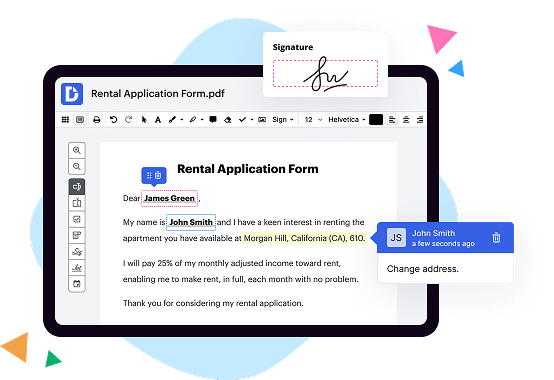
A quick comparison of DocHub vs. Imaging101 vs. MedianDocs key features

|
Other Solutions | |
|---|---|---|
| No Downloads | ||
| New Form and Document Creator | ||
| Host Fillable Forms | ||
| Edit PDF | ||
| Fill Online | ||
| Search text in PDF | ||
| Track Sending Documents | ||
| Get DocHub for free |

DocHub vs. Imaging101 vs. MedianDocs, which is better?
Although Imaging101 and MedianDocs offer vast features and integrations, DocHub provides full control of document management: editing, signature collection, and safe storage of documents with an opportunity to create reusable Templates.
Move from Imaging101 and MedianDocs to DocHub in a few steps

01. Register with DocHub using your email address or Google account. It's fast and easy. No credit card required.
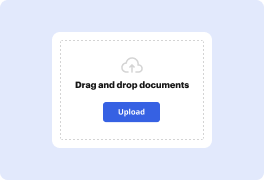
02. Upload the document you need or create it from scratch. Then, customize it by adding images, drawings, and different types of fillable fields.
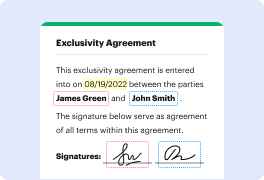
03. Customize your PDF in minutes. Type, highlight, underline, whiteout text, add comments, and sign your document.
04. Share your PDF with others to collaborate in real-time. Export your document, download or print it out.
Switch to DocHub from Imaging101 and MedianDocs to enjoy premium PDF customization

Online PDF creator and editor
Get your perfect document in minutes without hassle. Start with a blank document or modify an existing one. Type text, add shapes, drawings, images, and highlight or whiteout information. Whatever you do with a PDF, the result is always high quality, without rasterized text or removed fields.

Diverse PDF management tools
Manage your PDF to perfection. Add, delete, and rearrange document pages or merge them to create a new document. DocHub supports a variety of file types including PDF, DOC, PPT, XLS, TXT, DOCX, and PPTX, which you can easily convert to a PDF — all without leaving your account and switching between different apps.

Powerful PDF tools on your mobile device
Keep your work flowing from any location. Get DocHub capabilities on your mobile device so you can edit, annotate, manage, sign, and share PDFs just as easily as you would on desktop. No need to install the app.

Google integrations
Boost your productivity and deliver an amazing customer experience by managing your PDFs from your favorite Google apps. Import, edit, and sign your documents directly from your Gmail, Google Drive, and Dropbox. When finished, export documents to Google Drive or import your Google Address Book and share the document with your contacts.

Interactive PDF forms and templates
Get an intuitive and interactive experience when creating PDF forms and reusable document templates. With the easy-to-use field manager, you can modify existing fields or create new ones for checkboxes, signatures, initials, and more. Publish forms on your website, social media, or share them via URL to collect data.

Real-time collaboration
Collaborate effectively and securely on documents in real-time. Set document permissions to let others view, comment on, edit, and sign your documents. Stay in the loop with instant email notifications or track the status of your documents with court-admissible audit trails.
Industry-leading security and compliance
DocHub complies with industry-leading standards, regulations, and certifications to ensure the most effective and secure workflows.

GDPR compliance
Regulates the collection, use, and holding of personal data for EU residents.

PCI DSS certification
Ensures the security of credit and debit card transactions made by a customer.

CPRA compliance
Enhances the privacy rights of California residents while protecting their personal data.

SOC 2 certification
Ensures the security of your data and the privacy of your clients.

HIPAA compliance
Protects privacy, security, and integrity of sensitive healthcare information.
Check out what our customers are saying about their DocHub experience
Great solution for PDF docs with very little pre-knowledge required.

A Valuable Document Signer for Small Businesses.

I can create refillable copies for the templates that I select and then I can publish those.

Got questions?
Here are some common questions from our customers that may provide you with the answer you're looking for. If you can't find an answer to your question, please don't hesitate to reach out to us.
Contact us
What is the difference between DocHub vs Imaging101 vs. MedianDocs?
When it comes to document management and editing tools, there are several options available in the market. One such option is DocHub, which offers a wide range of features to make your document workflows seamless and efficient. However, it's important to explore other alternatives as well to find the one that fits your needs best.
Imaging101 is another excellent document management tool with a user-friendly interface and robust features. With Imaging101, you can easily organize, edit, and share your documents with just a few clicks. This platform prioritizes simplicity without compromising on functionality.
MedianDocs is yet another noteworthy contender in the document management space. With its intuitive design and powerful features, MedianDocs aims to streamline your document workflows and enhance collaboration. This tool provides a seamless experience for users and allows for efficient document editing and sharing.
While all three options have their unique strengths, it's essential to consider your specific requirements before making a decision. Whether you're looking for advanced editing capabilities, user-friendly interfaces, or seamless collaboration features, DocHub, Imaging101, and MedianDocs offer different benefits to cater to your individual needs.
With their user-centric approach, all three platforms aim to simplify your document management processes and enhance productivity. So, take the time to explore each option, considering your workflow and preferences, to find the perfect fit. Remember, the key is to choose a tool that aligns with your requirements and helps you work smarter and more efficiently.
DocHub vs Imaging101 vs MedianDocs: which is better for Enterprises?
While Imaging101 and MedianDocs are good solutions to work with PDFs online, DocHub offers greater capabilities to help individuals and businesses digitize their documents and make them run smoothly across different devices and your favorite apps.
DocHub vs Imaging101 vs MedianDocs: which is better for small businesses?
Imaging101 and MedianDocs are good options for editing, signing, and sharing PDFs. However, DocHub offers a more comprehensive featureset that includes organizations, reusable templates, advanced eSignatures, seamless Google integrations, and more that are perfect for small businesses, helping them simplify and streamline document editing, sharing, signing, and form completition.
What is DocHub?
DocHub is a Google-integrated PDF editor and eSignature solution that helps you get your PDFs done online, using any device. DocHub comes with an online PDF editor, advanced eSignatures, PDF forms, reusable templates, and straightforward Google integrations so you can maximize your productivity when working within your favorite Google apps.
What is Imaging101 and how does it work?
Imaging101 is an innovative and user-friendly imaging technology that allows users to capture and enhance their photos with ease. So, how does this amazing tool work? Let me break it down for you.
First and foremost, Imaging101 simplifies the process of capturing stunning photos by offering a wide range of advanced features. With just a few taps, you can adjust settings like exposure, white balance, and focus to ensure that every shot turns out flawless. Say goodbye to blurry or overexposed pictures!
But the magic doesn't stop there. Once you've taken your photo, Imaging101 steps in to enhance it further. Using intelligent algorithms, this technology optimizes image quality, making colors vivid, details sharp, and the overall appearance truly remarkable. It's like having your own personal photo editor right at your fingertips!
Imaging101 is all about empowering you to unleash your creativity and create masterpieces. You can explore various filters and effects to customize your photos according to your individual style. From vintage vibes to modern chic, the possibilities are endless!
Additionally, this exceptional imaging tool is designed for convenience. It seamlessly integrates with your favorite devices, whether you're using a smartphone, tablet, or computer. No matter where you are or what device you have on hand, Imaging101 ensures a consistently exceptional experience.
With its intuitive interface and user-friendly design, Imaging101 makes professional-level imaging accessible to everyone. You don't need to be a photography expert to elevate your images to a whole new level. Whether you're a casual photographer, a social media enthusiast, or a professional looking to enhance your portfolio, Imaging101 has got you covered.
So, are you ready to revolutionize your photography game? Give Imaging101 a try and watch your photos come to life in the most breathtaking way. Get ready for a whole new level of visual excellence!
What is MedianDocs and how does it work?
MedianDocs is a revolutionary platform designed to make document management a breeze. It operates by streamlining the entire process of storing, organizing, and accessing documents for individuals and teams. With MedianDocs, you can say goodbye to the days of scattering important files across different devices or drowning in a sea of paperwork.
Here's how MedianDocs works: first, you upload your documents to the platform, either from your computer or by connecting to cloud storage services like Google Drive or Dropbox. Once your documents are securely stored in the system, MedianDocs gets to work by automatically extracting relevant data, such as names, dates, and keywords, and creating intelligent tags for easy categorization.
Speaking of categorization, MedianDocs allows you to create custom folders and subfolders, giving you complete control over how you want to organize your documents. The intuitive interface ensures a seamless navigation experience, allowing you to find any document you need with just a few clicks.
But that's not all! MedianDocs comes equipped with powerful search capabilities. By leveraging advanced OCR (Optical Character Recognition) technology, it can recognize text within scanned documents, making them searchable. Whether it's a PDF, Word document, or image file, you can trust MedianDocs to dig up the information you're looking for in no time.
With collaboration in mind, MedianDocs makes it effortless to share documents with colleagues, clients, or other stakeholders. You can grant specific access permissions to ensure privacy and control who can view, edit, or comment on your files. Say goodbye to endless email chains and messy file versions – MedianDocs keeps everything neatly organized in one centralized hub.
What sets MedianDocs apart is its commitment to user experience. The platform is designed with simplicity in mind, ensuring that anyone, regardless of their technical expertise, can effortlessly navigate and utilize its features. You don't need to be a tech guru to benefit from MedianDocs – it's user-friendly and accessible to all.
In conclusion, MedianDocs is your trusted companion in the realm of document management. It simplifies the way you store, organize, and access your files, eliminating the frustration and time wasted on manual document handling. Its intelligent features, intuitive interface, and collaboration capabilities make it a game-changer in the field. Give MedianDocs a try, and experience the liberation of seamless document management firsthand.
Is DocHub free?
Yes. DocHub's free plan is a perfect fit for one-offs or occasional projects. You can start using DocHub’s Free Plan straight away after completing the quick account registration. No learning is needed. The DocHub Pro Plan has a 30-day free trial so you have enough time to test the product.
Is Imaging101 free to use?
Yes, Imaging101 is absolutely free to use! As a user, you can access all of our fantastic features without spending a single penny. Our platform is designed to cater to your imaging needs in the most convenient and cost-effective way possible. With Imaging101, you get access to a multitude of tools and resources, all at no cost to you. So, you can enhance your images, create stunning graphics, and unlock your creative potential without worrying about any fees. Plus, our user-friendly interface ensures a smooth and enjoyable experience for all. Start using Imaging101 today and discover a world of possibilities, all for free!
Is MedianDocs free to use?
Yes, MedianDocs is absolutely free to use! You can access all of its incredible features without spending a single penny. So, whether you're a student, a professional, or just someone who loves organizing and managing documents, MedianDocs is the perfect tool for you. With its user-friendly interface and seamless navigation, you'll have no trouble utilizing its functionalities. From uploading and organizing files to collaborating with others, MedianDocs has got you covered. So, go ahead and join the countless users who have already embraced this fantastic platform. Start enjoying the convenience and efficiency of MedianDocs today!
What is DocHub’s cost and pricing?
DocHub has straightforward pricing that includes one free plan and one paid plan. If you need to get documents done once in a while, the Free Plan is just the thing for you. It includes all the PDF tools to help you edit, sign, share, and organize your documents. For a growing document workflow, we recommend the DocHub Pro plan at $14 per user per month. It includes unlimited PDF capabilities and priority tech support. You can even test it free for 30 days before buying.
Is MedianDocs safe?
Yes, MedianDocs is indeed a safe platform for your document storage needs. Rest assured, we prioritize the security and privacy of our users above all else. Our dedicated team has implemented robust protective measures to safeguard your valuable data, ensuring that it remains confidential and protected from unauthorized access.
When it comes to your documents, we understand the importance of trust. That's why we have employed advanced encryption techniques to fortify the security of your files. Additionally, our platform undergoes regular audits and assessments to guarantee compliance with industry standards and best practices.
Furthermore, we have a user-friendly interface that makes it easy for you to navigate and manage your documents effortlessly. With features designed for seamless organization and sharing, you can focus on your work without any unnecessary distractions.
At MedianDocs, we strive to create a positive and reliable experience for our users. We are confident that your data is in safe hands with us. So why wait? Join our community of satisfied users and enjoy the peace of mind that comes with secure document storage.
What are the main DocHub alternatives?
The main DocHub alternatives are Lumin PDF, Small PDF, PDF escape, and others. However, DocHub’s ease of use, flexibility, affordability, and deep Google integrations are the reasons why DocHub is ahead of the competition.
What are the 10 best Imaging101 alternatives?
When it comes to finding great alternatives to Imaging101, there are numerous options available that offer fantastic features and functionalities. One alternative that certainly deserves your attention is DocHub. This powerful tool allows you to easily annotate, edit, and sign documents online. But don't worry, we won't only focus on DocHub here; we have a diverse range of alternatives to introduce to you.
1. DocHub: As mentioned before, DocHub is an excellent alternative that offers a user-friendly interface and extensive document editing capabilities. Collaborate and streamline your workflow effortlessly.
2. Adobe Sign: This popular solution is perfect for businesses looking for a reliable document signing platform. With its seamless integration with other Adobe tools, you can create, sign, and manage documents with ease.
3. PandaDoc: With PandaDoc, you can create stunning proposals, contracts, and other business documents in no time. This alternative offers an intuitive drag-and-drop editor that simplifies the document creation process.
4. Nitro: Nitro is a feature-rich tool that allows you to create, edit, convert, and eSign documents effortlessly. Boost your productivity and streamline your document management with this robust alternative.
5. PDFelement: This all-in-one PDF editor offers a wide range of features, including document editing, conversion, and form creation. Its intuitive interface makes it easy for anyone to work with PDF files effectively.
6. SignNow: SignNow is an excellent choice for those seeking a straightforward and secure eSignature solution. It offers a seamless signing experience and integrates seamlessly with popular cloud storage platforms.
7. Smallpdf: Smallpdf is a user-friendly alternative that specializes in PDF editing and conversion. With its simple interface and wide array of tools, you can easily manage your PDF documents hassle-free.
8. HelloSign: Streamline your document signing process with HelloSign. This intuitive tool allows you to send, sign, and store documents securely, all while maintaining a smooth and efficient workflow.
9. SignEasy: Simplify your document signing process with SignEasy. This alternative offers a mobile-friendly platform that allows you to sign documents on the go, making it perfect for those always on the move.
10. DocuSign: Last but certainly not least, DocuSign is an industry-leading eSignature solution trusted by millions worldwide. With its comprehensive features and robust security measures, you can rest assured that your documents are in safe hands.
These ten alternatives to Imaging101 offer a wide range of capabilities and features, ensuring that you find the perfect fit for your document management needs. So, explore these options, take advantage of their unique offerings, and enhance your productivity today!
What are the 10 best MedianDocs alternatives?
When it comes to finding alternatives to MedianDocs, there are several remarkable options available. In this list, we'll explore the top 10 alternatives, with a particularly noteworthy mention of DocHub. Get ready to discover a variety of dynamic and feature-rich platforms that can cater to all your document needs.
1. DocHub: DocHub is an excellent choice for those seeking a powerful and user-friendly alternative. Offering a comprehensive set of tools, it allows you to streamline your document workflows seamlessly.
2. PandaDoc: With its intuitive interface and robust functionality, PandaDoc is a standout choice. It offers a wide range of features, including electronic signatures and document analytics, to simplify your document management tasks.
3. Adobe Acrobat DC: As a trusted industry leader, Adobe Acrobat DC is a go-to solution for professionals worldwide. Its extensive capabilities, such as PDF editing, e-signatures, and collaborating tools, make it a versatile option.
4. HelloSign: HelloSign is a popular option for its simplicity and effectiveness. It provides a seamless experience for electronic signatures and document organization, making it an optimal choice for small businesses.
5. SignNow: SignNow is a reliable alternative that excels in delivering secure and efficient document management solutions. It offers advanced features like document templates, custom branding, and workflow automation.
6. Nitro Sign: Nitro Sign stands out with its focus on simplifying document workflows. Its intuitive interface, coupled with essential features like e-signatures and document tracking, ensures a smooth and efficient experience.
7. PDFelement: PDFelement combines powerful document editing capabilities with a user-friendly interface. Its unique features, such as OCR technology and form creation, make it an ideal choice for businesses of all sizes.
8. Signable: Signable offers an intuitive and straightforward document signing process. It prioritizes ease-of-use and simplicity, without compromising on essential features like document editing and template management.
9. SignRequest: SignRequest is a user-friendly platform that prioritizes simplicity and efficiency. With its seamless document signing process and integrations with popular apps, it's a favored choice for individual users and small businesses.
10. Hellosign API: For those requiring more advanced document management solutions, the Hellosign API is worth exploring. It provides developers with the necessary tools to integrate electronic signatures and document workflows directly into custom applications.
By exploring these top 10 alternatives, including the remarkable DocHub, you'll be equipped with exceptional document management options to cater to your unique needs. Whether you prioritize simplicity, comprehensive features, or enhanced customization, these alternatives offer a world of possibilities.