2011 ct form 990t-2026

Get Form
2011 ct form 990t Preview on Page 1

Here's how it works

01. Edit your form online
Type text, add images, blackout confidential details, add comments, highlights and more.

02. Sign it in a few clicks
Draw your signature, type it, upload its image, or use your mobile device as a signature pad.

03. Share your form with others
Send it via email, link, or fax. You can also download it, export it or print it out.

How to use or fill out 2011 ct form 990t with our platform

Form edit decoration
9.5
Ease of Setup
DocHub User Ratings on G2
9.0
Ease of Use
DocHub User Ratings on G2
  1. Click ‘Get Form’ to open the 2011 CT Form 990T in the editor.
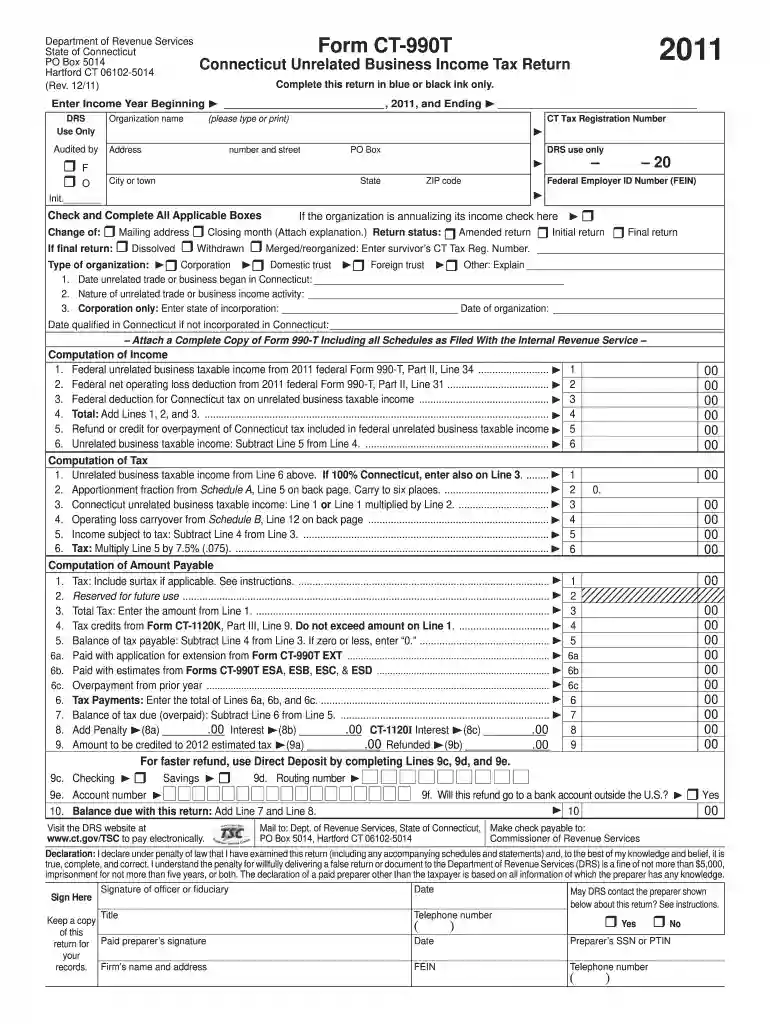
  2. Begin by entering the income year at the top of the form. Specify the beginning and ending dates for your organization’s fiscal year.
  3. Fill in your organization name, CT Tax Registration Number, and address details. Ensure all information is accurate to avoid processing delays.
  4. Check all applicable boxes regarding your organization's status, such as whether this is an initial or final return.
  5. Complete the Computation of Income section by entering figures from your federal Form 990-T. This includes unrelated business taxable income and any deductions.
  6. Proceed to the Computation of Tax section, where you will calculate your tax based on the unrelated business taxable income.
  7. Finally, review all entries for accuracy before signing and submitting your form electronically through our platform for a faster process.

Start using our platform today to simplify filling out your forms for free!

See more 2011 ct form 990t versions

We've got more versions of the 2011 ct form 990t form. Select the right 2011 ct form 990t version from the list and start editing it straight away!
Versions Form popularity Fillable & printable
2022 4.4 Satisfied (58 Votes)
2021 4.6 Satisfied (53 Votes)
2020 4.8 Satisfied (116 Votes)
2019 4.4 Satisfied (139 Votes)
2018 4 Satisfied (53 Votes)
2017 4.3 Satisfied (185 Votes)
2016 4.4 Satisfied (69 Votes)
2015 3.7 Satisfied (30 Votes)
2014 4.3 Satisfied (64 Votes)
2013 4.3 Satisfied (49 Votes)
2012 4.3 Satisfied (48 Votes)
2011 4.4 Satisfied (39 Votes)
be ready to get more

Complete this form in 5 minutes or less

Get form

Got questions?

We have answers to the most popular questions from our customers. If you can't find an answer to your question, please contact us.
Contact us
Form CT-19IT is utilized for claiming Title 19 status in Connecticut. It is essential for individuals requiring tax assistance due to their Medicaid status. Completing this form properly ensures compliance with the Connecticut Department of Revenue Services.
You must file a Connecticut income tax return if your gross income for the 2024 taxable year exceeds: $12,000 and you are married filing separately; $15,000 and you are filing single; $19,000 and you are filing head of household; or.
Drake Tax Form CT-1065/CT-1120SI This form is required for every pass-through entity (partnership or S corp) that does business in Connecticut or has income derived from or connected with sources within Connecticut regardless of the amount of its income (loss).
The fiduciary of a nonresident trust or estate must file Form CT‑1041 if the trust or estate: Had income derived from or connected with sources within Connecticut; Incurred a net operating loss for Connecticut income tax purposes, but not for federal income tax purposes; or.
Form CT-706 NT EXT is used to request a six-month extension to file Form CT-706 NT (Connecticut Estate Tax Return for Nontaxable Estates) with the Probate Court.

Security and compliance

At DocHub, your data security is our priority. We follow HIPAA, SOC2, GDPR, and other standards, so you can work on your documents with confidence.

Learn more
ccpa2
pci-dss
gdpr-compliance
hipaa
soc-compliance
be ready to get more

Complete this form in 5 minutes or less

Get form