




Here's how it works



How to use or fill out 8814 form with our platform

- Click ‘Get Form’ to open the 8814 form in the editor.
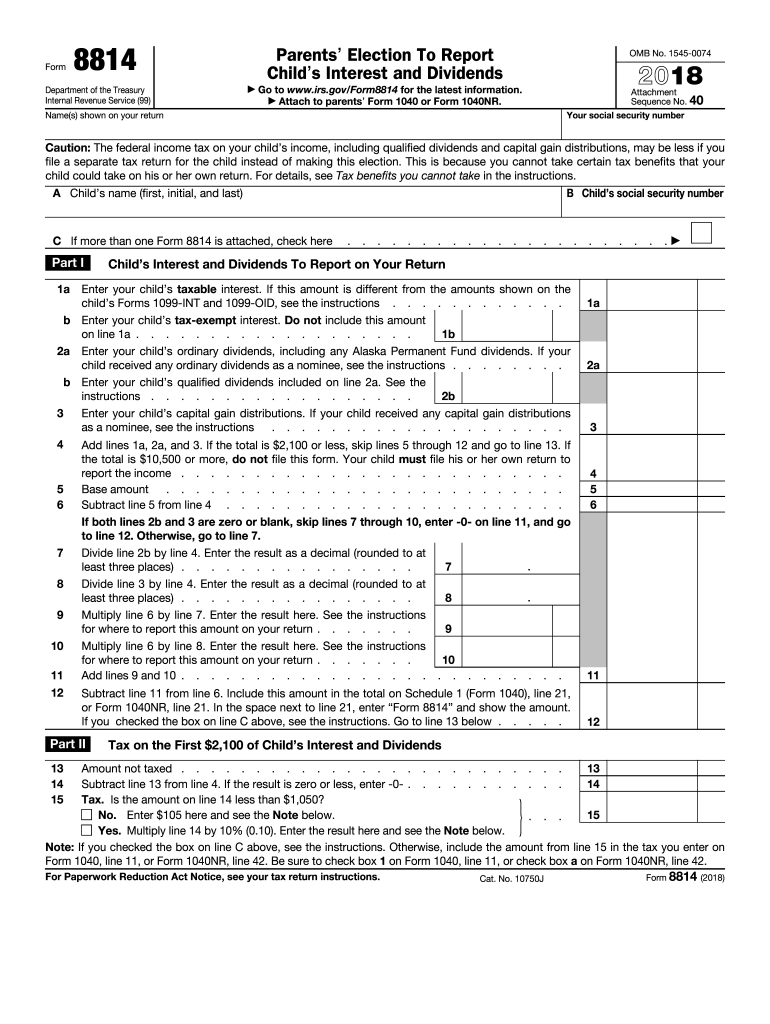
- Begin by entering your social security number and the names shown on your tax return at the top of the form.
- In Part I, provide your child's name and social security number. If you have multiple children, check the box indicating additional forms are attached.
- Fill in your child's taxable interest on line 1a and tax-exempt interest on line 1b. Ensure these amounts match any Forms 1099 received.
- Continue to report ordinary dividends on line 2a and qualified dividends on line 2b, following similar instructions as above.
- Calculate total income by adding lines 1a, 2a, and any capital gain distributions from line 3. Follow the instructions for subsequent lines based on totals.
- Complete Part II to determine tax owed based on your child's income, ensuring all calculations are accurate before submission.
Start using our platform today for free to simplify filling out your Form 8814!
It's free
See more 8814 form versions
| Versions | Form popularity | Fillable & printable |
|---|---|---|
| 2025 | 4.2 Satisfied (41 Votes) | |
| 2024 | 4.2 Satisfied (32 Votes) | |
| 2023 | 4.7 Satisfied (25 Votes) | |
| 2022 | 4.7 Satisfied (24 Votes) | |
| 2021 | 4.8 Satisfied (83 Votes) | |
| 2020 | 4.4 Satisfied (258 Votes) | |
| 2019 | 4.4 Satisfied (169 Votes) | |
| 2018 | 4.3 Satisfied (286 Votes) | |
| 2016 | 4.3 Satisfied (151 Votes) | |
| 2013 | 4 Satisfied (35 Votes) |
Got questions?
Can I sign my 8814 form in electronic format?
Based on eSignature laws, forms signed digitally have the same validity as traditionally approved ones. You can eSign almost any business and personal documentation. Four types of paperwork still require handwritten signatures only - wills and testamentary trusts, court orders and other court forms, state statutes regulating divorce, adoption, or other family law, and notice of cancellation of utility services. If you adhere to the guidelines and use a secure and compliant software solution, like DocHub, you can eSign your 8814 form without printing it.
Can I sign my 8814 form while I edit it?
If you edit your 8814 form with DocHub, you will not need to look for other software or solutions to sign it. An electronic signature is a component of DocHub’s extensive editing toolset, which allows you to apply changes in your form without jumping between websites. Just complete your form, double-check the correctness of your information and place your electronic signature at the end to make it submission-ready within minutes.
What is the purpose of form 8814?
What is form 8814 on tax return?
Can capital gains be reported on form 8814?
Security and compliance
At DocHub, your data security is our priority. We follow HIPAA, SOC2, GDPR, and other standards, so you can work on your documents with confidence.
Learn more


