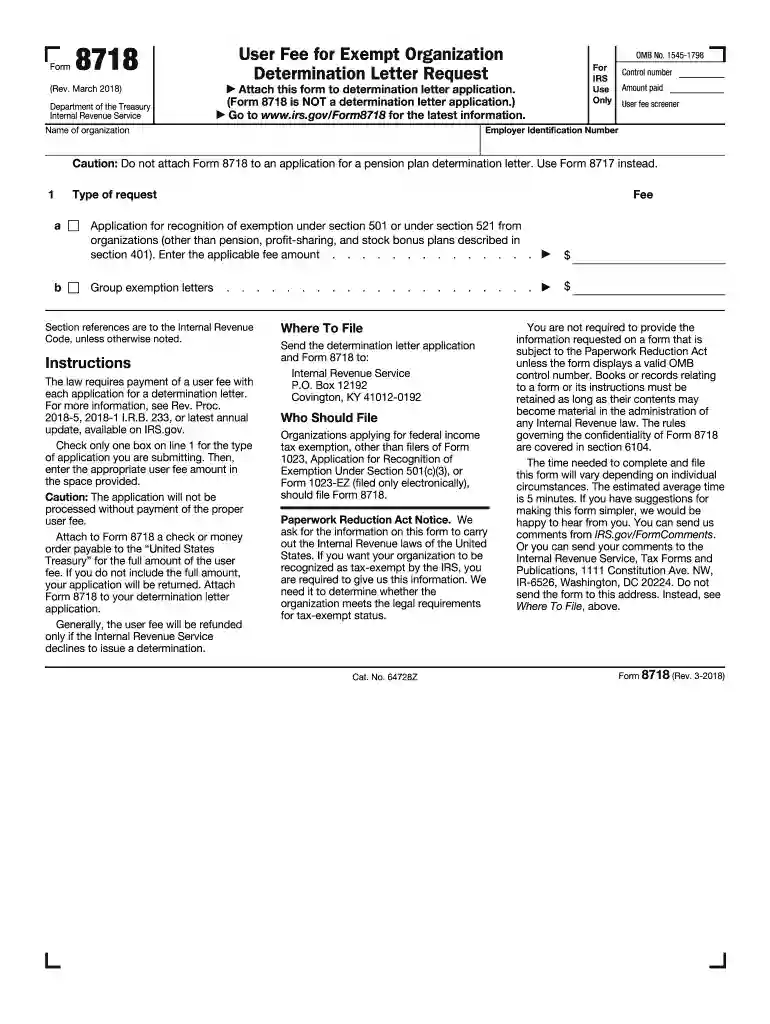
Irs form 8718-2026

Get Form
form 8718 Preview on Page 1

Here's how it works

01. Edit your form 8718 online
Type text, add images, blackout confidential details, add comments, highlights and more.

02. Sign it in a few clicks
Draw your signature, type it, upload its image, or use your mobile device as a signature pad.

03. Share your form with others
Send irs form 8718 via email, link, or fax. You can also download it, export it or print it out.

Definition and Purpose of IRS Form 8718

IRS Form 8718 is specifically designed for organizations seeking a determination letter regarding their tax-exempt status under sections 501 or 521 of the Internal Revenue Code. This form allows these entities to request a user fee associated with the letter that confirms their eligibility for tax exemption. Organizations typically include charitable groups, religious institutions, and educational entities. By filing Form 8718, organizations can ensure they receive clarity on their tax statuses, which is essential for compliance and operational transparency.

Importance of Determination Letters

The determination letter serves as official documentation from the IRS that grants tax-exempt status. This status not only confirms the organization’s eligibility for federal income tax exemption but also facilitates potential state tax benefits, grants, and public donations. The absence of this letter may hinder an organization's ability to operate effectively, raising concerns regarding its legitimacy in the eyes of donors and stakeholders.

Steps to Complete IRS Form 8718

Completing IRS Form 8718 involves several crucial steps to ensure that the request is properly documented and submitted.

  1. Download the Form: Obtain the form from the IRS website or through authorized sites where tax forms are available.
  2. Identify the Entity: Clearly specify the organization's name, address, type of organization, and the relevant section under which it seeks tax exemption (501 or 521).
  3. User Fee Payment: Include the appropriate payment for the user fee, as listed in the form’s instructions. The fee may vary based on the type of organization.
  4. Gather Required Documentation: Compile all necessary attachments, which typically include supporting documents like articles of incorporation and bylaws.
  5. Review for Accuracy: Double-check all entries for correct information and documentation to avoid processing delays.
  6. Submission: Send the completed form with payment to the designated IRS address specified in the form’s instructions.

Each step is essential to effectively navigate the application process, avoiding potential pitfalls that could delay approval.

Who Typically Uses IRS Form 8718?

IRS Form 8718 is primarily utilized by various nonprofit organizations seeking tax-exempt status. The following categories commonly file this form:

  • Charitable Organizations: Groups established for purposes such as education, relief of poverty, or other charitable endeavors.
  • Religious Entities: Churches, synagogues, and other houses of worship that seek recognition as tax-exempt institutions.
  • Educational Entities: Schools, colleges, and universities aiming to provide public learning opportunities while maintaining tax benefits.

These organizations rely on tax-exempt status to conduct operations without the burden of federal income tax, thus enhancing their ability to serve their respective communities.

Filing Deadlines and Important Dates

Filing Form 8718 in a timely manner is crucial to avoid penalties and ensure uninterrupted tax-exempt status for organizations. Key deadlines include:

  • Initial Submission: Organizations should aim to submit Form 8718 as soon as they are ready to apply for tax-exempt status. It is advisable to do this before starting operations or seeking funding.
  • User Fee Payment Deadline: The user fee must accompany the submission of the form. Delays in payment could result in processing Halts.
  • Follow-Up Responses: Upon submitting the form, the IRS may request additional information. Organizations should respond promptly to avoid delays in processing.

Organizations must keep track of these dates to maintain compliance with IRS regulations.

Important Terms Related to IRS Form 8718

Understanding key terms related to IRS Form 8718 is essential for organizations navigating the tax-exemption process:

  • Tax-Exempt Status: A designation that allows qualifying organizations to be exempt from federal income tax.
  • Determination Letter: An official correspondence from the IRS confirming an organization’s tax-exempt status.
  • User Fee: A payment required by the IRS for processing Form 8718, necessary to obtain the determination letter.

Familiarity with these terms can aid organizations in effectively completing the application process and communicating with IRS officials.

Legal Use of IRS Form 8718

The use of IRS Form 8718 is governed by specific legal guidelines set forth by the IRS. Adhering to these rules ensures compliance and protects organizations:

  • Proper Submission: It is imperative that organizations submit Form 8718 in accordance with IRS instructions and guidelines.
  • Inclusion of Supporting Documentation: The IRS requires certain documents to be attached with Form 8718, such as articles of incorporation, to establish legitimacy in the application.
  • Retention of Records: Organizations should maintain all records of correspondence and submission related to Form 8718 for future reference and potential audits.

Legal compliance while using Form 8718 helps organizations avoid penalties and maintain a positive standing with the IRS.

See more irs form 8718 versions

We've got more versions of the irs form 8718 form. Select the right irs form 8718 version from the list and start editing it straight away!
Versions Form popularity Fillable & printable
2021 4.8 Satisfied (121 Votes)
2018 4.4 Satisfied (159 Votes)
2015 4.4 Satisfied (547 Votes)
2010 4.3 Satisfied (208 Votes)
be ready to get more

Complete this form in 5 minutes or less

Get form

Got questions?

We have answers to the most popular questions from our customers. If you can't find an answer to your question, please contact us.
Contact us
More In Forms and Instructions Noncorporate taxpayers use Form 8582-CR to: Figure the amount of any passive activity credit (PAC) for the current tax year (including any prior year unallowed credits) and the amount of credit allowed for the current year.
Non-US individuals who receive certain types of income from US sources such as interest, dividends, rents, royalties and certain other types of income need to fill in the W-8 BEN. The form is used to claim any applicable tax treaty benefits and to verify that the individual is not a US resident for tax purposes.
Please note, W-8BEN forms are only valid for three years after date of signature. If any information needs to be updated during the three-year time period, a new W-8BEN form must be submitted within 30 days.
How Do I Fill Out Form W-8BEN? Part I Identification of Beneficial Owner: Line 1: Enter your name as the beneficial owner. Line 2: Enter your country of citizenship. Line 3: Enter your permanent residence/mailing address. Line 4: Enter your mailing address, if different.
Paper Request Form IRS Form 4506-T Line 5 provides non-filers with the option to have their IRS Verification of Non-filing Letter mailed directly to a third party by the IRS.
be ready to get more

Complete this form in 5 minutes or less

Get form

People also ask

Use Form 8949, Sales and Other Dispositions of Capital Assets. To report income from forks, staking, mining, etc., use Form 1040 (Schedule 1), Additional Income and Adjustments to Income PDF.
Form W8-BEN, Certificate of Foreign Status of Beneficial Owner for U.S. Tax Withholding, is used by a foreign person to establish both foreign status and beneficial ownership, and to claim income tax treaty benefits with respect to income other than compensation for personal services.
To complete your W-8 form: Choose your form type, and then choose the file youd like to upload. Please note that the file needs to be in PDF format. Then, click Upload document. To complete the form on the platform, enter your information in the Your tax information section.

Related links