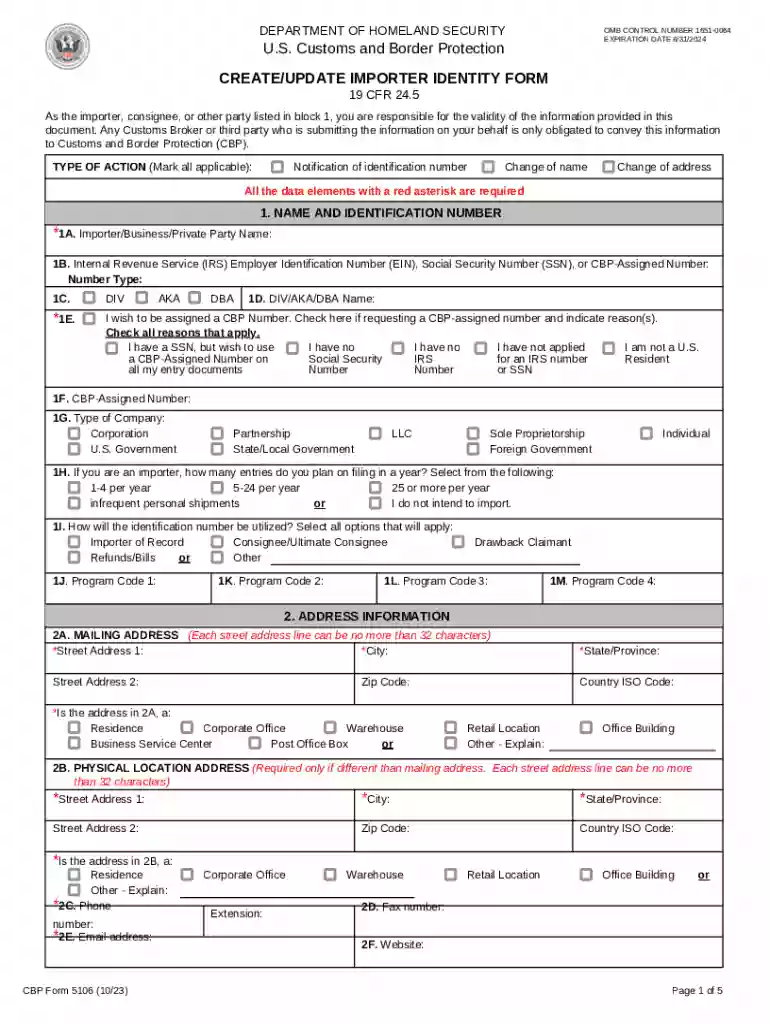
CBP 5106 - CBP Form 5106-2026

Get Form
form 5106 Preview on Page 1

Here's how it works

01. Edit your form 5106 online
Type text, add images, blackout confidential details, add comments, highlights and more.

02. Sign it in a few clicks
Draw your signature, type it, upload its image, or use your mobile device as a signature pad.

03. Share your form with others
Send cf 5106 via email, link, or fax. You can also download it, export it or print it out.

How to use or fill out CBP 5106 - CBP Form 5106 with DocHub

Form edit decoration
9.5
Ease of Setup
DocHub User Ratings on G2
9.0
Ease of Use
DocHub User Ratings on G2
  1. Click ‘Get Form’ to open it in the editor.
  2. Begin by filling out Section 1, which includes your name and identification number. Ensure you provide your IRS Employer Identification Number (EIN) or Social Security Number (SSN) as required.
  3. In Section 2, enter your mailing address. Make sure to complete all fields marked with a red asterisk, including street address, city, state, and zip code.
  4. Proceed to Section 3 for company information. Provide a brief business description and the NAICS code. If applicable, include details about related business entities.
  5. Review all entered information for accuracy before submitting. Utilize our platform's features to save or print the completed form directly.

Start using our platform today to fill out your CBP Form 5106 easily and for free!

See more CBP 5106 - CBP Form 5106 versions

We've got more versions of the CBP 5106 - CBP Form 5106 form. Select the right CBP 5106 - CBP Form 5106 version from the list and start editing it straight away!
Versions Form popularity Fillable & printable
2023 4.3 Satisfied (59 Votes)
2022 4.7 Satisfied (54 Votes)
2020 4.7 Satisfied (137 Votes)
2020 4.2 Satisfied (26 Votes)
2017 4.3 Satisfied (48 Votes)
2013 4.4 Satisfied (290 Votes)
2000 4.3 Satisfied (279 Votes)
1999 4.4 Satisfied (153 Votes)
be ready to get more

Complete this form in 5 minutes or less

Get form

Got questions?

We have answers to the most popular questions from our customers. If you can't find an answer to your question, please contact us.
Contact us
As an alternative, you may request a CBP assigned number by completing a CBP Form 5106 and presenting it to the Entry Branch at a CBP port of entry.
There are 2 ways of getting an EORI number: you can apply for one, or create one yourself. Whether you can create your EORI number yourself or need to apply for one depends on your situation. Do you want to find out whether an EORI number actually exists? The EORI number has replaced the old customs or TIN number.
The ultimate importers identification number is either the Employers Identification Number (EIN) tax identification number assigned by the Internal Revenue Service (IRS) or the importers social security number.
The Create/Update Importer Identity Form (CBP Form 5106) is the form used to create or update importers unique identification information within CBPs systems, per 19 CFR 24.5.
While the term IOR may appear to refer to importers, any individual or organization involved as a party, such as 4811 party, consignee, sold to party, etc., on an Automated Commercial Environment (ACE) based trade transaction will be required to register as an IOR via the CBP Form 5106.

Security and compliance

At DocHub, your data security is our priority. We follow HIPAA, SOC2, GDPR, and other standards, so you can work on your documents with confidence.

Learn more
ccpa2
pci-dss
gdpr-compliance
hipaa
soc-compliance

People also ask

DA Form 5016 (Retirement Accounting Statement) Establishing the Anniversary Year Ending (AYE) Date. Recording and Reporting Retirement Points.
Your importer number is your IRS business registration number. If you do not have this number or you do not own a business, you can use your Social Security number. You can also request a CBP-assigned number. Complete CBP Form 5106 and bring it to the entry branch at a CBP port of entry.

5106 form usa