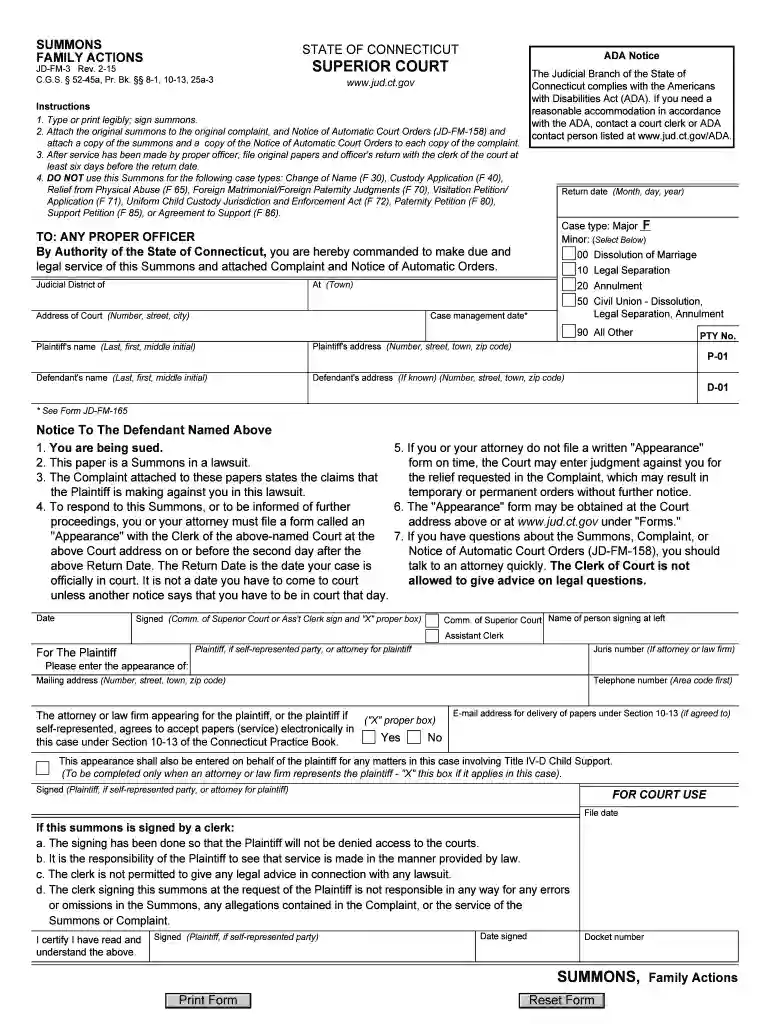
Connecticut jd fm 3 form 2026

Get Form
connecticut jd fm 3 form Preview on Page 1

Here's how it works

01. Edit your form online
Type text, add images, blackout confidential details, add comments, highlights and more.

02. Sign it in a few clicks
Draw your signature, type it, upload its image, or use your mobile device as a signature pad.

03. Share your form with others
Send it via email, link, or fax. You can also download it, export it or print it out.

How to use or fill out connecticut jd fm 3 form with DocHub

Form edit decoration
9.5
Ease of Setup
DocHub User Ratings on G2
9.0
Ease of Use
DocHub User Ratings on G2
  1. Click ‘Get Form’ to open the Connecticut JD-FM-3 form in our editor.
  2. Begin by filling in the 'Judicial District' and 'Return Date' fields. Ensure that you enter the correct date format as specified.
  3. In the 'Case Type' section, select the appropriate option from the dropdown menu, such as 'Dissolution of Marriage' or 'Legal Separation'.
  4. Enter the Plaintiff's name and address clearly in the designated fields. Make sure to include all necessary details for accurate identification.
  5. Next, provide the Defendant's name and address if known. This information is crucial for proper service of the summons.
  6. Review all entered information for accuracy before signing. Once confirmed, sign where indicated and date your signature.
  7. Finally, attach any required documents as instructed, such as the original complaint and Notice of Automatic Court Orders, before submitting.

Start using our platform today to fill out your Connecticut JD-FM-3 form easily and for free!

See more connecticut jd fm 3 form versions

We've got more versions of the connecticut jd fm 3 form form. Select the right connecticut jd fm 3 form version from the list and start editing it straight away!
Versions Form popularity Fillable & printable
2021 4.4 Satisfied (23 Votes)
2015 4.8 Satisfied (186 Votes)
be ready to get more

Complete this form in 5 minutes or less

Get form

Got questions?

We have answers to the most popular questions from our customers. If you can't find an answer to your question, please contact us.
Contact us
Paperwork Begins The Divorce Process in Connecticut In Connecticut, either spouse can elect to file for divorce. To do so, one must first complete a Divorce Complaint with the State of Connecticut Superior Court. The Divorce Complaint is also known as a Dissolution of Marriage.
To initiate a divorce in Connecticut, you or your attorney must, at a minimum, serve and file a Summons, Complaint, and Notice of Automatic Orders. Generally speaking, these documents explain how you meet the residency requirement, some basic facts about your marriage, the grounds for divorce, and flag requests
Divorce may be granted in approximately 35 days without the need to see a judge. If either spouse has ever received public assistance: Certification of Notice in Family Cases (Public Assistance) (JD-FM-175) You will be assigned your first court date after filing your case.
Uncontested Divorce in Connecticut An uncontested divorce is a relatively fast and inexpensive way to end a marriage, compared to traditional litigation. However, it requires complete agreement between the spouses about alimony, child custody and support, and property division, including all assets and debts.
What are the court fees for divorce in Connecticut? Court Costs for all types of cases: mediation, collaboration, litigation, or pro se representation are all the same: Court Filing Fee: $350. Sheriffs Fee: $50 $75.

Security and compliance

At DocHub, your data security is our priority. We follow HIPAA, SOC2, GDPR, and other standards, so you can work on your documents with confidence.

Learn more
ccpa2
pci-dss
gdpr-compliance
hipaa
soc-compliance

People also ask

You can file most family case types electronically (on-line), including dissolution of marriage (divorce); legal separation; annulment; and civil union - dissolution, legal separation or annulment, custody application, and visitation petition.

Related links