




01. Edit your form online
Type text, add images, blackout confidential details, add comments, highlights and more.

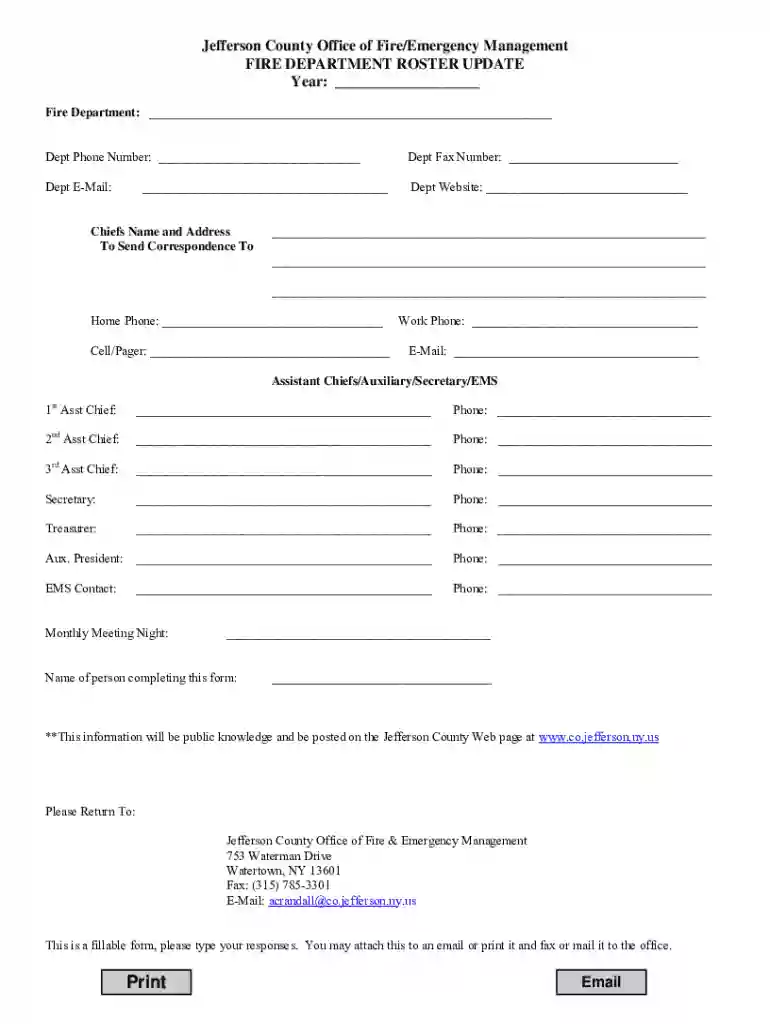
Type text, add images, blackout confidential details, add comments, highlights and more.

Draw your signature, type it, upload its image, or use your mobile device as a signature pad.

Send it via email, link, or fax. You can also download it, export it or print it out.
The Jefferson County Office of Fire/Emergency Management FIRE form serves as a critical document for updating rosters in fire departments. Its primary objective is to collect current contact information for department leadership and key personnel. This facilitates effective communication and coordination during emergencies. The form includes sections that capture details about department heads, assistant chiefs, auxiliary members, and their respective meeting schedules.
Primarily used by fire departments, the form is essential for department administrators and leadership staff tasked with maintaining up-to-date emergency contact lists. It may also be relevant for adjunct staff involved in emergency preparedness and operations within Jefferson County.


The form must comply with local data protection laws, ensuring that all personal information listed is handled with care and used only for its intended purpose. Proper authorization must be obtained from individuals before their details are submitted.
Failing to submit a completed FIRE form by designated deadlines may lead to administrative follow-ups and potential fines. Timely submissions are vital for ensuring public safety and operational efficiency.
Both versions have their advantages. The digital form allows quicker submission and processing, with immediate confirmation of receipt. The paper version, though traditional, provides tangible documentation but requires manual handling processes.
For ease of completion, the form is compatible with document management platforms like DocHub, which offers tools to edit, sign, and manage forms online. This compatibility ensures seamless workflow integration and enhances usability across various software environments.
We've got more versions of the Jefferson County Office of Fire/Emergency Management FIRE ... form. Select the right Jefferson County Office of Fire/Emergency Management FIRE ... version from the list and start editing it straight away!
| Versions | Form popularity | Fillable & printable |
|---|---|---|
| 2012 | 4.8 Satisfied (20 Votes) |
With DocHub, it’s quite simple. The platform offers users an add-on called DocHub for Gmail, which you can locate in the Google Workspace Marketplace without being charged. Set it up and give it access to your Google account. Open your email with your Jefferson County Office of Fire/Emergency Management FIRE ... attached and click on the add-on button in the right-side panel. Log in to your DocHub account, and upload the file to our editor, where you can fill it out and sign.
When you edit your Jefferson County Office of Fire/Emergency Management FIRE ... with DocHub, you will not need to look for other software or services to eSign it. An electronic signature is a component of DocHub’s substantial editing toolset, which allows you to implement changes in your form without jumping between websites. Just complete your form, double-check the correctness of your data and place your electronic signature at the end to make it submission-ready quickly.
At DocHub, your data security is our priority. We follow HIPAA, SOC2, GDPR, and other standards, so you can work on your documents with confidence.
Aug 27, 2025 Fire Chief NAME: DAVID STACEY PHONE: 409-796-3036 PHONE TYPE: Landline EMAIL: districtchief@jcesd4.com CONTACT: Chief is the primary public contact.Read more
Emergency Management Metro-Jeff Public Safety Building 753 Waterman Drive Watertown, New York 13601 (315)786-2654 Office (315)786-2601Read more


