8879-2026

Get Form
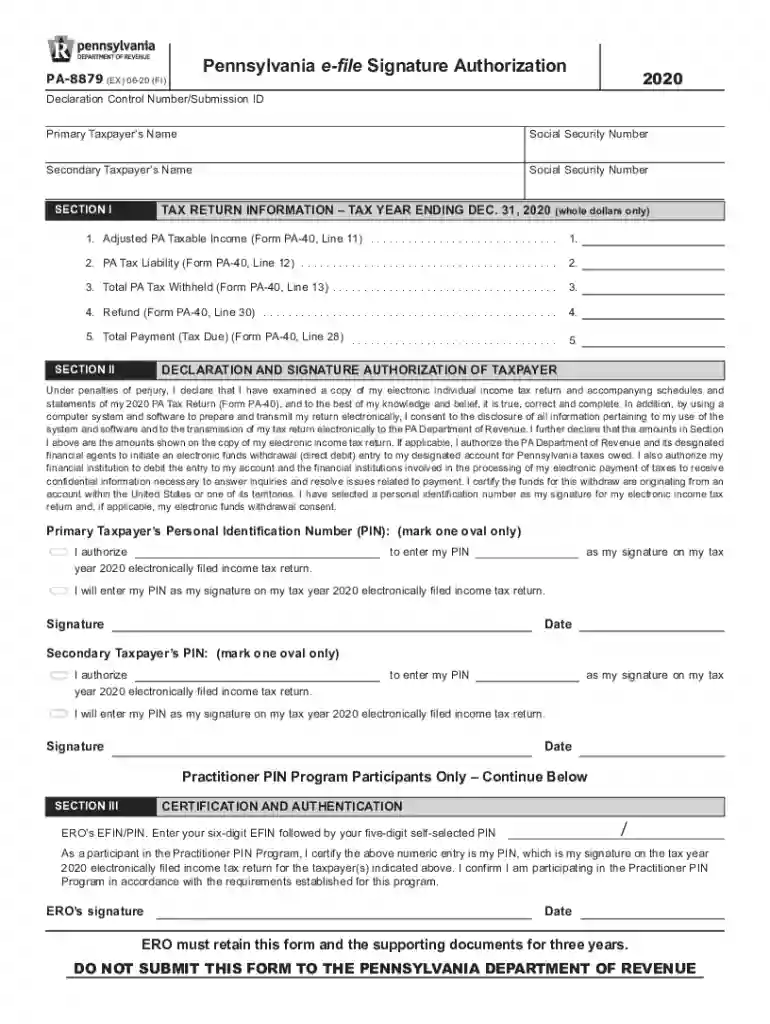
form pa 8879 Preview on Page 1

Here's how it works

01. Edit your form pa 8879 online
Type text, add images, blackout confidential details, add comments, highlights and more.

02. Sign it in a few clicks
Draw your signature, type it, upload its image, or use your mobile device as a signature pad.

03. Share your form with others
Send pa 8879 via email, link, or fax. You can also download it, export it or print it out.

How to use or fill out 8879 with our platform

Form edit decoration
9.5
Ease of Setup
DocHub User Ratings on G2
9.0
Ease of Use
DocHub User Ratings on G2
  1. Click ‘Get Form’ to open the PA-8879 in the editor.
  2. Begin by entering the Primary Taxpayer’s Name and Social Security Number in the designated fields at the top of the form.
  3. Next, fill in the Secondary Taxpayer’s Name and Social Security Number if applicable.
  4. Proceed to Section I, where you will input whole dollar amounts for Adjusted PA Taxable Income, PA Tax Liability, Total PA Tax Withheld, Refund, and Total Payment. Ensure these figures match your Form PA-40.
  5. In Section II, review the declaration statement carefully. You will need to authorize your Personal Identification Number (PIN) as your electronic signature for your tax return.
  6. Finally, sign and date the form where indicated. If there is a Secondary Taxpayer, they must also provide their PIN and signature.

Start using our platform today to easily complete your 8879 form online for free!

See more 8879 versions

We've got more versions of the 8879 form. Select the right 8879 version from the list and start editing it straight away!
Versions Form popularity Fillable & printable
2022 4.5 Satisfied (46 Votes)
2021 4.9 Satisfied (31 Votes)
2020 4.8 Satisfied (96 Votes)
2019 4.4 Satisfied (101 Votes)
2018 4.3 Satisfied (78 Votes)
2017 4.3 Satisfied (104 Votes)
2015 4.3 Satisfied (169 Votes)
2014 4.3 Satisfied (73 Votes)
2004 4.1 Satisfied (66 Votes)
be ready to get more

Complete this form in 5 minutes or less

Get form

Got questions?

We have answers to the most popular questions from our customers. If you can't find an answer to your question, please contact us.
Contact us
Taxpayers and the ERO representative must always complete and sign Form 8879 or Form 8878 for the Practitioner PIN method of electronic signature. EROs must also sign with a PIN.
Sign form FTB 8879 and submit it to your ERO. Your tax return will not be transmitted to the Franchise Tax Board (FTB) until the ERO receives your signed form FTB 8879.
season to the three year retention requirement for Forms 8879 and supporting document. This waiver does not provide an exception to the volunteers responsibility to solicit and maintain consents required under IRC 7216.
Form 8879 is used to authorize the electronic filing (e-file) of original and amended returns. Use this Form 8879 (Rev. January 2021) to authorize e-file of your Form 1040, 1040-SR, 1040-NR, 1040-SS, or 1040- X, for tax years beginning with 2019.
Form 8879 is the declaration document and signature authorization for an e-filed return filed by an electronic return originator (ERO). Complete this form when: The Practitioner PIN method is used.

Security and compliance

At DocHub, your data security is our priority. We follow HIPAA, SOC2, GDPR, and other standards, so you can work on your documents with confidence.

Learn more
ccpa2
pci-dss
gdpr-compliance
hipaa
soc-compliance
be ready to get more

Complete this form in 5 minutes or less

Get form

People also ask

An ERO can be the same person or entity as the preparer or they can be different. The person filing electronic returns using UltraTax CS is the ERO.

pa 8879 form