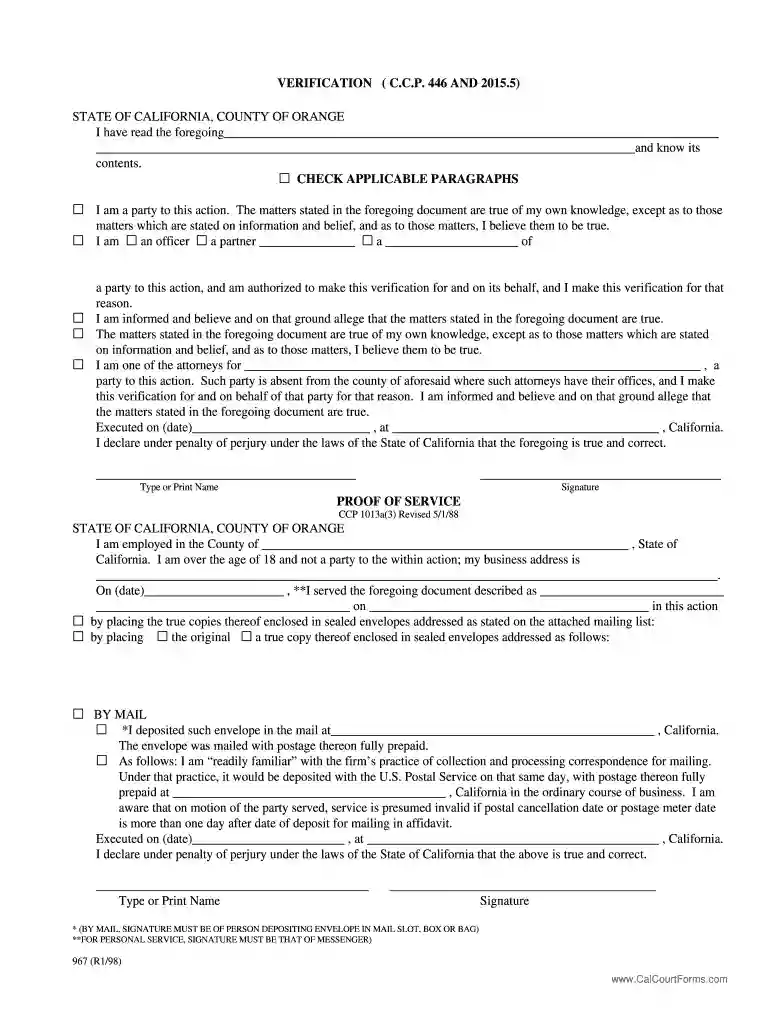
ccp 446 Preview on Page 1

Ccp 446 2026

Here's how it works

  • 01. Edit your ccp 446 online

    Type text, add images, blackout confidential details, add comments, highlights and more.

  • 02. Sign it in a few clicks

    Draw your signature, type it, upload its image, or use your mobile device as a signature pad.

  • 03. Share your form with others

    Send animal intake form via email, link, or fax. You can also download it, export it or print it out.

How to use or fill out ccp 446 with our platform

Form edit decoration
9.5
Ease of Setup
DocHub User Ratings on G2
9.0
Ease of Use
DocHub User Ratings on G2
  1. Click ‘Get Form’ to open the ccp 446 document in the editor.
  2. Begin by reading the verification section carefully. You will need to check the applicable paragraphs that describe your relationship to the action.
  3. Fill in your name and title if you are an officer or partner of a party involved in this action. Ensure all information is accurate and complete.
  4. Indicate the date and location where you are executing the document. This is crucial for legal validity.
  5. Proceed to the Proof of Service section. Enter your employment details, including your business address, and ensure you are not a party to this action.
  6. Select how you served the document (by mail or personal service) and provide necessary details such as dates and addresses.
  7. Finally, type or print your name and add your signature where indicated to complete the form.

Start using our platform today for free to streamline your ccp 446 form completion!

See more ccp 446 versions

We've got more versions of the ccp 446 form. Select the right ccp 446 version from the list and start editing it straight away!

VersionsForm popularityFillable & printable
19984.8 Satisfied (211 Votes)

be ready to get more

Complete this form in 5 minutes or less

Security and compliance

At DocHub, your data security is our priority. We follow HIPAA, SOC2, GDPR, and other standards, so you can work on your documents with confidence.

Related links

IBM Content Manager OnDemand: Messages and Codes

NEXT CCP IDENTIFIER PARAMETER IN CCP STRUCTURED FIELD identifier2 WAS NOT APK446S. USE OF FIELDn BY INDEXn IS INVALID. ONLY ONE FIELD IS ALLOWED IN ANRead more

Learn more
verified - California Legislative Information

No information is available for this page.

Learn more
If you believe that this page should be taken down, please follow our DMCA take down process here