Pa form 8879-2026

Get Form
what is form 8879 Preview on Page 1

Here's how it works

01. Edit your what is form 8879 online
Type text, add images, blackout confidential details, add comments, highlights and more.

02. Sign it in a few clicks
Draw your signature, type it, upload its image, or use your mobile device as a signature pad.

03. Share your form with others
Send pa 8879 via email, link, or fax. You can also download it, export it or print it out.

How to use or fill out PA Form 8879 with DocHub

Form edit decoration
9.5
Ease of Setup
DocHub User Ratings on G2
9.0
Ease of Use
DocHub User Ratings on G2
  1. Click ‘Get Form’ to open PA Form 8879 in our editor.
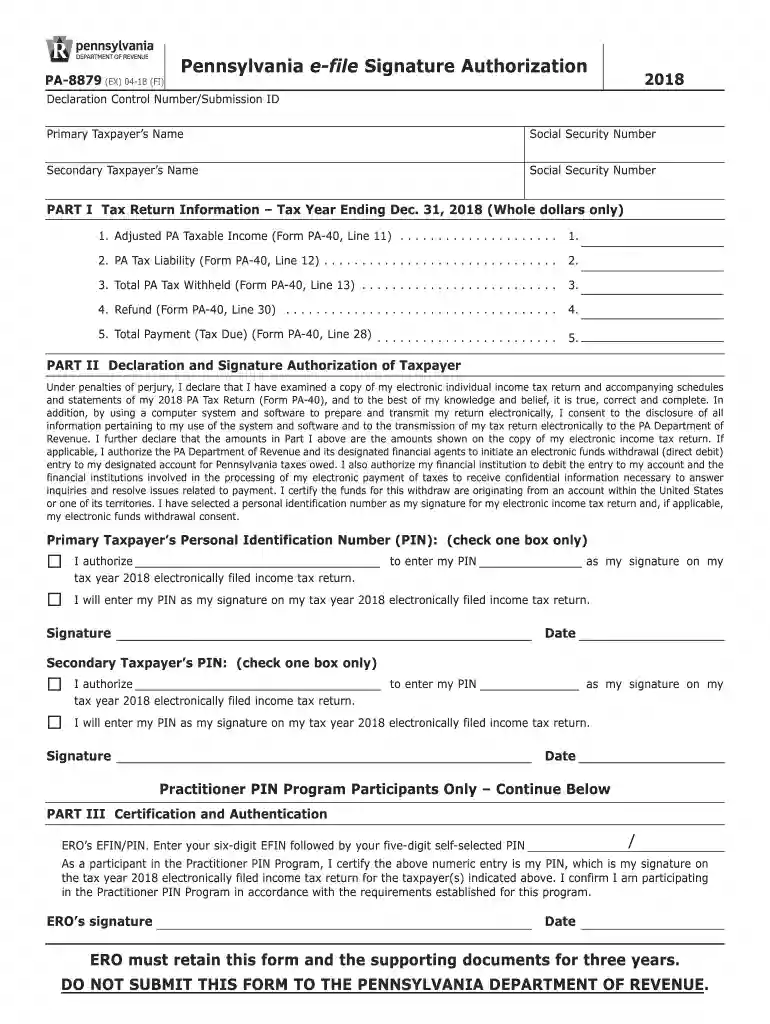
  2. Begin by entering the Primary Taxpayer’s Name and Social Security Number in the designated fields at the top of the form.
  3. Next, fill in the Secondary Taxpayer’s Name and Social Security Number if applicable.
  4. In Part I, provide your tax return information for the year ending December 31, 2018. Input whole dollar amounts for Adjusted PA Taxable Income, PA Tax Liability, Total PA Tax Withheld, Refund, and Total Payment as indicated on Form PA-40.
  5. Proceed to Part II where you will declare your information is true and complete. Enter your Personal Identification Number (PIN) as your signature for electronic filing.
  6. Finally, ensure all signatures are completed after printing the form. Remember to save your work frequently using our platform's features.

Start filling out your PA Form 8879 today for free with our easy-to-use editor!

See more pa form 8879 versions

We've got more versions of the pa form 8879 form. Select the right pa form 8879 version from the list and start editing it straight away!
Versions Form popularity Fillable & printable
2022 4.5 Satisfied (46 Votes)
2021 4.9 Satisfied (31 Votes)
2020 4.8 Satisfied (96 Votes)
2019 4.4 Satisfied (101 Votes)
2018 4.3 Satisfied (78 Votes)
2017 4.3 Satisfied (104 Votes)
2015 4.3 Satisfied (169 Votes)
2014 4.3 Satisfied (73 Votes)
2004 4.1 Satisfied (66 Votes)
be ready to get more

Complete this form in 5 minutes or less

Get form

Got questions?

We have answers to the most popular questions from our customers. If you can't find an answer to your question, please contact us.
Contact us
Form 8879 is the declaration document and signature authorization for an e-filed return filed by an electronic return originator (ERO). Complete this form when: The Practitioner PIN method is used.
Your tax professional will typically prepare the form for you as part of their tax preparation services. Once your tax return is ready for review, your tax preparer will present you with Form 8879 to capture your authorization to e-file.
The ERO prints Form 8879, the IRS e-file Signature Authorization, and the Practitioner or Self-Select PIN Consent to Disclosure form. The taxpayer/spouse needs to sign Form 8879 (IRS e-file Signature Authorization).
Form 8879 is used for Form 1040, U.S. Individual Income Tax Return; Form 8879-PE, IRS efile Signature Authorization for Form 1065; Form 8879-C, IRS efile Signature Authorization for Form 1120;and Form 8879-S, IRS efile Signature Authorization for Form 1120S.
If you are a PA resident, nonresident or a part-year PA resident, you must file a 2024 PA tax return if: You received total PA gross taxable income in excess of $33 during 2024, even if no tax is due with your PA return; and/or You incurred a loss from any transaction as an individual, sole proprietor, partner in a

Security and compliance

At DocHub, your data security is our priority. We follow HIPAA, SOC2, GDPR, and other standards, so you can work on your documents with confidence.

Learn more
ccpa2
pci-dss
gdpr-compliance
hipaa
soc-compliance