Type text, add images, blackout confidential details, add comments, highlights and more.
02. Sign it in a few clicks
Draw your signature, type it, upload its image, or use your mobile device as a signature pad.
03. Share your form with others
Send pirsa pic renewal via email, link, or fax. You can also download it, export it or print it out.
How to use or fill out pirsa pic renewal with our platform
Ease of Setup
DocHub User Ratings on G2
Ease of Use
DocHub User Ratings on G2
Click ‘Get Form’ to open the pirsa pic renewal document in the editor.
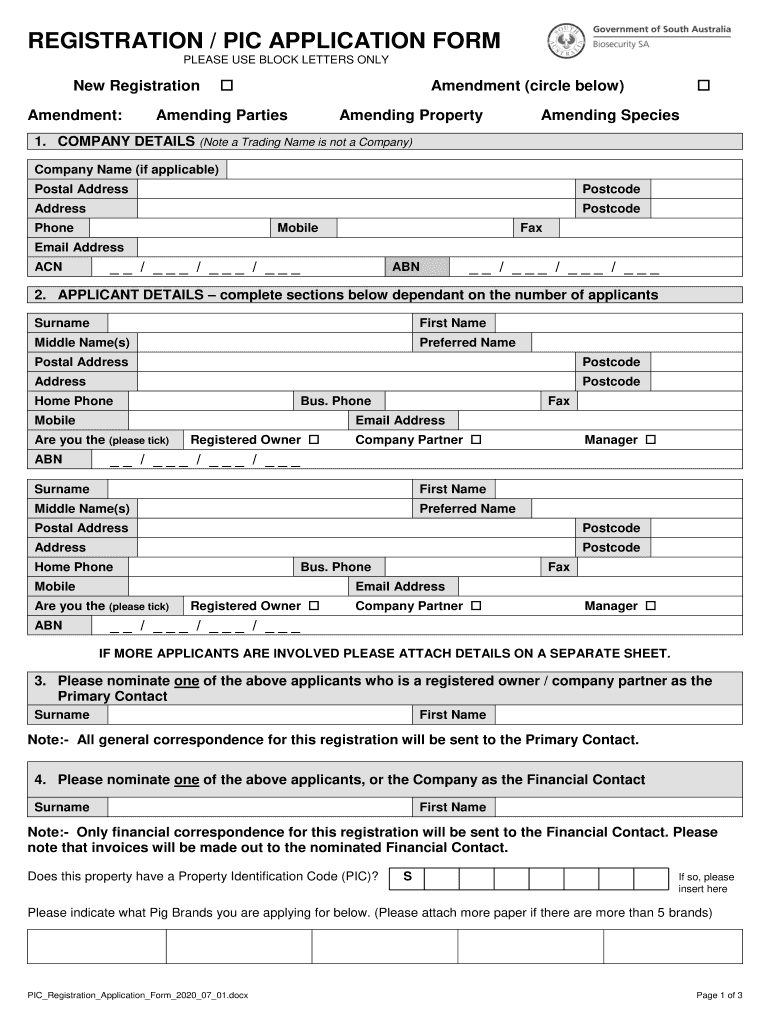
Begin by filling out the 'Company Details' section. Enter your company name, postal address, and contact information. Ensure all fields are completed using block letters.
Proceed to the 'Applicant Details' section. Complete this for each applicant involved, including their names, addresses, and contact details. If there are more than two applicants, attach additional sheets as necessary.
Designate a 'Primary Contact' and a 'Financial Contact' from the applicants listed. This ensures that all correspondence is directed appropriately.
In the 'Property Details' section, provide information about your property location and ownership details. Make sure to include any relevant identification codes.
Complete the 'Livestock Enterprise' section by indicating the maximum number of livestock expected on your property and specifying the species you will keep.
Finally, review all entered information for accuracy before signing and dating the form at the bottom.
Start your pirsa pic renewal process today using our platform for free!
Pirsa pic renewal onlinePirsa pic renewal feePirsa pic renewal formPirsa pic renewal near mePIC registration formPIC number lookup SAPIC number applicationPIC number lookup Australia free
Security and compliance
At DocHub, your data security is our priority. We follow HIPAA, SOC2, GDPR, and other standards, so you can work on your documents with confidence.
*a-Geol. News., ALL - Jackson School of Geosciences
Love (PIRSA, this is a counterpart of the Bureau), Tom Wilson. (a Flinders undergraduate student working with Halihan and Simmons), and C. R (Rowley) TwidaleRead more
Cookie consent notice
This site uses cookies to enhance site navigation and personalize your experience.
By using this site you agree to our use of cookies as described in our Privacy Notice.
You can modify your selections by visiting our Cookie and Advertising Notice.