



Here's how it works



How to use or fill out wa combined excise tax return 2016 form with our platform

- Click ‘Get Form’ to open the wa combined excise tax return 2016 form in the editor.
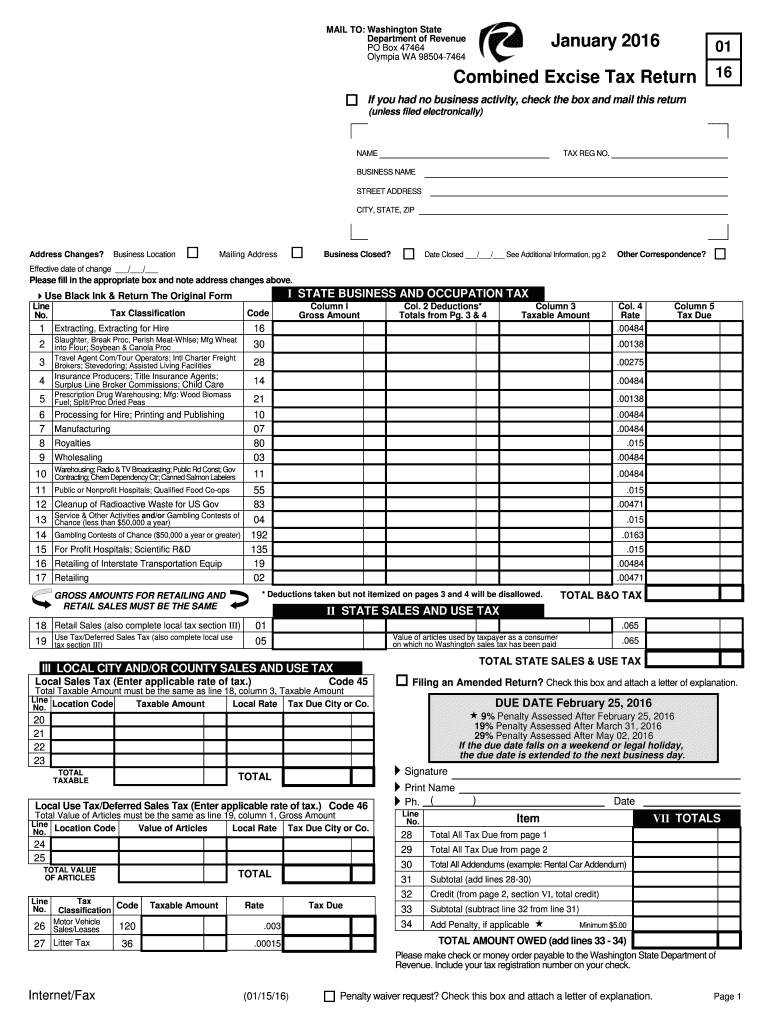
- Begin by filling in your NAME, TAX REG NO., and BUSINESS NAME at the top of the form. Ensure all details are accurate for proper processing.
- Indicate if you had no business activity by checking the appropriate box. If applicable, provide your mailing address and any changes to your business location.
- In Section I, report your Gross Amounts under the Business and Occupation Tax. Use black ink as specified and ensure you calculate deductions accurately from pages 3 and 4.
- Complete Section II for State Sales and Use Tax, ensuring that taxable amounts match those reported in Section III for local taxes.
- Finally, review all entries for accuracy before signing and dating the form at the bottom. Submit it via mail to the Washington State Department of Revenue.
Start using our platform today to simplify your tax return process for free!
It's free
See more wa combined excise tax return 2016 form versions
| Versions | Form popularity | Fillable & printable |
|---|---|---|
| 2025 | 4.3 Satisfied (24 Votes) | |
| 2023 | 4.7 Satisfied (26 Votes) | |
| 2023 | 4.3 Satisfied (55 Votes) | |
| 2022 | 4.7 Satisfied (55 Votes) | |
| 2021 | 4.8 Satisfied (64 Votes) | |
| 2020 | 4.3 Satisfied (102 Votes) | |
| 2019 | 4.3 Satisfied (64 Votes) | |
| 2018 | 4.4 Satisfied (194 Votes) | |
| 2017 | 4.4 Satisfied (50 Votes) | |
| 2016 | 4.3 Satisfied (294 Votes) | |
| 2015 | 4 Satisfied (52 Votes) | |
| 2013 | 4 Satisfied (33 Votes) | |
| 2012 | 4 Satisfied (37 Votes) |
Got questions?
How can I sign my wa combined excise tax return 2016 form without printing?
Electronic signatures are a great alternative to traditional signing, as they save time, effort, and costs people spend on printing, scanning, and paper delivery. You can electronically sign your wa combined excise tax return 2016 form using a reliable and robust online document processing tool like DocHub. It complies with main eSignature regulations (ESIGN and UETA), so all forms approved there are legally binding and have the same validity as physically signed ones.
What internet browser do I need to edit wa combined excise tax return 2016 form online?
If you want to edit your wa combined excise tax return 2016 form online easily, it does not matter what browser you use. DocHub’s straightforward editing tools are accessible using any internet browser. Simply open the appropriate tab in the editor, add your document, and fill it out without stress.
Do I need to file a WA state tax return?
Who must file a Washington excise tax return online?
What is the Washington excise tax for?
Security and compliance
At DocHub, your data security is our priority. We follow HIPAA, SOC2, GDPR, and other standards, so you can work on your documents with confidence.
Learn more