




Here's how it works



How to use or fill out nyc 399z 2012 form with our platform

- Click ‘Get Form’ to open the NYC 399Z 2012 form in the editor.
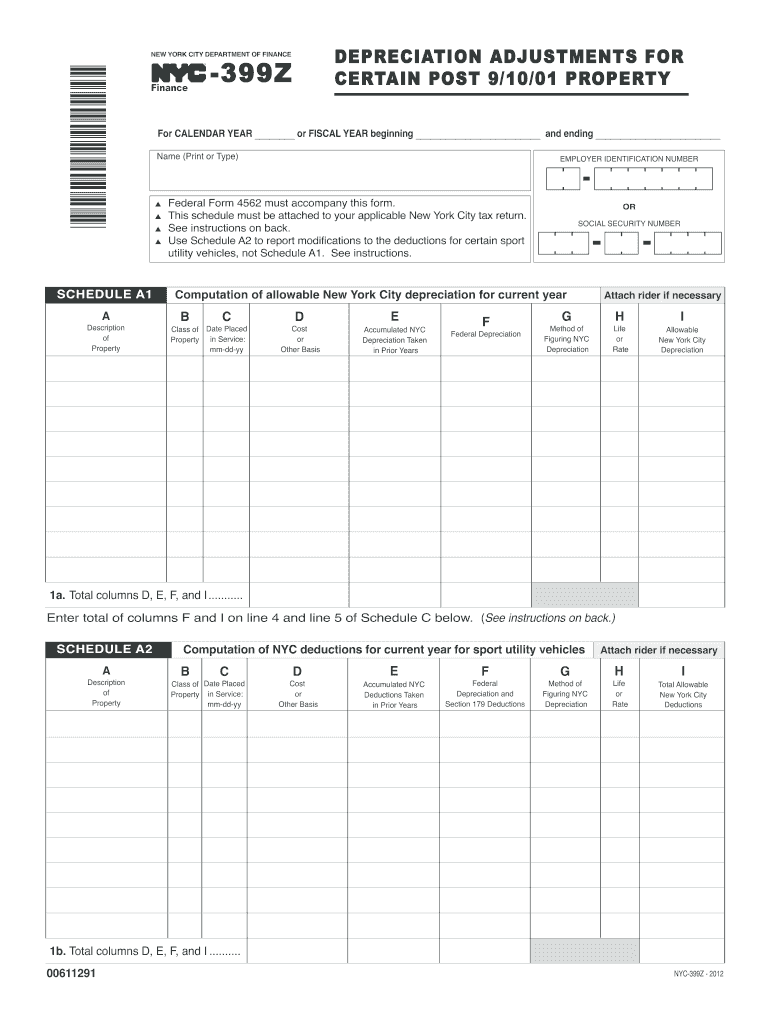
- Begin by entering the calendar or fiscal year at the top of the form. This is crucial for accurate reporting.
- In Schedule A1, provide a brief description of each property in Column A. Ensure that you accurately classify the property type in Column B.
- Fill in the cost or other basis of each property in Column D, ensuring it matches federal records before any special depreciation allowances.
- Complete Columns E through I by entering accumulated NYC depreciation, federal depreciation, and selecting your method for calculating NYC depreciation.
- If applicable, use Schedule A2 for sport utility vehicles (SUVs) and follow similar steps as above, ensuring to note any special provisions.
- Finally, review all entries for accuracy and completeness before saving your work. Use our platform's features to sign and distribute your completed form easily.
Start using our platform today to fill out your NYC 399Z form online for free!
It's free
See more nyc 399z 2012 form versions
| Versions | Form popularity | Fillable & printable |
|---|---|---|
| 2025 | 4.7 Satisfied (44 Votes) | |
| 2024 | 4.8 Satisfied (33 Votes) | |
| 2023 | 4.5 Satisfied (35 Votes) | |
| 2022 | 4.5 Satisfied (39 Votes) | |
| 2021 | 4.8 Satisfied (125 Votes) | |
| 2020 | 4.2 Satisfied (97 Votes) | |
| 2019 | 3.9 Satisfied (44 Votes) | |
| 2018 | 4.3 Satisfied (105 Votes) | |
| 2017 | 4.3 Satisfied (23 Votes) | |
| 2016 | 4.4 Satisfied (399 Votes) | |
| 2015 | 3.8 Satisfied (28 Votes) | |
| 2014 | 4 Satisfied (37 Votes) | |
| 2012 | 4 Satisfied (55 Votes) |
Got questions?
Is it secure to sign my nyc 399z 2012 form electronically?
You should use only trustworthy software solutions with strong data protection compliance to approve your documents electronically. DocHub is just the type of service you need! It stores data on Amazon Web Servers and complies with all necessary security requirements and eSignature laws, so it’s a trustworthy way to eSign your nyc 399z 2012 form or other forms with this tool.
How to complete nyc 399z 2012 form on the internet free of charge in 2024?
Using a swift editing platform like DocHub, you do not need anything but a browser and internet connection to modify your nyc 399z 2012 form on the internet quickly. Add your file or find the appropriate form in DocHub’s catalog, open our editor with a single click, and finish it electronically. To edit your forms anytime, register a free account with DocHub.
Security and compliance
At DocHub, your data security is our priority. We follow HIPAA, SOC2, GDPR, and other standards, so you can work on your documents with confidence.
Learn more


