Prescription & Letter of Medical Necessity 2026

Get Form
letter of medical necessity Preview on Page 1

Here's how it works

01. Edit your letter of medical necessity online
Type text, add images, blackout confidential details, add comments, highlights and more.
02. Sign it in a few clicks
Draw your signature, type it, upload its image, or use your mobile device as a signature pad.
03. Share your form with others
Send letter of medical necessity template pdf via email, link, or fax. You can also download it, export it or print it out.

How to use or fill out Prescription & Letter of Medical Necessity with DocHub

Form edit decoration
9.5
Ease of Setup
DocHub User Ratings on G2
9.0
Ease of Use
DocHub User Ratings on G2
  1. Click ‘Get Form’ to open it in the editor.
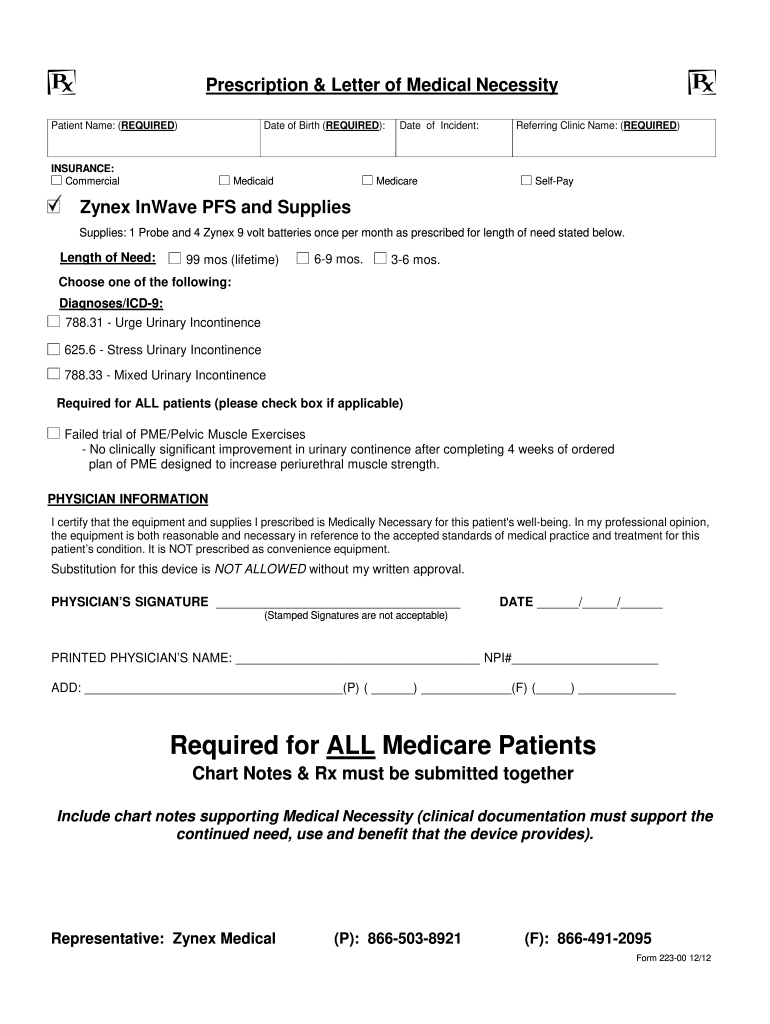
  2. Begin by entering the Patient Name and Date of Birth in the required fields. Ensure accuracy as this information is crucial for processing.
  3. Select the appropriate insurance option from Commercial, Medicare, Medicaid, or Self-Pay. This helps determine coverage eligibility.
  4. Fill in the Referring Clinic Name, which is mandatory for all submissions.
  5. Specify the Supplies needed, including '1 Probe and 4 Zynex 9 volt batteries once per month' and indicate the Length of Need by selecting one of the options provided.
  6. Choose a diagnosis from the list of ICD-9 codes relevant to urinary incontinence. Check the box if applicable regarding failed trials of PME.
  7. Complete the Physician Information section by certifying medical necessity. Include your signature, date, printed name, NPI number, and contact details.
  8. For Medicare patients, ensure that chart notes and prescriptions are submitted together to support medical necessity.

Start using our platform today to easily fill out your Prescription & Letter of Medical Necessity for free!

See more Prescription & Letter of Medical Necessity versions

We've got more versions of the Prescription & Letter of Medical Necessity form. Select the right Prescription & Letter of Medical Necessity version from the list and start editing it straight away!
Versions Form popularity Fillable & printable
2023 4.8 Satisfied (35 Votes)
2022 4.3 Satisfied (46 Votes)
2021 4.8 Satisfied (67 Votes)
2021 4.8 Satisfied (37 Votes)
2021 4.5 Satisfied (34 Votes)
2021 4.8 Satisfied (155 Votes)
2020 4.8 Satisfied (161 Votes)
2020 4.8 Satisfied (135 Votes)
2020 4.8 Satisfied (53 Votes)
2020 4.7 Satisfied (43 Votes)
2020 4.8 Satisfied (133 Votes)
2020 4.4 Satisfied (124 Votes)
2019 4.4 Satisfied (24 Votes)
2019 4.3 Satisfied (31 Votes)
2018 4.5 Satisfied (50 Votes)
be ready to get more

Complete this form in 5 minutes or less

Get form

Got questions?

We have answers to the most popular questions from our customers. If you can't find an answer to your question, please contact us.
Contact us
A letter of medical necessity (LOMN) is a document from your healthcare provider recommending a particular treatment, product, or device for medical purposes. The letter often includes relevant patient history and information about the medical necessity and duration of the treatment being recommended.
How Do I Get One? The first step to getting a Certificate of Medical Necessity is visiting your doctor to get a diagnosis. Only a doctor or physician can determine if the supplies you need are medically necessary. Once youve received your diagnosis, its time to contact us and enroll.
How to get a letter of medical necessity Consult with your healthcare provider and share your condition, diagnosis and any relevant medical history. Ask your healthcare provider to issue a letter of medical necessity for the treatment or service youre seeking.
A Letter of Medical Necessity (LMN) is the written explanation from the treating physician describing the medical need for services, equipment, or supplies to assist the claimant in the treatment, care, or relief of their accepted work-related illness(es).
For example, an amphetamine prescription may be medically necessary on this definition in a patient with abnormal concentration and attention that is significantly reducing their ability to function at school or the workplace.

Security and compliance

At DocHub, your data security is our priority. We follow HIPAA, SOC2, GDPR, and other standards, so you can work on your documents with confidence.

Learn more
ccpa2
pci-dss
gdpr-compliance
hipaa
soc-compliance
be ready to get more

Complete this form in 5 minutes or less

Get form